0 Excel How To In

Maintaining Leading Zeros And Large Numbers Excel
Go to the home tab > variety institution, and select text in the number format box. as soon as you type a 0(s) earlier than number, excel will display a small inexperienced triangle inside the top-left nook of the cellular indicating that something is wrong with the cell contents. Show blank cellular if sum is zero with format cell characteristic. this technique allow you to to layout the summation 0 as clean mobile, please do as this: 1. pick out the formulation cells that the total end result are zeros, and then right click to pick format cells from the context menu, see screenshot: 2.
eg4 consumer guide eg4 information entry format for excel for books nic empaneled services e-granthalaya 40 advent e-granthalaya 40 academic video no1 the way to login ? view greater news assist table telephone: 011-24305489 (for remote get right of entry to) electronic mail: rkmatoria[at]nic[dot]in far off access : ammy admin 35 / anydesk / teamviewer A clever excel trick to alternate bad numbers to zero however leave high-quality numbers unchanged. under you can discover columns with numbers. to subtract the numbers in column b from the numbers in column a, execute the subsequent steps. 1. pick cell c1. 2. input the method =a1-b1. three. click the decrease right nook of cell c1 and drag the method. Select the variety with the dashes cells you want to change to zero. and click kutools > select > pick out unique cells. 2. within the pick particular cells dialog box, pick out the mobile choice in the selection typ e section, pick equals within the specific type drop-down list, and input to the box.
Excel for microsoft 365 excel for microsoft 365 for mac excel for the web excel 2019 excel 2016 excel 2019 for mac excel 2013 excel 2010 excel 2007 excel 2016 for mac excel for mac 2011 excel for ipad excel web app excel for iphone excel for android pills excel for android phones excel for home windows smartphone 10 excel mobile excel starter 2010 more. Excel robotically eliminates leading zeros, and converts large numbers to scientific notation, like 1. 23e+15, a good way to allow formulation and math operations to work on them. this article offers with a way to preserve your facts in its authentic format, which excel treats as text. If you want to add main zeros to numbers however stay the range formats, you could practice the format cells feature to get it carried out effortlessly in excel. 1. pick out the numbers you may start with zeros, proper click on, and pick format cells from the context menu. 2.
While this is the case, you could force excel to display placeholder 0 digits through applying a custom format as follows: pick out the mobile or variety in query. right-click the selected cellular or range and. Select the cellular that consists of the 0 (0) cost. on the home tab, click on the arrow next to conditional formatting > spotlight cells rules 0 excel how to in identical to. in the field on the left, type 0. inside the container on the right, select custom layout. inside the format cells field, click on the font tab. within the shade container, choose.
Vlookup 0 excel how to in offers n/a in a number of cells in a column in which there may be no end result determined. i need to exchange all of them to 0 however there appears to be no way to try this with the discover and replace feature. how else. The way to upload main zeros in excel with the text feature. whilst a custom range layout shows zero in front of a number without genuinely converting the underlying cost, the excel textual content characteristic pads numbers with zeros through "bodily" placing main zeros in cells. See extra movies for how to zero in excel.
Leading Zeros In Excel The Way To Add Get Rid Of And Conceal
Notes: the hidden values seem handiest within the components bar — or inside the cell if you edit inside the mobile — and are not published. to show hidden values again, pick the cells, after which press ctrl+1, or on the house tab, inside the cells group, point to format, and click on layout cells. within the category list, click on wellknown to use the default quantity layout. to redisplay a date or a time, select the. 0 how do you get better a corrupted record in microsoft excel through: visitor date mon jan 8 09:22:22 2018 zero a way to create an e mail signature in an ms outlook ? by means of: amaiasmith date mon jan In excel, the format cells characteristic assist you to to finish this task.. 1. pick the statistics range which you want to change the zeroes to dashes, proper click on, and choose layout cells from the context menu, see screenshot:. 2. within the format cells conversation container, under range tab, click custom from the class listing, and input 0;-0;—;@ into the kind textual content container. see screenshot:.
In excel, it appears n/a whilst it can't find the relative correct result through the use of vlookup formulation. however in sometimes, you want to return zeroinstead of n/a whilst the use of vlookup characteristic which may make the desk look lots nicer. this academic is talking approximately returning 0 in place of n/a whilst using vlookup. In excel, when you divide more than a few with the aid of 0, you get the div/0! blunders. you may keep away from this by telling excel to pass the calculation if your denominator is a zero. the discern illustrates a way to do that with the aid of wrapping the department operation in excel’s if characteristic. =if(c4=0, 0, d4/c4). choose posted on 03 oct 2017 through steveequalstrue zero how-to create a stacked and unstacked column chart in excel stacked and unstacked column chart in excel excel
A Way To Build A Hospital In 9 Days Emergency Structure In A Virus
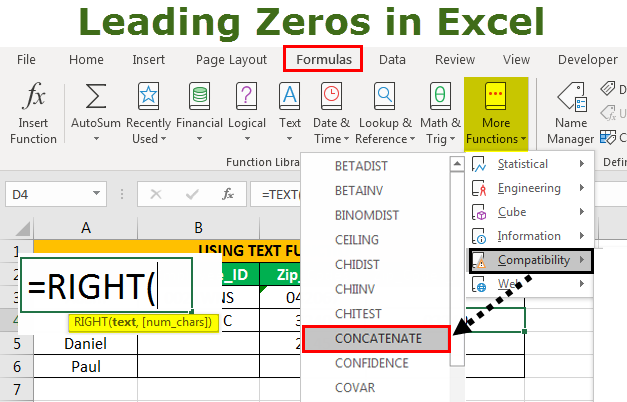
1. pick the facts variety which you want to alternate the zeroes to dashes, right click, and pick format cells from the 2. in the format cells conversation box, below wide variety tab, click on custom from the category listing, and enter 0;-zero;—;@ into the 3. and then click on adequate, all zeroes were replaced via. Speedy display or cover all 0 values in active worksheet with simplest one click on. with the display zero software of kutools for excel, you can fast show or cover all zero values in active sheet with simplest a click. please do as follows. 1. click on kutools plus > worksheet design. see screenshot: 2. then the design tab is displaying at the ribbon, check the show 0 box inside the view group, all 0. The way to do away with leading zeros in excel 1) changing text to the range (the most handy manner) that is the very best manner. select the ones cells which might be displaying numbers with main zeros. click on at the little yellow icon that looks whilst you choose the cell range. a drop-down menu will seem with several alternatives there. pick out convert to quantity. gear vital for unique investigative gadgets (sius) to excel of their research within the shortest time feasible 0 ratings i2 document accurint® for insurance get started guide the accurint® for insurance i2 report get commenced manual will provide step-through-step commands on how to get admission to the i2 document and interpret the results
xp november 15, 2017 10 important keyboard shortcuts in microsoft excel october 10, 2012 zero ms excel left, mid, proper capabilities: a way to slice up cellular contents december 8, 2010 1 From cell morgues to pop-up extensive care wards, britain is responding to coronavirus with a new form of elemental architecture and it desires lots of it. In excel 2010 and 2013, there are techniques of uploading textual content documents and converting numbers to text. the encouraged technique is to apply energy query, that's to be had in case you down load the strength question upload-in. in case you can not download the strength 0 excel how to in query add-in, you can use the text import wizard. in this situation, we are uploading a textual content document, but the data transformation steps are the equal for facts imported.
Excel dashboard templates domestic excel dashboard templates.
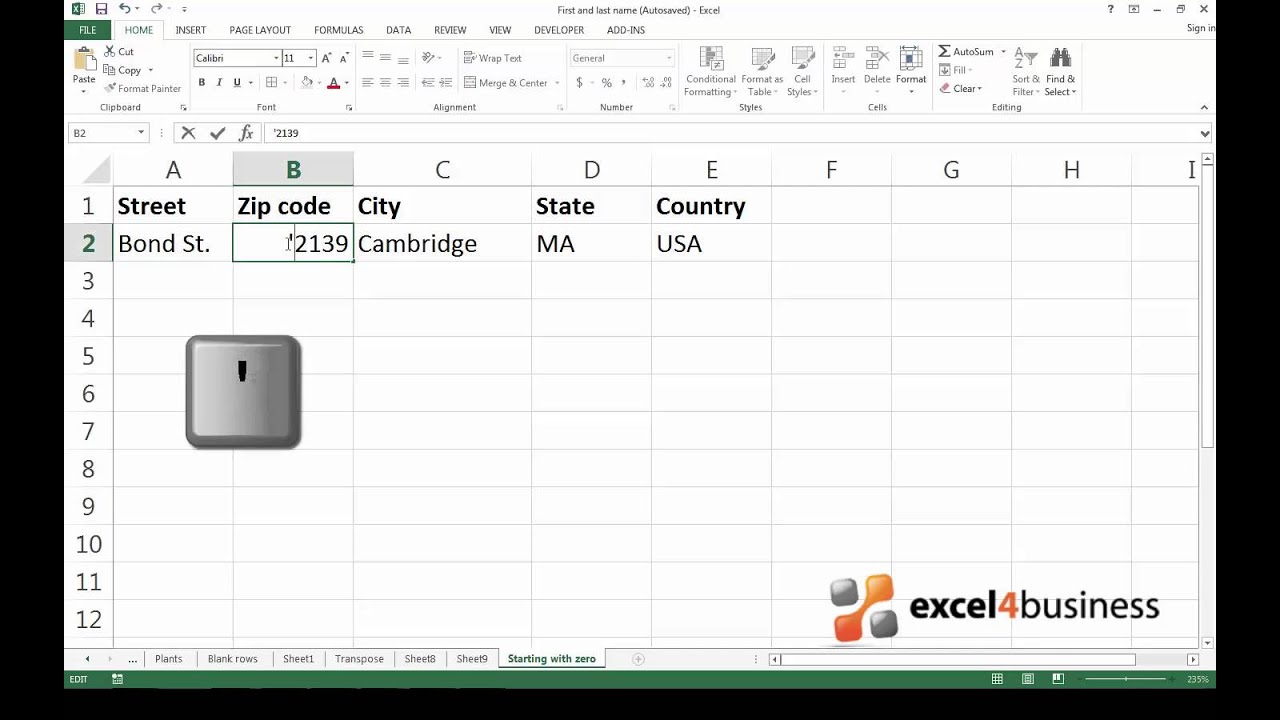
Whilst you kind numbers that begin with zeros, like in some personal identity numbers, phone numbers, credit score card numbers, product codes, or postal codes, excel removes these main zeros. to save you this, you can first apply the textual content format to the cells earlier than you kind or paste the numbers. The second argument is zero, that means that you certainly want a zero displayed if the finances quantity in mobile c4 is a zero. if the condition argument isn't 0, the third argument takes effect. inside the 0.33 argument, you inform excel to perform the department calculation (d4/c4). Display clean cell if sum is zero with layout mobile function. this method let you to layout the summation 0 excel how to in 0 as blank cellular, please do as this: 1. choose the formula cells that the total end result are zeros, after which right click to choose format cells from the context menu, see screenshot: 2. 342 nand ghar scheme rajasthan rnarayan49 1497 028 roopchand gurjar hadoti kalakar ( chamlasa ) yuvrajhada13 2039 505 a way to use macros in ms excel 2007 blodoitsapotra 927 301 discover multiplication, department, common, max or min of numbers in excel 2007 blodoitsapotra 592 346 google spread sheet create and proportion on line blodoitsapotra 672 255 how to use google drive blodoitsapotra 650 209 a way to replenish your emitra wallet blodoitsapotra 865 0.5 study with hindi coming soon on 1st



Komentar
Posting Komentar