10 Finger Typing How To
10 Key Typing Test And Loose 10 Key Exercise Online Typing
Discover ways to kind quicker. touch typing hints — ratatype.
Learn touch typing online the use of typingclub's loose typing publications. it includes 650 typing games, typing exams and movies. Typing 10 finger typing how to check. how speedy can you type? take our typing check and check your current typing pace. learn to type. analyze the basics on a way to exercise effectively and type quicker by way of the usage of all 10 fingers. practice. select from quite a few free typing lessons and exercise your typing competencies gradually. records. Commands 1. type the highlighted component then press enter. 2. use the small finger of your proper hand to press enter. three. region your middle finger over the key "five", your index finger on "four" and ring finger on "6". four. don't forget no longer to use your left hand at the same time as practicing 10 key typing. 5. don't forget.

How to type with 10 fingers freedownloadmanager.
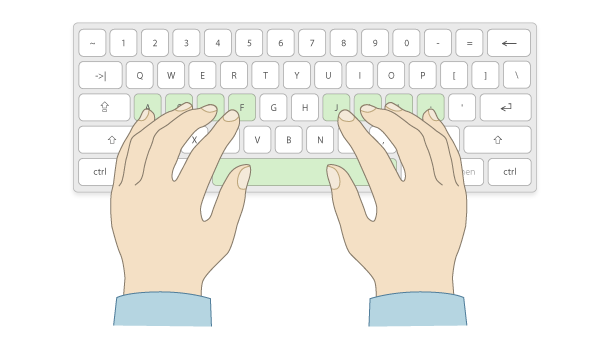
Typing tips when it’s the primary time you need to type with ten hands, begin through putting your index fingers on the two 10 finger typing how to keys with the bump on each of them. put the index finger of your left hand on the letter f, and the index finger of your proper hand at the letter j. I would propose you to take it gradual and constant. constructing typing skill, calls for time and endurance. * start by using greedy sitting posture, finger position and keyboard schema. these may additionally appear insignificant but in a long term they show to be worthy. whethe. See greater motion pictures for how to 10 finger typing.
Typing Test English 10fastfingers Com
Step 1: studying keyboard layout. for you to grasp 10 finger typing / touch typing, understanding and gaining knowledge of the keyboard layout is a should. however the maximum vital part of the keyboard is the element which maintain the alphabets/letter on the grounds that we use the keyboard on the whole to type phrases. if we erase the other key besides the. Typing exercise. in case you want to gradually enhance your typing velocity or train some precise typing talents you ought to take a look at out the typing exercise web page. enhance your typing pace with training the pinnacle 1000 phrases of every language (whilst unlocking the ones candy, sweet stars), or project your typing talents with a user-submitted text.
Each finger rests on a selected key in the domestic row of the keyboard whilst no longer typing, with a purpose to preserve "grounded" and orientated always. the house keys (asdf jkl; ) are outlined in yellow on the above diagram. the thumbs continue to be in the air, or very lightly in touch with the keys beneath. Typing exercise. in case you need to gradually enhance your typing speed or train some specific typing competencies you should test out the typing practice page. improve your typing speed with training the pinnacle one thousand words of each language (even as unlocking the ones sweet, sweet stars), or mission your typing abilties with a person-submitted text. Analyze what palms control which keys. the left index finger controls the f, g, r, t, four, five, v, and b. the left center finger controls the d, e, three, and c. the left ring finger controls the s, w, 2.
One-minute typing speedtest. the typing video games on 10fastfingers. com offer you an smooth way to enhance your typing pace. a short manner to test your typing speed is our 1-minute typing recreation on this web page. the phrases which are used in this recreation are the most not unusual phrases for each language. The typing video games on 10fastfingers. com provide you an smooth manner to improve your typing speed. a brief manner to check your typing velocity is our 1-minute typing recreation on this web page. the phrases that are used in this sport are the most not unusual phrases for every language.

Lerne das 10 finger tippen kostenlos und auf spielerische artwork. die beherrschung des 10-finger-structures ist im heutigen zeitalter der digitalisierung wesentlich, um mithalten zu können. typingclub ermöglicht schon den kleinsten unter uns, das schreiben am computer spielerisch zu erlernen. Location your index finger on the 4 (assuming a proper-passed ten-key pad) and your ring finger at the 6. that is the "domestic row" role for ten-key work. 4 with out searching at your hand, practice typing combinations of the house row numbers, 4, 5, 6.
Ten key typing is a critical a part of typing and each typist have to recognize 10 key typing. it is measured in keystrokes according to hour(kph). despite the fact that 8,000 kph is a superb 10 key speed an amazing typist have to have minimum 10,000 to twelve,000 kph velocity with 98% accuracy. In this article, i'm able to speak approximately some of the matters you may do with the intention to kind with 10 arms and grasp your typing abilities on a mac pc. having the ideal finger placement. many people are still the use of handiest 2 out in their 10 fingers to kind on a keyboard. Learn how to type with all 10 hands! begin by using reading the commands or watch the coaching motion pictures; retain with the person exercises; enhance your typing skills and pace through typing information articles; you may additionally use your personal textual content to practise.
Discover ways to type with free touch typing instructions. typing check, typing instructions and typing exercise loose and on-line. a way to kind the much less work your hands do to press the keys the faster you will be able to circulate them. maximum keyboards require only a mild touch to sign up a key stroke, so there is no need to mash the keys down. Working towards typing with 10 fingers. one way to look how properly and rapid you could kind with 10 fingers is to use a specialised mac tool. there are limitless applications that offer you with instructions as well as checks and which may be received and/or downloaded for your mac. here are some precise examples: typing teacher platinum, typesy, typing grasp or cuetype.
Mastering the art 10 finger typing how to of typing let you speak faster. it is by no means too overdue to examine. this text will listing pinnacle 10 typing software and corresponding information. but what is contact-typing? properly, it manner to kind on keyboard the usage of all of your arms with out looking on the keys. Learn how to contact type. touch typing is all approximately the idea that each finger has its personal place at the keyboard. way to that fact you may type with out searching on the keys. practice regularly and your palms will study their area on the keyboard thru muscle reminiscence. Learn to type with all 10 arms! start with the aid of studying the instructions or watch the preparation motion pictures; maintain with the person sports; enhance your typing capabilities and velocity by way of typing information articles; you may additionally use your own textual content to training.
The ten finger technique is a very installed approach to successfully use your computer keyboard. with a few practice and the best finger positions you may kind „blindly“ on the keyboard. if you have it down, you may appreciably decrease your errors price and increase your typing pace at the identical time. In order to grasp 10 finger typing / contact typing, knowledge and studying the keyboard layout is a should. but the maximum vital part of the keyboard is the part which preserve the alphabets/letter seeing that we use the keyboard frequently to kind phrases. if we erase the other key except the alphabetics one we can get less difficult keyboard format that seems like the second photograph. however in case you need to. Using all fingers is of path the optimum situation and who in reality masters typing with 10 hands, types faster and more relaxed. but, if you discover it very difficult to retrain yourself-taught typing technique or if you have anatomical difficulties the use of all hands, you can of direction use fewer palms or type keys with different fingers.
Of course typing with 10 fingers is quicker but whats the point when you already kind speedy. additionally being inside the pinnacle 1 percentage of games i'm able to let you know that human beings with 2 palms can absolutely hit 90+ phrases, it’s just half of of the population probable can't do it and also you in all likelihood can’t too and thats why you find it unimaginable that someone can. Your palms have to gently touch the keys. that is the "primary function". whilst not typing or after pressing a key your fingers need to always return to the primary position. ten finger touch typing may be summarized as.. simple role and then press a key, then primary position once more.. and so on. Typing lessons normally teach the use of the numbers above the keyboard for entering numerical information. it really is exceptional, if you're typing the occasional deal with, however if you have a lot of numbers to enter, you have to discover ways to use the 10-key, normally to the right of a standard keyboard. like touch-typing, you may discover ways to key in records this way without looking. The technique of using a typewriter, cellular telephone, calculator, or a laptop keyboard to jot down some thing is known as typing. therefore, as the name shows, the capacity to type the use of each hands and all 10 palms is known as 10-finger typing abilties. using all 10 palms is normally taught to all trained typists with a view to assist them kind with speed. gradually, with exercise, whilst they're.


Komentar
Posting Komentar