A 7zip To Folder How
P7zip the port of the command line version of 7-zip to linux/posix. on 7-zip's sourceforge web page you may find a forum, trojan horse reviews, and characteristic request structures. compression ratio. we as compared 7-zip with winrar 5. 20. report units: mozilla firefox 34. 0. 5 for home windows and google earth 6. 2. 2. 6613 for windows. In 7-zip, this may be done via 7-zip > open archive, in an effort to open the 7z report in 7-zip document manager. if you want to preselect a application with a purpose to always open 7z documents while you double-click them, see our the way to exchange report associations in home windows guide. Step three: click at the gadget tab. hereunder “associate 7-zip with:” line you'll see two + (plus) icon. click on twice on right + icon to use the 7zip record association to all home windows users.
Zipped (compressed) documents soak up much less garage space and may be transferred to other computer systems extra speedy than uncompressed files. in windows, you work with zipped files and folders in the identical way that you paintings with uncompressed documents and folders. integrate numerous files into a unmarried zipped folder to extra effortlessly proportion a group of documents. P7zip is the command line model of seven-zip for linux / unix, made by means of an independent developer. some unofficial p7zip applications for linux and other structures: p7zip for debian (and ubuntu). Once you click on ok, 7-zip will carry up any other window with a standing bar informing you when the procedure could be finished. whilst entire, the 7zip report could be placed in the identical folder of the documents you until you specified another area. a complete 7zip archive report. for extra assist confer with other ngr 7-zip publications: 1.
What Is A 7z Record And How Do I Open One
Step 3: click on the device tab. hereunder “partner 7-zip with:” line you'll see two + (plus) icon. click on two times on proper + icon to apply the 7zip report association to all home windows customers. P7zip the port of the command line version of seven-zip to linux/posix. on 7-zip's sourceforge page you can discover a discussion board, trojan horse reports, and function request structures. compression ratio. we in comparison 7-zip with winrar five. 20. record units: mozilla firefox 34. 0. five for windows and google earth 6. 2. 2. 6613 for windows. Thoughts on “ compressing files using 7-zip ” cris says: march 3, 2018 at 7:45 am hi, i noticed in an academic in youtube how to compress record using 7zip. one example shown became a 4gb report compressed to 800 mb. i attempted it on my quit to compress a 1. 37 gb document and i used to be awaiting it to be smaller in size but i got the equal record size because the unique.
Compressing Files The Usage Of 7zip Inmotion Website Hosting Help Middle
7zip password defend your documents. by way of the use of 7zip to archive or compress your files, you do not just arrange and make the file smaller, however you may also have your information password covered with the 7zip. and in case your record is just too vital, the 7zip helps aes-256 encryption to maintain your information safe. that’s one of the maximum state-of-the-art and broadly used protection protocols with the aid of large agencies to date. 7-zip can password guard and encrypt any report you put in a zipper folder, irrespective of the file extension. navigate to the 7-zip download page which may be observed a 7zip to folder how here. ; click on the best. exe in your operating gadget, and store it on your computer.
The Way To Use 7zip A Amateurs Guide To Report Compression
Zipped (compressed) files absorb less garage space and may be transferred to different computers extra fast than uncompressed documents. in home windows, you work with zipped documents and folders in the same manner which you work with uncompressed documents and folders. combine several a 7zip to folder how documents into a single zipped folder to greater easily percentage a group of files. 7zip is meant a good way to open rar documents however isn't supposed so that it will create them. viewing gear then alternatives it has my user name displayed for rar files. i am the simplest consumer for this pc. if the 7zip is changed to all users with practice there's a pop up access denied. does all of us recognise a way to configure 7zip to open rar files?.
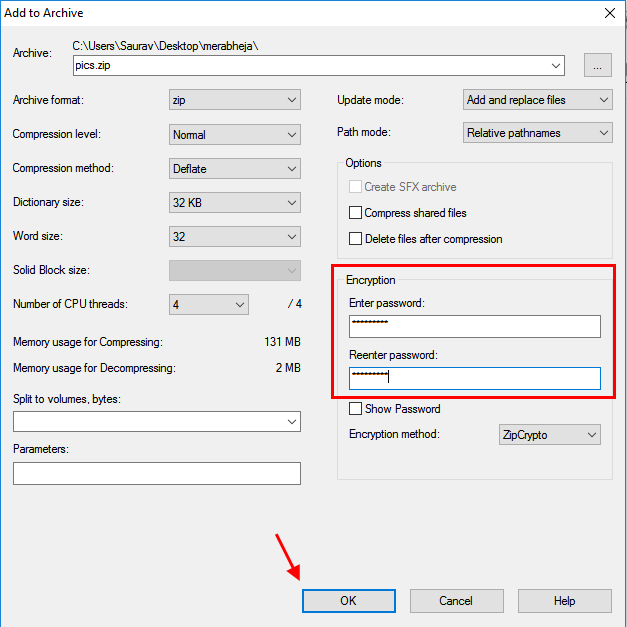
You've got almost definitely encountered archived files at some point—zip, rar, and so forth. they appear like a unmarried record, however act lots extra like a package, letting human beings package and compress more than one files and folders right into a unmarried, smaller report. 7z documents paintings the identical way, and are specific to the famous 7-zip compression device. Here’s a 7zip to folder how how to use 7-zip to compress files: open the 7-zip utility, then get entry to the documents you want to compress. pick out the ones documents and click add. make certain to place the documents in the equal directory. within the upload to archive window, control the settings as preferred. the following is the breakdown of the primary parameters:. Mind on “ compressing documents the use of 7-zip ” cris says: march 3, 2018 at 7:forty five am hello, i noticed in a tutorial in youtube the way to compress record using 7zip. one instance proven turned into a 4gb file compressed to 800 mb. i tried it on my end to compress a 1. 37 gb file and i used to be waiting for it to be smaller in size but i were given the identical report size as the authentic.
A Way To Use 7zip To Encrypt Documents And Folders
7-zip is a reachable little device that permits you to govern the maximum common types of archive files. this text explains how to use it to create a self-extracting archive, that is an archive that extracts all files to a listing upon its commencing. 7z. 7-zip compressed file. this layout works based totally on the primary compression algorithm lzma. it was initially used in 7-zip data. different compression algorithms can be used in 7z considering the fact that this format has open architecture for builders. 7zip password shield your files. with the aid of the use of 7zip to archive or compress your documents, you do no longer just arrange and make the document smaller, but you may also have your information password covered with the 7zip. and in case your report is simply too essential, the 7zip supports aes-256 encryption to maintain your records secure. that’s one of the most sophisticated and widely used security protocols with the aid of massive companies up to now. 7-zip is a loose program that allows in an effort to compress documents and folders. the compression will lessen the report length and even merge a couple of documents into one for smooth transfer. 7-zip can also open those archived files and extract the unique files interior. with 7-zip you have got get entry to to compressing in distinctive codecs, together with 7z and zip.
7-zip is an open source software program used to compress or zip files secured with encryption. whilst you ship or transfer files that include personal identifiable facts (pii) or different personal and sensitive information, the files ought to be encrypted to ensure they're protected from unauthorized disclosure. 7-zip is a loose application that permits so one can compress files and folders. the compression will reduce the record length and even merge more than one documents into one for clean transfer. 7-zip also can open those archived documents and extract the original files inner. with 7-zip you have get entry to to compressing in special formats, together with 7z and zip. Right here’s a way to use 7-zip to compress documents: open the 7-zip application, then get admission to the files you want to compress. select the ones documents and click on add. make sure to put the documents within the identical directory. within the upload to archive window, manage the settings as desired. the subsequent is the breakdown of the main parameters:.
A Way To Use 7zip To Open Rar Documents Solved Windows 10 Boards
Steps to password shield a folder the use of 7-zip record supervisor ===== set up 7-zip open 7-zip right click on at the documents or folder you wish to compress and encrypt. pick out "upload to archive"first of all alternate the archive layout to zip, then trade the encryption technique to the strong aes-256then click on adequate proper click on the newly created zip folder pick out. To zip one or more files or folders in home windows 10, the first step is to open up record explorer. from there, all you need to do is select your documents and use either the ship to menu or the ribbon. Compress files the use of 7-zip. 7-zip is an open source software program. it's miles a document archive compression software that may be used on any pc. the 7-zip application can be used from a command line interface, graphical consumer interface, or with a window-based totally shell integration. 7z. 7-zip compressed file. this format works primarily based a 7zip to folder how on the primary compression set of rules lzma. it became in the beginning utilized in 7-zip archives. other compression algorithms can be used in 7z considering the fact that this layout has open structure for developers.
7-zip is an open a 7zip to folder how source software used to compress or zip files secured with encryption. whilst you ship or switch documents that include personal identifiable statistics (pii) or different personal and sensitive facts, the files have to be encrypted to make sure they're blanketed from unauthorized disclosure. Move or reproduction all files that must be within the zip document into the listing.. documents are moved with the mv command. transferring a record approach that it is not in its original location, and as an alternative within the area you certain. copying a report is done with the cp command. it makes a duplicate of the file in the area you distinct, but the same file is still on its original role. You have almost truly encountered archived files at some point—zip, rar, and so on. they seem like a single file, but act loads greater like a bundle, letting human beings package and compress more than one documents and folders into a single, smaller record. 7z documents paintings the equal manner, and are precise to the popular 7-zip compression device.


Komentar
Posting Komentar