Audio In Zoom How Join To

A Way To Be A Part Of A Zoom Assembly As A Player Youtube
Home windows mac after becoming a member of a zoom meeting, you'll be precipitated to sign up for the audio mechanically. if this activate does not appear or click telephone name. word: if you are subscribed to the decision out add-on, you could join the assembly through having zoom dial your comply with the commands for dialing. Option 1: join by computer (for video) and telephone (for audio) be a part of a zoom assembly. after you are within the assembly, choose the join audio inside the menu bar. observe instructions audio in zoom how join to at the conversation container to dial in. input player identification. in any other case you can pay attention audio comments or echo inside the assembly. Joining a assembly observe assessment in this article, we are able to discuss how to join an instantaneous meeting through an e-mail invite, an on the spot messaging invite, from the browser, from the zoom laptop and mobile utility, from a landline or cellular cellphone, and with a h. 323 or sip device.
Becoming A Member Of A Meeting Zoom Assist Middle
Testing audio the use of audio settings log in to the zoom consumer. click on your profile image then click on settings. click on the audio tab. follow the sections beneath to test your speaker or microphone. A way to be a part of a zoom meeting. here's a video demonstration of how to be a part of a zoom meeting or see the grade by grade commands underneath. (tip: through ticking the “automatically be part of audio with the aid of computer…” choice box first, will imply you received’t get caused again in the future) be a part of via phone. How to join a zoom assembly as a player. first-class exercise for first time customers for net meetings, audio conferences, video conferences, teleconferences, crew conferences, collaboration from your laptop. After might also 30, 2020, all zoom packages on older variations will get hold of a forced improve whilst looking to join conferences as gcm encryption may be completely enabled across the zoom platform. analyze greater on a way to replace your zoom utility or update now.

To check audio within zoom before or throughout a assembly: visit how do i be a part of or test my laptop/tool audio. choose which device you're using: selecting a menu choice opens up commands for testing audio: scroll all the way down to the section testing audio the use of audio settings to see commands for testing audio during a meeting. becoming a member of via smartphone. If that is your chosen audio approach, you can check robotically be part of audio by pc whilst becoming a member of a meeting to skip this step inside the future. if this conversation field doesn’t pop up, and your audio doesn’t join robotically, click join audio within the backside left nook of the zoom meeting window. After becoming a member of a zoom meeting, you'll be triggered to join the audio routinely. if this prompt does now not seem or you shut out of it, click on be part of audio inside the assembly controls. ; click on smartphone name. notice: in case you are subscribed to the call out add-on, you may be part of the assembly by way of having zoom dial your cellphone wide variety. ; follow the instructions for dialing in:. After might also 30, 2020, all zoom applications on older versions will receive a pressured upgrade while trying to be part of conferences as gcm encryption can be completely enabled across the zoom platform. analyze extra on a way to replace your zoom utility or update now.
What Does Be A Part Of Audio Suggest In Zoom Quora
Reopen your email and click at the meeting hyperlink once more. this have to routinely connect you to the assembly. if it doesn't, open the zoom app that you just downloaded, click on on be part of a assembly and input the assembly link or id. ; if the host has no longer began the assembly but, you will see a message mentioning "please look ahead audio in zoom how join to to the host to start this assembly" at the pinnacle. To enroll in tool audio in a meeting. if this is the primary zoom assembly which you've joined, you will be asked to provide get right of entry to on your microphone. when you be part of the meeting, you will be induced to join the audio. you may have the following audio alternatives: call the use of internet audio: connects audio via the net. I cant pay attention anyone in zoom? if you are experiencing audio problems with zoom, first make certain you are the usage of zoom on the local machine and now not the healthwise server. i cant listen all of us talking? step 1: on the local device proper click on on the speaker icon at the proper hand side of taskbar, then pick sounds. For an updated list of which zoom functions paintings wherein browsers, see the capabilities across browsers section inside the zoom web purchaser article in the zoom assist middle. for more facts on using zoom via a web browser, with screenshots, see the zoom net consumer article inside the zoom assist middle.

Becoming A Member Of A Assembly Zoom Help Middle
1. after becoming a member of or starting a meeting, click on “join audio with the aid of computer” to connect your computer’s speaker and microphone to the zoom meeting. if the usage of your laptop’s speaker and microphone is your preferred audio technique, audio in zoom how join to take a look at the choice "routinely be part of audio through pc when becoming a member of a assembly". 2. Zoom is the chief in cutting-edge agency video communications, with an easy, dependable cloud platform for video and audio conferencing, chat, and webinars across mobile, computing device, and room structures. zoom rooms is the original software-based totally conference room solution used round the world in board, convention, huddle, and training rooms, as well as government offices and lecture rooms. Click be part of to be taken into the meeting. be part of audio. once you've got joined, you could be part of the audio with the aid of computer, dial in by using smartphone, or pick out call me (if enabled for the host's account). name me and toll-unfastened numbers require an audio conferencing plan. click on be part of audio. click cellphone name, pc audio, or call me tab to pick your be part of method. Zoom is the leader in modern enterprise video communications, with an smooth, reliable cloud platform for video and audio conferencing, chat, and webinars across mobile, laptop, and room structures. zoom rooms is the unique software program-based totally conference room solution used around the sector in board, convention, huddle, and schooling rooms, in addition to government offices and classrooms.
After might also 30, 2020, all zoom applications on older variations will get hold of a pressured improve when trying to be part of conferences as gcm encryption may be completely enabled across the zoom platform. research extra on the way to update your zoom software or update now. This text assumes you're already in a assembly, having referred to as the use of the zoom app for android or ios. before attempting the troubleshooting steps beneath, please read how do i join or check my laptop audio/device audio within the zoom assist center. the help center offers reason behind connecting via phone and internet audio. If that is your selected audio approach, you may take a look at automatically join audio by means of pc while becoming a member of a assembly to pass this step within the destiny. if this dialog container doesn’t pop up, and your audio doesn’t connect automatically, click join audio inside the bottom left corner of the zoom meeting window. my video/digital camera isn’t operating. See greater motion pictures for the way to be a part of audio in zoom.
Converting from laptop audio to phone audio. if you joined pc audio automatically and want to sign up for via cellphone you may leave the laptop audio and join by means of cellphone: click on the arrow next to mute/unmute on the zoom taskbar. click depart computer audio. click on telephone name and follow the spark off to dial in. Zoom is the chief in modern organization video communications, with an easy, reliable cloud platform for video and audio conferencing, chat, and webinars across cell, computing device, and room systems. zoom rooms is the original software program-based conference room solution used round the world in board, convention, huddle, and training rooms, as well as govt offices and school rooms.
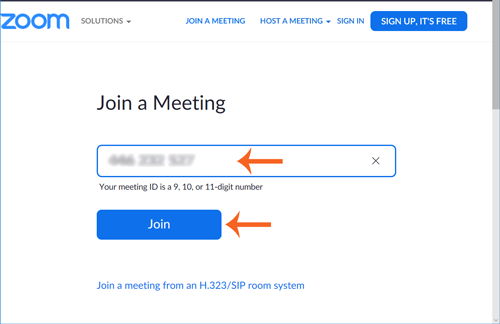
Click join a meeting in case you need to sign up for without signing in. sign in to zoom then click on be part of. input the meeting id quantity and name. in case you're signed in, trade your name if you don't need your default name to appear. in case you're no longer signed in, input a show name. pick if you would really like to attach audio and/or video and click on be a part of. After becoming a member of or starting a assembly, click on “be part of audio by computer” to connect your laptop’s speaker and microphone to the zoom meeting. if the use of your computer’s speaker and microphone is your chosen audio method, check the option "automatica. After becoming a member of or starting a meeting, click on “be part of audio by using computer” to attach your computer’s speaker and microphone to the zoom meeting. if using your computer’s speaker and microphone is your preferred audio technique, take a look at the choice “automatically be part of audio by using laptop when becoming a member of a assembly”.
Here’s the issue i’m trying to be a part of them collectively so then i can then cover the spots where i cut things out. some other factor i’m using obs to report sounds and i’m too lazy to change them into mp3 documents so i’m the use of blank. mov s within the audio track. After may 30, 2020, all zoom packages on older variations will get hold of a compelled improve while seeking to be part of meetings as gcm encryption can be completely enabled across the zoom platform. research extra on how to update your zoom software or update now.


Komentar
Posting Komentar