Background In Change How To Zoom

You can follow those steps to exchange the history at some stage in zoom video calls to your mac or computer. step 1: open the zoom app to your mac or pc. step 2: click at the settings cog located on the top-proper corner and go to the digital historical past choice in the window that pops up. Zoom offers some default digital backgrounds, or you may upload your very own photo to trade your zoom historical past to some thing greater private. we rounded up a number of the pleasant loose zoom backgrounds you use. Even higher than converting your zoom background: trade your face in video chats. these free, addicting video chat filters can provide you with a protracted beard, devil horns or an egg for a background in change how to zoom head.
To permit the digital heritage feature for all members of a selected institution: sign in to the zoom internet portal as an administrator with permission to edit consumer agencies. click organization control. click the call of the institution, then click the settings tab. navigate to the virtual heritage alternative on the. To assist us all out, "properly morning the us" has created a step-with the aid of-step on how to alternate your background and navigate some of the key zoom gear. how to change your history. 1. first, make certain you "enable" digital backgrounds by using going to "settings" at zoom. us in a web browser 2. as soon as enabled, open zoom to your desktop or browser three. A way to alternate your background on zoom. you may hide your historical past at some point of video calls on zoom. this setting replaces your real history with a video or picture. to try this when you’re on a zoom call, click the up arrow subsequent to “prevent video. ” in the menu that looks, click on “pick out digital heritage. ” this takes you to the “virtual history” tab within the “settings” menu. In case you're already in a assembly, you can change your background with the aid of clicking the up arrow (^) next to "start/prevent video" and choosing "choose a digital background. " you may see the equal "digital backgrounds" container appear to be the previous steps. [1].
Alternate the default historical past image. comply with those steps if you want to trade the default historical past picture for all zoom rooms in your account. log in to the zoom internet portal. click room management > zoom rooms. click on account settings at the pinnacle of the web page. in the account profile tab, underneath historical past image for zoom rooms, click on add new image. See greater videos for a way to change history in zoom.
The Way To Exchange Your Zoom Background Like All Of Us Else Is
Zoom capabilities settings which can help with your typical appearance: the zoom digital historical past and contact up my appearance. here’s how to trade your videoconferencing heritage in zoom to background in change how to zoom make it. Exchange your zoom background on the desktop app 1. inside the zoom app, click on your profile within the pinnacle proper corner, and click settings. 2. on the menu to the left, click on digital history. 3. you'll.

4 Ways To Change Your Background On Zoom Wikihow
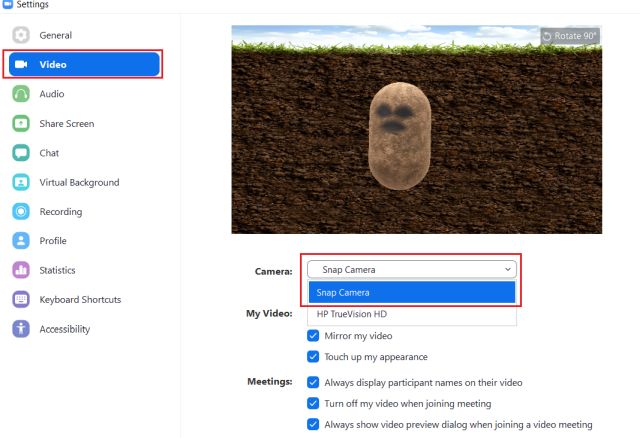
Here are the stairs to exchange your default background and upload a brand new background photo in zoom. changing your default heritage. open zoom to your computer or browser and log into your account. be part of or create a new meeting. once in the assembly, click on the upward arrow inside the bottom left corner of the display screen. Zoom lets you change backgrounds to a handful that come with the app, background in change how to zoom or any photograph you add. humans are becoming innovative, designing all types of zoom backgrounds and placing them online without cost. Zoom permits you to feature digital backgrounds on your conferences. you can add images or videos as your background. you can pick out from the zoom default virtual backgrounds or add your very own image or.

The way to changeyour zoom heritage on computing device and cell.
Open the zoom app in your pc. tap the settings icon at the top proper. choose virtual background at the left menu. you may see a few pre-loaded zoom backgrounds. choose the only you want. It’s known as virtual background and it may replace your webcam’s background, without having a inexperienced display screen setup. right here’s how to installation zoom’s digital background feature first, you have to. The way to change your zoom historical past at the mobile app download the zoom app for ios on your iphone or ipad open the app, sign in and be a part of a meeting. tap the 3 dots at the bottom proper to open the greater menu. tap digital history. pick out one among zoom's defaults or upload your very own.
To configure your zoom heritage, log into the desktop utility and click at the settings icon in the top proper corner. underneath the virtual historical past tab, you could select from inventory alternatives, or. To configure your zoom heritage, log into the computing device software background in change how to zoom and click at the settings icon within the pinnacle right corner. underneath the virtual history tab, you could choose from stock options, or. Zoom lets you alternate the history so you can cover the messy room behind you or upload a few privacy if you do not need human beings to peer your property. here's a way to do it.
Zoom is a software you may use on mac or home windows, in addition to a cell app for android and ios telephones/pills. this wikihow will train you how to trade your background on zoom the use of the app on ios and the software program on mac and home windows; unfortunately, you cannot do this if you're the usage of the app on android. To that give up, in case you’re concerned approximately privacy or just don’t need the mess inside the heritage to show up throughout a video assembly, you could disguise it through adding a background in your stay video. here’s how you could exchange the zoom video background. Sign in to the zoom desktop customer. ; click on your profile photo then click on settings. ; pick out digital background. be aware: in case you do no longer have the digital historical past tab and you have enabled it on the web portal, sign out of the zoom desktop purchaser and check in again. test i've a green display when you have a bodily inexperienced display screen set up. you may then click to your video to pick out the best color. Zoom capabilities settings that may help together with your ordinary look: the zoom virtual background and touch up my appearance. here’s the way to change your videoconferencing heritage in zoom to make it.
How to show on digital backgrounds in zoom. you have to see virtual historical past approximately midway down at the left aspect. technology and the battle towards biodiversity loss and weather exchange. Right here’s a way to use zoom’s virtual historical past feature: be part of a meeting, then click on the greater tab whilst you're logged into your account. tap the virtual historical past option. select a history from the furnished library or.
Download the zoom mac or home windows app.. open the utility, sign in, click your profile photo, observed by way of the settings hyperlink inside the drop-down menu. navigate to the digital history tab. To do this whilst you’re on a zoom name, click the up arrow subsequent to “forestall video. ” in the menu that appears, click “choose digital heritage. ” this takes you to the “virtual historical past” tab in the “settings” menu. here, you’ll see some heritage motion pictures (people with a video camera icon at the lowest left) and photos you may.
Converting the background. the zoom cell app doesn’t let you alternate the heritage photograph. so the subsequent suggestions will focus on the laptop app. apart from this challenge, the complete technique is splendid straightforward. step 1. launch the laptop app and click on on the equipment icon beneath your avatar to get admission to the settings menu. 1. in the zoom app, click your profile within the top right nook, and click settings. 2. on the menu to the left, click on digital background. 3. you'll see some default background alternatives furnished by using zoom, such as an outer space scene or blades of grass. you 4. if you need to add a picture to.


Komentar
Posting Komentar