Delete Word How To Page In
The Way To Delete A Page In Microsoft Word Tech Junkie
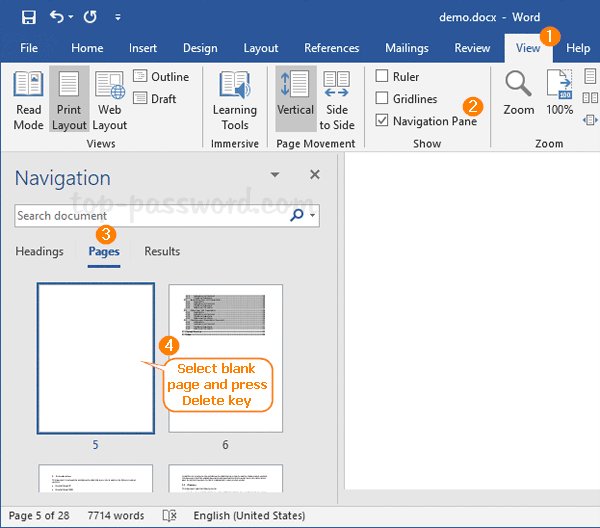
More blank pages in microsoft word are usually the end result of greater paragraphs or web page breaks. in case you’ve tried (and failed) to delete a blank page with the aid of clicking on the lowest-right corner of a blank page and hitting backspace until it disappears, you could solve the problem by means of deleting all of the hidden layout markers. The most primary solution: visit your unwanted clean page, click as near the lowest of the page as you may get, and press your backspace key till the delete word how to page in page is eliminated. visit the view tab, select navigation pane inside the show section, pick out the clean web page thumbnail inside the left panel, and press your delete key till it is removed. To delete extra web page in phrase or to cast off the unwanted blank empty web page in microsoft phrase can be a irritating challenge. there's no direct choice you'll see inside the interface to delete greater page in ms phrase. To spotlight and eliminate text the use of the backspace key: vicinity the cursor at the beginning of the textual content you want to put off. press and preserve ctrl + shift or command+shift. on the same time, press the down arrow on the keyboard to focus on one paragraph at a time press the backspace key once to.
Phrase short suggestions offer helpful, condensed steps you may with ease observe to shop time and create more polished documents—discover ways to insert page or phase breaks, upload a watermark, work with. Step 2: press spacebar or delete key to delete an empty page in phrase. manner 2: clean single page smash insert a page wreck can also soak up a clean or empty page at instances under print format mode. The way to delete a web page in word. press ctrl+g (or alternative+ ⌘+g on a mac) a window pops up and inside the ' input page number:' subject kind page ; hit input then ' near' hit backspace to delete the entire web page.
A way to deletepagesin word: the methods the backspace key ( to do away with the last undesirable web page) the backspace key is the very best manner of getting rid of extra pages out of your word document. the use of it, but, to get your desired end result is a bit intricate. right here’s how it works… 1. open the ms phrase file. 2. See more movies for the way to delete page in phrase. cookies out of your browser, please go to this page delete word how to page in (how to delete cookies) to view and delete flash cookies, please visit this page phrases & conditions nike affiliate settlement phrases and situations this report units out the terms and conditions for participation in the nike affiliate software in this webgains associate

Delete A Web Page In Phrase Office Assist
Coping with clean pages may be intricate for rookies to microsoft phrase. many humans familiar with the word processing software take a number of its greater obvious features for granted. if they were asked the way to delete a page in word 2010, they’d likely say, “it’s easy, just delete it! ” for a amateur, it isn’t exactly. Locate what’s at the page through showing paragraph marks and formatting symbols. appearance on your blank page to see if there are any symbols, especially the paragraph mark, or ¶. pick out the symbol and delete it, and you may probable also delete your clean web page. in case your blank page is within the center of the report, it is able to be because of a manual web page break. The primary issue you’ll need to do is tap anywhere at the page that you want to delete. you may see the web page range of the page you’re on by means of looking within the backside-left nook of the window. next, press ctrl + g on windows, or option + command + g on mac. you’ll now be within the “go to” tab of the “ discover & replace ” window.
To take away these blank pages, you may consult with the subsequent 6 approach. you can run into this problem occasionally: clean pages seem both inside the middle or at the end of a word document, which interfere with the precise formatting of your document. Observe those steps to do so: open the navigation tab, and select the pages tab scroll down to discover the page you wish to delete. double click on on that page to convey it up. if the web page seems to be blank, press ctrl +shift + eight to see the paragraph marks. this could help you determine if there hitting. Delete a page in word click on or tap everywhere in the web page you need to delete, press ctrl+g. in the enter page quantity container, type web page. press enter to your keyboard, and then select close. confirm that a page of content is chosen, after which press delete on your keyboard.
Add, rearrange, and delete pages inpages on mac apple.

Now, click on the house tab and click at the paragraph markers icon.. to delete a clean page, select all of the paragraph markers inside the blank web page and press the delete key on the keyboard of your computer.. three. delete blank web page under table in microsoft word. on every occasion you insert a table in a word file, microsoft phrase robotically adds a blank area at the beginning and bottom of the desk.
To delete more than a few pages in phrase, display the locate and replace conversation by means of urgent f5, type the web page quantity of the primary page into the enter web page number area and press input. press f8 to allow enlarge mode and then press f5 again. kind the web page quantity of the ultimate web page you want to delete and press enter to choose the whole range of pages. press delete to delete the pages. To delete a web page in word is less complicated than you observed. with out giving your backspace key a exercise, right here are a few methods to delete a page in word effectively on home windows 10 and macos. If you have an undesirable clean web page on your file, the file may contain empty paragraphs, manual web page breaks, or particularly formatted segment breaks. you can delete empty paragraphs and web page breaks using the edit view in phrase delete word how to page in for the web. to delete or alter phase breaks, you’ll need the word laptop software.
Delete a couple of unique pages in word record with vba code. to delete more than one unique pages in a word file which might be non-consecutive, the following vba code will let you. 1. keep down the alt + f11 keys to open the microsoft visual primary for packages window. 2. click on insert > module, and paste the subsequent code in the module window. How to delete a page in word 1. press the backspace key. this one is easy. pass the cursor to the lowest of the page you need to delete, then press 2. pick out the web page content material and delete. in phrase, press ⌘+option+g (or ctrl+g) to open up the ‘discover and update’ window. 3. view the page and delete. a. Kind page into the enter web page number field and click on go to to pick out the whole page. click on near and press delete to delete the web page. to delete a number of pages in word, display the find and update dialog by way of urgent f5, kind the page range of the first web page into the input page wide variety discipline and press input. Whilst there's no movement that deletes a web page from a microsoft word file, you can without problems cast off all of the text on that web page with the delete or backspace key for your keyboard. first, even though, use the show/disguise characteristic to peer precisely what you need to dispose of.
While you need to delete a page in phrase, the go to characteristic now not only ‘teleports’ your cursor to the web page you need to delete, but it also lets you spotlight the contents of the web page, essentially. Open the navigation pane tab, and choose the pages tab; scroll down to locate the page you want to delete. double click on that web page to bring it up. if the web page appears to be blank, press ctrl + shift + eight (cmd + 8 on mac) to look the paragraph marks. this could help you determine if there are any unintended entries at the web page.
Delete a web page in a phrase-processing record: pick all of the textual content and objects on the page (or multiple pages), then press delete to your keyboard till the web page disappears. if the web page you need to delete is clean, click on at the start of the subsequent page (to place the insertion factor earlier than the primary text or image), then press delete in your. More blank pages in microsoft phrase are typically the result of greater paragraphs or web page breaks. if you’ve tried (and failed) to delete a clean web page through clicking on the lowest-proper corner of a clean web page and hitting backspace till it disappears, you can solve the trouble by way of deleting all the hidden layout markers.
Delete a delete word how to page in page in phrase. to delete a page that contains textual content, graphics, or empty paragraphs, select the content to delete, and press delete. you may also try this:. Technique 2: delete the web page using the navigation pane. phrase 2013 comes with a feature named navigation pane that makes it pretty smooth for users to delete an entire page from a word document at one time. to use the navigation pane to delete a page in word 2013, you need to: navigate to the view tab.


Komentar
Posting Komentar