Epub Open To How File
A Way To Openepubfileson Home Windows 10 With Out Microsoft Aspect
Given that epub documents are established like zip files, you may rename an epub e-book, changing. epub with. zip, and then open the file along with your preferred document compression program, like the unfastened 7-zip tool. inner you have to find the contents of the epub ebook in html layout, in addition to the snap shots and styles used to create the epub record. the epub report. Microsoft edge will now not assist e-books that use the. epub file extension. visit the microsoft keep to peer our endorsed. epub apps. you could anticipate to look more introduced over time as we companion with corporations just like the daisy consortium to add additional, on hand apps. ; microsoft has collaborated with our partners and the daisy consortium to shortlist a few reachable epub programs. Upload your epub documents to play books. if you have already uploaded your epub files the use of your laptop, then continue to step 5. go to the directory wherein your e-book report is stored in your android tool the usage of any report manager and tap at the epub report. inside the whole motion the use of popup, select add to play books. the epub report will start uploading.
Click on the default applications and select partner a document kind or protocol with a program choice. double-click the. epub report type. as soon as the pop-up epub open to how file window shows the choice, click on greater apps drop down then pick out side. let us know if the answer above works for you. Open adobe virtual variants (ade) on your windows or mac laptop. visit document > add to library. discover the stored epub or pdf file in your pc. by way of default, documents are saved in your computer's "downloads" folder. double-click on an ebook to begin analyzing, or follow those steps to transfer it to an ereader.
The Way To Open Epub Files On Windows Leawo Educational Middle
A file with the. epub file extension is a famous document layout used for storing ebooks and other sorts of content material. epub, brief for digital e-book, changed into named the professional preferred of the worldwide digital publishing discussion board (idpf) in september 2007. The way to convert a epub to a pdf document? pick out the epub report which you want to convert. select pdf because the the format you need to convert your epub document to. click "convert" to convert your epub report.
Open settings, then click system. click on default apps, then click pick out default apps via file type. below name, search for. epub record, then under default app, click on the + signal to pick a default app. once carried out, near the settings window and strive starting. epub record using part. allow us to realize the way it goes. regards. Tap the "files" button on the principle screen to view the record device on your tool. navigate to the location of your epub. faucet on the record that corresponds in your epub. clicking on "open" will merely open the e-book temporarily. clicking on "import" will import it completely to the reader's "library" or "bookshelf. ".

Epub To Pdf Convert Your Epub To Pdf For Free Online
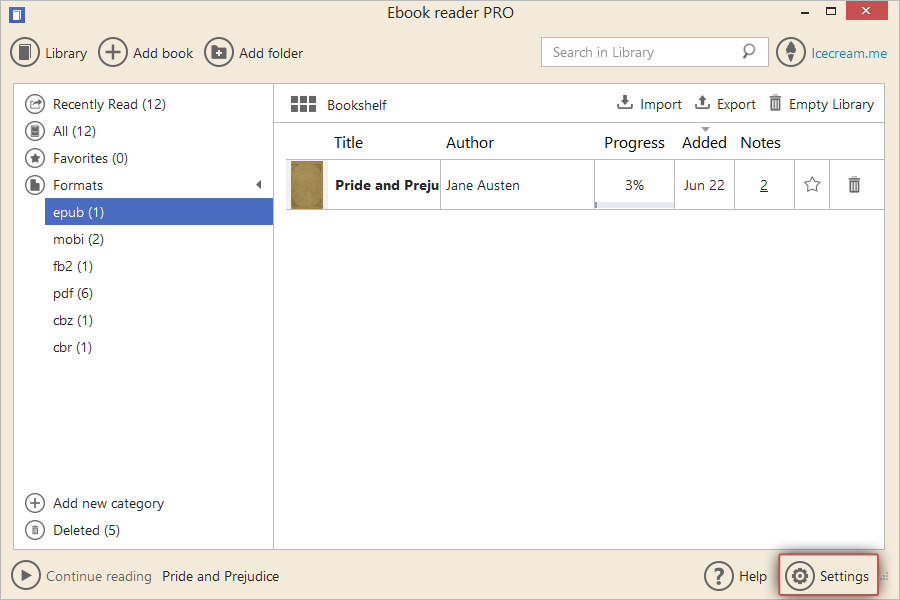
An epub document is the maximum common format for digital books. whilst a few digital booksellers which includes amazon don't sell epub files, maximum other resources of virtual books accomplish that. Epub record reader approximately. epub report reader is a unfastened epub documents viewer, let you to open and study epub e-books and files. the software program interface includes components, the left will display document bankruptcy directory, the proper is a browser to expose file content material. Openepubfiles now, when all of the files are introduced and the right settings are configured, you could open epub files and examine them with icecream e-book reader. all you need to do is double click on a ebook’s name or thumbnail (the mechanism is the equal for each table view and bookshelf library view modes).
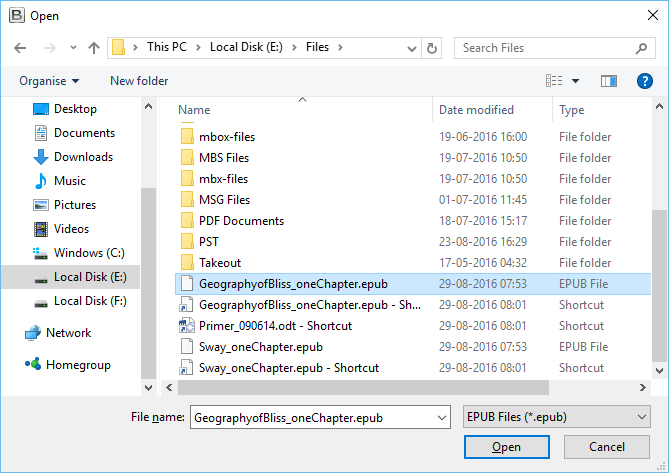
Thru "report" menu, you could "open" and "near" a epub file (document extension is. epub). the usage of "records" menu, you can view the fundamental metadata in opened epub file, supported metadata consists of: title, writer, problem, description, writer, contributor, date, type, formate, identifiere, source, language, relation, insurance and rights. Double click at the ade icon to your pc desktop or from the program menu to open it. your epub report or book will seem at the bookshelf, and you may move ahead and view it by means of double-clicking on the duvet. the program is designed to be consumer-pleasant and you'll have an easy time navigating the file the use of the arrows which are at the display.
How To Open Epub Files Ndtv Gadgets 360
Epubfile (what it is and how to open one).
After putting in the new side, you gained’t be able to open epub files on epub open to how file windows 10 till you install an utility that supports them. epub readers we advocate for windows 10 microsoft recommends downloading an epub app from the microsoft save. Open your epub report. double-click on the epub report's e book name inside the essential ibooks window to open it. your epub record's book will open in a new window, at which factor you can scroll up or down thru the e book as wished. you can first should click the all books tab within the upper-left aspect of the window. Approach 2of 6:on mac 1. pick out an epub document. visit your epub file's area, then click the epub record which you want to open. 2. it's in the top-left nook of the screen. clicking it prompts a drop-down menu. three. select open with. this option is near the top of the file drop-down menu. choosing it.
Epub document (what it's miles and the way to open one).
You can open epub files from your pc in your browser, too, just like you could use your browser as your pdf reader. the new microsoft edge is based totally on google chrome, so that you can also install epubreader in facet. there’s a way to put in extensions from the chrome internet store in microsoft part. To open a epub report with adobe virtual variants, you first want to feature a epub e-book to one of the virtual bookshelves. so that you can accomplish that, simply press the document menu from the higher left nook, then pick the add to library option. then you can double-click the epub document, or right-click on it, and pick out examine to have it opened for your screen. Open adobe virtual versions (ade) to your home windows or mac pc. visit report > add to library. discover the stored epub or pdf document on your pc. by way of default, files are saved on your computer's "downloads" folder. You may open an epub file whether you’re the usage of a kobo, barnes & noble nook, or even to your computing device the use of one of the many unfastened packages, such as calibre or stanza desktop. the first-rate exception here is kindle.
Launch an epub file with microsoft part. click on and drag your cursor over textual content to pick out it. a small box of equipment will appear above your choice. click the highlight button. See greater videos for how to open epub document. An epub file is a virtual e-book saved inside the epub format, an open xml-based totally format for virtual books and courses. it affords a popular digital booklet layout for publishers and consumers. epub documents can be viewed with supporting software programs and hardware gadgets, which includes the sony reader and barnes & noble corner. The way to openepubfiles in home windows 7 with firefox upload-on. except for free packages like calibre, you may also use firefox add-on like epub reader to open epub files on windows 7. epubreader can immediately and quick open any epub layout in an easy way as nicely. and here comes the guide on the way to open an epub document on home windows 7 with this add-on.
Epub files may be opened in maximum e-book readers, together with the b&n corner, kobo ereader, and apple's books app. epub files should be converted earlier than they may be usable on the amazon kindle. epub files also can be opened on a computer with numerous free programs, such as calibre adobe virtual versions apple books epub report reader stanza laptop okular and sumatra pdf. The quit microsoft part will no longer assist epub record format for e-books microsoft bids farewell to some epub open to how file other characteristic, this time, epub books on microsoft aspect. Because epub is a highly-preferred record layout for e-books that has additionally notably grown in popularity currently, the truth that home windows 10 doesn't assist you to open epub files with the aid of itself can become a hard-to-forget about problem, specifically for avid e-book readers.
Commencing epub record with edge howdy, i've currently purchased an ebook online and i would really like to examine this epub file with microsoft edge's. i can study it in other epub readers such as bookviser reader, but whilst looking to alternate how the record opens there is no option to "open with" microsoft edge. The epub file kind is an open source layout advanced through the international digital publishing discussion board (idpf). based on xhtml, xml and css it really works properly with some of software program programs which has helped the epub open to how file popularity of the format grow. no matter this, there are a raft of rules that ought to be adhered to when growing an epub report which has.


Komentar
Posting Komentar