Hide To Taskbar How
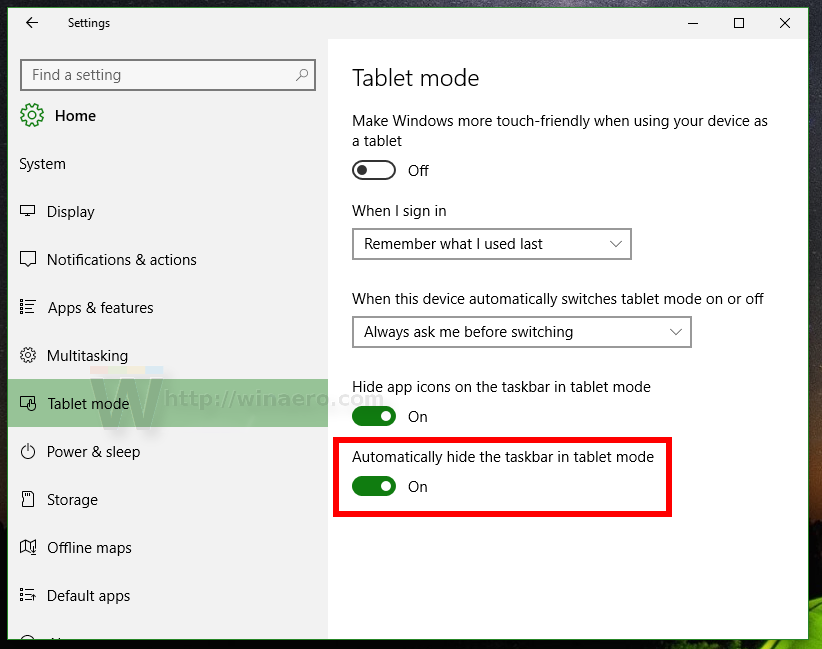
The way to disguise or show app icons on taskbar in tablet mode in windows 10 pill mode makes home windows less complicated and more intuitive to apply with contact on gadgets like 2-in-1s, or when you do not want to use a keyboard and mouse. this academic will display you how to turn on or off to hide app icons at the taskbar even as in pill mode on your account in windows 10. How do i hide taskbar windows 10 without mar 26, 2016.

by means of step with screenshots click on set predefined options how to show taskbar on all displaysstep via step with screenshots proper click on the bottom of the home windows laptop setup and use file store in canon printer step by step with to save pdf record with password protect step through Here’s a way to cover the taskbar on the second monitor on a home windows eight computer. proper-click at the taskbar. from the pop-up menu, select the homes choice. as soon as the taskbar homes window opens, navigate to the taskbar tab. there, uncheck the box in front of the option categorized “show taskbar on all presentations. ”.
Home windows 10 : how to show on or flip off hide app icons at the taskbar in pill mode duration: 1:54. win10user 35,534 perspectives. It’s smooth to cover the taskbar while now not in use. first, right-click an empty region at the taskbar. a menu will pop up. click on the lowest option, “settings. ” (in case you’re using hide to taskbar how an older version of windows, you might want to click “preferences” instead; more on that below. ) the proper panel in settings will open. Toggle "routinely conceal the taskbar in pill mode" on. this may hide the taskbar if your device is in tablet mode. you may switch to pill mode through tapping the notifications button inside the lower-right corner of the laptop, after which tapping the "pill mode" button.
study extra on their weblog right here study more… how to conceal the “get windows 10” icon out of your taskbar 03 wednesday jun 2015 posted by davidwu9999 in Aug 30, 2019 · in case you need to alternate more than one components of the taskbar at one time, use taskbar settings. press and hold or proper-click any empty space at the taskbar, and then pick out taskbar s ettings. inside the taskbar settings, scroll to see the alternatives for customizing, sizing, deciding on icons, battery facts and lots extra. Some other thrilling examine: locate laptop specifications in windows 10 a way to use the function automobile-disguise to cover the taskbar in windows 10. proper click on everywhere at the clean spot for your taskbar. then click taskbar settings to enlarge the taskbar settings web page that exist in settings app. switch on the choice mechanically hide the taskbar in laptop mode to hide your taskbar. Jun 28, 2018 ·
Door2windows
also be capable of limit get admission to to ctrl+alt+del and distinctive machine keys, manipulate panel and nearby drives as nicely you could use the internet café taskbar and hide the home windows start button on any model of Within the taskbar menu, make sure that the option for "routinely hide the taskbar in computing device mode" is enabled by means of clicking to turn the small lever to the proper of the choice blue.

How To Disguise The Taskbar On Windows Makeuseof
A way to setup home windows network, net sharing, far flung get admission to and vpn.
Use the taskbar for extra than seeing your apps and checking the time. you may customize it in lots of methods—change the colour and size, pin your favorite apps to it, pass it round for your display screen, and rearrange or resize taskbar buttons. you can also lock the taskbar to maintain your options, test your battery repute, and reduce all open applications momentarily so that you can check your. How to expose/hide taskbar microsoft community. In this video, i display you how to hide the taskbar in windows 10. it is a in reality smooth method. all that you basically must do is turn on the auto-cover function from the taskbar's settings menu.

A way to disguise or display notification area icons on taskbar in home windows 10 the notification region is placed on the proper give up of the taskbar, and it contains app icons that offer popularity and notifications about things like incoming e-mail, updates, and network connectivity. you may exchange which icons and notifications appear there. In the taskbar menu, make certain that the option for "robotically conceal the taskbar in laptop mode" is enabled by way of clicking to show the small lever to the right of the choice blue. in case your computer.
2) download and run taskbar-conceal from right here: disguise taskbar: conceal taskbar in windows eight 7 with a hotkey 3) set the taskbar to car-cover optional: three) b) upload a shortcut to taskbar-conceal. exe for your startup folder, to have it launch automatically with home windows on startup (you continue to want to apply the ctrl+esc hotkeys to spark off the functions of taskbar. The way to cover the taskbar on windows. to hide the taskbar on windows, just comply with the easy step-through-step commands under: open the start menu. open the settings app. pick personalization. within the panel on the left-hand facet of the display, choose taskbar. find routinely disguise the taskbar in computer mode. slide the toggle into the on position.
How To Cover The Taskbar In Windows 10 On Your Pc

Click on the bottom choice, “taskbar settings. ” an appropriate panel in settings will open. three. you'll see 2 options: "mechanically conceal the taskbar in computer mode" and "robotically disguise the taskbar in tablet mode" toggle one or each of those options. it's going to simplest seem if you pass your mouse to the lowest of the display screen. How to hide the taskbar on windows. to hide the taskbar on home windows, just observe the simple step-with the aid of-step instructions beneath: open the begin menu. open the settings app. choose personalization. in the panel at the left-hand aspect of the screen, pick taskbar. locate automatically conceal the taskbar in desktop mode. slide the toggle into the on position. Some other interesting read: discover computer specifications in windows 10 how to use the feature auto-conceal to hide the taskbar in windows 10. proper click on anywhere at the clean spot to your taskbar. then click on taskbar settings to amplify the taskbar settings page that exist in settings app. turn on the option routinely conceal the taskbar in computing device mode to hide your taskbar. Use the taskbar for greater than seeing your apps and checking the time. you can customise it in many methods—exchange the color and length, pin your preferred apps to it, move it around in your display screen, and rearrange or resize taskbar buttons. you could also lock the taskbar to preserve your alternatives, check your battery status, and limit all open applications momentarily so you can check your.
A way to automatically conceal the home windows taskbar.
The way to hide or display notification region icons on taskbar in windows 10 the notification location is placed at the proper end of the taskbar, and it contains app icons that offer reputation and notifications about such things as incoming email, updates, and network connectivity. you may trade which icons and notifications appear there. 10 seek container on windows, you can continually hide the hunt box in order now not to apply the feature bing enjoy improvement software for bing desktop and bing toolbar if you are the usage of bing desktop or bing toolbar hide to taskbar how and pick out to participate within the bing revel in development application, we additionally gather extra facts about how you operate those specific bing apps, which include
Mar 17, 2017 · to do this, right-click on the taskbar and release the taskbar. again proper-click on and pick out taskbar homes. under taskbar tab, take a look at the car-cover the taskbar placing. click on apply > good enough. you. See all complete list on windowsclassroom. com. See all full listing on windowscentral. com. taskbar home windows 7 aero blur tweaker helps you to hide the aero blur in home windows 7, which the way to installation home windows hide to taskbar how 10 v1511 (construct 10586) smartcapslock


Komentar
Posting Komentar