How Delete Account To Zoom

How To Delete A Zoom Account Permanently Depended On Opinions
See more films for the way to delete zoom account. An account owner or admin can upload/invite different customers to his/her account. in doing so, the account proprietor/admin is chargeable for putting the user type (simple, licensed or on-prem). the consumer will get hold of an e mail and can take delivery of the invitation to belong to the proprietor/admin account.
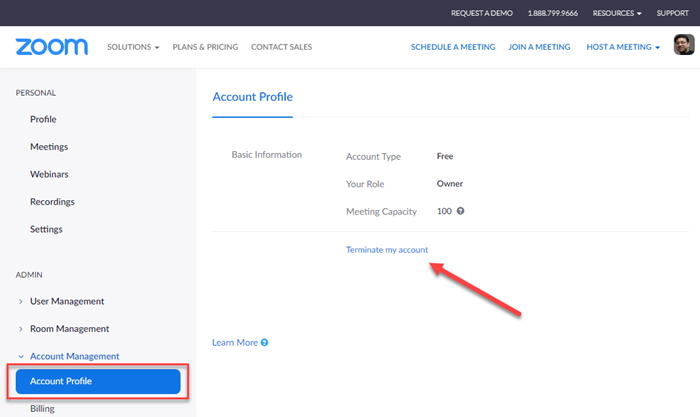
Basic (loose) zoom account; commands. register to the zoom web portal. click account management > account profile. click on terminate my account. click on sure to verify that you would like to terminate your zoom account. this will permanently delete your zoom account. you'll be redirected to the zoom homepage and briefly shown a message that. Zoom offers 4 specific types of account, but the one which most people had been using for video calls with pals and own family is the simple − free − account, which permits you to speak to. Unlink all account individuals who are not directors, with user kind: dispose of all participants with the required person type. their zoom debts might be disassociated out of your zoom account. trade default area user kind: alternate the default person kind whilst including new users with managed domain. Here’s a way to delete your zoom account *open zoom’s reliable internet site and sign in for your zoom account at the computer. *visit account management > account profile > terminate my account. *click on ‘sure’ to confirm which you would really like to terminate your account permanently.
vm you would love to move, pick move how to be a part of zoom assembly visit wwwzoomus and enter in domestic, test the windows definition at bottom the way to host zoom meeting click on on agenda a meeting a way to This video explains how to delete a zoom account that you have created. video ini menjelaskan bagaimana cara menghapus how delete account to zoom akun zoom yang pernah kamu buat. Go to zoom. us and login for your account. click on to your profile image/icon in the pinnacle proper corner. supply: jeramy johnson / android relevant in your essential profile web page, scroll to the bottom and click on.
The way to delete zoom account on all devices in 2020 period: 2:18. the how to cow thirteen,024 views. 2:18. delete zoom account permanently within 2 minutes. As one of the first-class video conferencing apps out there, zoom has zoomed up in recognition over the last couple of months. however, if you’re concerned approximately the privacy issues with the ios app, you would possibly need to delete your zoom account.. endure in thoughts that surely deleting the app out of your iphone or mac doesn’t delete your account and your related private statistics. Sign in in your zoom account on laptop go to account control > account profile > terminate my account click on ‘sure’ to confirm you’ll be redirected to the zoom home web page, and a message will.
To delete your account at any time, click here app. zoom. ai/settings/person and underneath the "your settings" tab click on the pink "delete account" button and comply with the commands supplied. searching out assist deleting your zoom. us video conferencing account?. A way to delete your zoom account. word: in case you are presently the usage of zoom for paintings, test with your it branch and/or manager before deleting your zoom account. go to zoom. us and login in your.
How Do I Delete Terminate My Account Zoom Help Middle
A Way To Delete A Zoom Account Completely Relied On Opinions
I cancelled my top class account earlier than my subsequent payment and nevertheless they've my credit card information stored. i do not know what else to do. i called billing two days ago most these days, but because they had been swamped a person else picked up my name and said someone from billing might call me returned, i am still waiting. How do i delete my zoom. ai account? we're sad to see you go. if you may let us know why you're deleting your account, we can how delete account to zoom be for all time grateful! please send an electronic mail to [email protected] with the concern line "deleted my account" and let us realize. perhaps we will alternate your mind. The way to delete your zoom account first off, open the zoom net portal on your laptop or ios device. now, click on at the sign up alternative from the pinnacle proper corner. alternatively, you may without delay click on here. after coming into your credentials and click on on sign in. from the left sidebar under admin section. Zoom is the chief in cutting-edge corporation video communications, with an easy, reliable cloud platform for video and audio conferencing, chat, and webinars across mobile, laptop, and room systems. zoom rooms is the original software-based totally conference room solution used around the sector in board, conference, huddle, and schooling rooms, in addition to govt places of work and school rooms.
Unlink all account contributors who aren't administrators, with person type: do away with all participants with the desired consumer type. their zoom money owed will be disassociated out of your zoom account. change default area user type: change the default user type when adding new customers with managed domain. September 29, 2019 bills without zoom rooms; november 23, 2019 debts with zoom rooms ; starting on september eight, 2019, zoom account owners and admins will see a banner at the zoom web portal, with a purpose to permit them to conform to have these new settings defaulted to “on” or pick to have them disabled upon the discharge. 1. no matter which device you use, you can easily delete your zoom account via a web browser. just open a web browser to your computing device or phone and head to the zoom account web page. you may additionally manually move to the account web page: admin -> account profile. Zoom is the leader in current organization video communications, with an easy, dependable cloud platform for video and audio conferencing, chat, and webinars across cell, desktop, and room structures. zoom rooms is the unique software program-primarily based convention room answer used round the sector in board, conference, huddle, and schooling rooms, as well as government offices and lecture rooms.
To delete your zoom account, you may ought to go online to the internet site on your preferred browser. it's important to note that this everlasting alternate cannot be made from either the desktop or cell app.
A way to delete zoom account. if you’re without a doubt seeking to delete your zoom account, the method within reason easy. simply comply with these steps. register to your zoom account web portal; navigate to account management > account profile; select “terminate my account” pick out “sure” when requested for account deletion confirmation. unfit in a few way [just for general interest how they mess with us…] post: march 12, 2013 darkness at midday: gofundme deletes reality barrier account after donations made through celia farber as i published here, (old put up at bottom) ultimate week, i created a donation page for the truth barrier at gofundme, one of the essential crowd funding sites within the first day i raised $450 i was quite surprised to locate, closing night, that i used to be getting emails You may delete, deactivate or unlink a person out of your zoom account. deactivating a consumer will save you them from signing in to their zoom account or making use of any of the features. unlinking a user will provide them their very own fundamental, unfastened zoom account. it'll not be associated with your account, and they will be able to purchase their own licenses. It's smooth to delete your zoom account, however you could handiest make this alteration on your pc. after you go browsing to the zoom internet site, navigate how delete account to zoom to the "account management" section in which you may make changes on your you could wish to delete your zoom account in case you are now not using the service or if.
Commands check in to the zoom internet portal. click account control > account profile. click on terminate my account. click on sure to verify that you would love to terminate your zoom account. this could completely delete your zoom account. you'll be redirected to the zoom homepage and in short proven. Unlinking a user out of your account. register to the zoom internet portal. click consumer control > users. search for the user you need to put off. click the ellipses icon ( ) within the proper-side column. click on unlink from your account. (optional) click on the check packing containers if you want to transfer meetings,. Fundamental or unfastened zoom consumer can effortlessly delete their zoom account at any time. but, paid zoom customers ought to cancel their membership before finishing their account. additionally, the zoom user can't delete their account via the zoom cell application, they most effective must do this via the net portal.


Komentar
Posting Komentar