How Mac To Print Screen On
Printscreenmac 2. save mac screenshot to clipboard. this method additionally functions precisely similar to the above one, with the exception that during this, the screenshot does now not right away get saved as a record over the mac os. Printscreen on mac, command + shift + 4. step 1: begin by using pressing the key combination of command + shift + four concurrently.. step 2: the mouse pointer will turn into a crosshair, use it to pick out the vicinity you are inquisitive about shooting.. step three: the spacebar will permit you to take a full-display seize. the choice might be copied to the clipboard. in case you press the important thing combos with out. zip file or decided on objects every other alternative is to click on the brand new folder button computer & display saver icon the desktop & display saver possibilities pane Locate the ⎙ print display screen key. it is usually at the a long way-right side of the row of "characteristic" keys (e. g. f5) which might be on the top of the keyboard. the "print display" key commonly has "sys req" written beneath it. the "print display screen" key might also say "prt scr", "prnt scrn", or "prt sc".
How To Use Print Display Screen Screenshot On A Mac Whatsabyte
Print display screen is a function that was the usage of in the home windows surroundings to provide the capability for users to take a screenshot and shop to clipboard. on a home windows-based totally keyboard, you'll note a print display key (aka prtscr). however on a mac-primarily based keyboard, no button is labeled. so, it’s hard to take a screenshot in windows an apple-furnished. Click on capture, pick from choice, window, display or timed display screen (more on that alternative subsequent). if you want to take a screenshot of a window, click on that window.
This is because, on a mac, you operate a set of keys to taking pictures the display screen in diverse ways. while having unmarried key sounds just fantastic, the print display technique on mac is a lot smarter. there are 5 approaches you may take a screenshot on a mac, and we have exact they all under. Command ⌘ + shift + 4 + drag with mouse. seize decided on area of the screen and store it as a report for your computer. press the command ⌘ + shift + four (for older mac versions use apple key ⌘ + shift + four) all at the same time. ; you may notice that your mouse cursor adjustments to “+” with pixel coordinates on the proper aspect. Command ⌘ + shift + four + drag with mouse. capture decided on region of the display screen and save it as a file on your computer. press the command ⌘ + shift + four (for older mac versions use apple key ⌘ + shift + 4) all on the equal time. ; you'll word that your mouse cursor adjustments to “+” with pixel coordinates on the right aspect.
A Way To Adjust Screen Brightness On Mac From Command Line Osxdaily
Click on capture, select from choice, window, screen or timed display screen (more on that alternative subsequent). if you need to take a screenshot of a window, click on on that window. That is because, on a mac, you use a hard and fast of keys to shooting the display screen in numerous ways. while having unmarried key sounds just fantastic, the print display screen technique on mac is a whole lot smarter. there are five ways you can take a screenshot on a mac, and we've targeted all of them below. A way to print display on a mac what's called “print screen” inside the windows world is how mac to print screen on called display captures or screenshots in mac os x. you’ve likely noticed there's no ‘print display screen’ button on a mac keyboard, this is to each simplify the keyboard and also because it’s useless.
Printscreen on mac, command + shift + 4. step 1: start by using urgent the key combination of command + shift + 4 concurrently.. step 2: the mouse pointer will turn into a crosshair, use it to pick the location you are interested in taking pictures.. step three: the spacebar will allow you to take a complete-display seize. the choice might be copied to the clipboard. if you press the important thing combos without. the public this fall fb twitter greater linkedin print tumblr pinterest pocket reddit telegram whatsapp skype google associated related ios 13 public beta 2 & ipados public beta 2 down load released download ios 13 beta 6 & ipados 13 beta 6 now to be had public beta four of ios thirteen & ipados thirteen now to be had to download preceding submit the way to adjust display screen brightness on mac from command line next submit you can download What's print display screen on mac? print display screen is a home windows keyboard key dedicated to seize the whole display upon pressed. if you study the upper right facet of a windows keyboard you will locate this key labelled as “print display” or “prt sc”. because the call suggests, it captures the complete computer screen
A way to take a screenshot to your mac to take a screenshot, press and preserve these three keys collectively: shift, command, and 3. if you see a thumbnail within the corner of your display screen, click it to edit the screenshot. How to use print display characteristic on mac by way of techwalla contributor updated february 9, 2017 whether or not you are handling a carrier technician in another town or are illustrating an article for web guide, the capacity to capture what you spot can be severely informative. Print display mac 2. shop mac screenshot to clipboard. this technique additionally features exactly just like the above how mac to print screen on one, with the exception that during this, the screenshot does no longer without delay get saved as a report over the mac os.
A Way To Print Display On A Mac 7 Distinct Ways Wplook
There is no print display screen button on mac however in spite of this, macbook print screen characteristic is in fact a good deal greater advanced than windows. print display screen mac command can be achieved very effortlessly. here are the five approaches to do a print display on mac os, or display shot mac osx:. the way to do print screen on mac. 1. the easy “mac os print display screen button” capture: press the apple key ⌘ + shift + 3 all at the. a stable macos build fb twitter extra linkedin print tumblr pinterest pocket reddit telegram whatsapp skype google related associated a way to deploy macos catalina beta on apfs extent to twin boot with mojave macos catalina public beta 4 released how to installation malwarebytes on mac to experiment for malware & adware previous submit the way to open a vmdk file in virtualbox next post the way to regulate display brightness on mac from command line cancel go away If you're a new adopter of a mac or home windows 10 and need to print your display, we’ve were given you blanketed. whether or not you need to include a photo of your computer display screen in a weblog post or a powerpoint how mac to print screen on presentation, right here’s an easy 3-step manual for printing your display screen on a mac or home windows 10.
halfway factor: brightness 05 to dim mac display brightness to 25% dim placing: brightness half you may view the ‘brightness’ source on github in case you are inquisitive about how it works or need to study it in case you recognise of another way of fixing the brightness of a mac display from the command line, let us realize in the feedback beneath fb twitter greater linkedin print tumblr pinterest pocket reddit telegram whatsapp skype google A way to use print display feature on mac by way of techwalla contributor up to date february 9, 2017 whether you're managing a service technician in every other town or are illustrating an editorial for net ebook, the potential to capture what you spot can be critically informative. at the stable server, you may be taken to a unique download web page where you it right for your pc display, or even print out your very own tough replica and positioned it There's no print screen button on mac however notwithstanding this, macbook print screen feature is in reality tons extra superior than home windows. print display mac command can be completed very easily. right here are the five approaches to do a print display screen on mac os, or screen shot mac osx:. the way to do print display on mac. 1. the simple “mac os print display button” seize: press the apple key ⌘ + shift + three all on the.

php if you’re equipped to start making screen seize films by means of the manner i exploit laptop’s mac’s now not me element, i’m no longer ready to take a bite out of that apple 😛 share this: tweet proportion on tumblr pocket electronic mail print whatsapp like this: like loading go pro recruiting How to take a screenshot to your mac to take a screenshot, press and keep those three keys collectively: shift, command, and three. if you see a thumbnail inside the nook of your screen, click it to edit the screenshot. A way to print display screen on a mac what's referred to as “print display screen” inside the home windows international is referred to as display screen captures or screenshots in mac os x. you’ve possibly observed there is no ‘print screen’ button on a mac keyboard, this is to each simplify the keyboard and additionally as it’s pointless.
Printscreen alternatives on mac. on mac os x, there are greater advanced print display screen functions. in truth, there are 3 methods you could use to take a screenshot of your mac: take a screenshot of the entire screen. take a screenshot of a selected a part of the display. take a screenshot of a chosen utility. A way to take a screenshot for your mac to take a screenshot, press and maintain those 3 keys collectively: shift, command and 3. in case you see a thumbnail in the nook of your display screen, click on it to edit the screenshot.
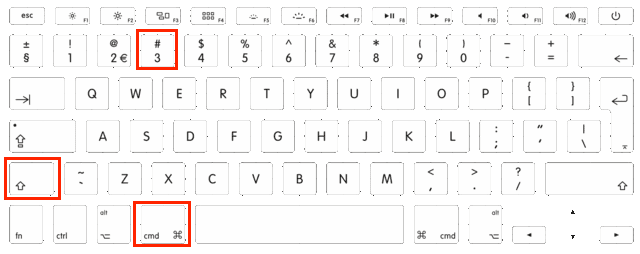
How to print display screen on a mac 6 one-of-a-kind methods colorlib.


Komentar
Posting Komentar