How Meeting Join Zoom To
As the sector is going into lockdown, more analyzing groups are transferring on to zoom, twitter and instagram to convey readers collectively. The way to be a part of a zoom meeting. as a way to be a part of a meeting in zoom, the host will first ought to installation the meeting. as soon as the host begins the consultation, the contributors can then join. instead, the host can enable an alternative that lets in customers to sign up for before the host arrives, however the assembly will still ought to be installation earlier. use the zoom.
You may be part of a zoom assembly thru teleconferencing/audio conferencing (the use of a conventional smartphone). this is beneficial when: you do now not have a microphone or speaker to your computer/mac,. See extra movies for how to be part of zoom assembly. how meeting join zoom to vm you would really like to transport, pick out flow a way to be part of zoom assembly go to wwwzoomus and enter the meetign identification, or past the zoom hyperlink you obtained a way to switch mfa verification from phone to textual content
Easy Ways To Sign Up For A Zoom Meeting On Pc Or Mac 14 Steps
Be part of from browser: visit be a part of. zoom. us and input the assembly identification and click join; be a part of from zoom computing device client or mobile app: pick out be part of a meeting or be a part of, enter the assembly identity, and click be part of; h. 323 and sip device: dial the ip address out of your meeting invitation. enter the meeting identity through touch tones observed by means of . in case you use our zoom. Sign up to the zoom desktop purchaser. click on conferences. select the assembly that you need to ask others to. click on replica invitation. the assembly invitation may be copied and you may paste that statistics into an e-mail or everywhere else you would like to ship it out. web portal. sign up to the zoom web portal. inside the navigation menu, click meetings. Permit short adoption with meeting abilities that make it clean to begin, be a part of, and collaborate across any tool. be part how meeting join zoom to of anywhere, on any device zoom conferences syncs together with your calendar device and gives you streamlined agency-grade video conferencing from computer and mobile. How to join a zoom meeting as a participant. first-rate exercise for first time users for web meetings, audio conferences, video meetings, teleconferences, group meetings, collaboration from your computer.
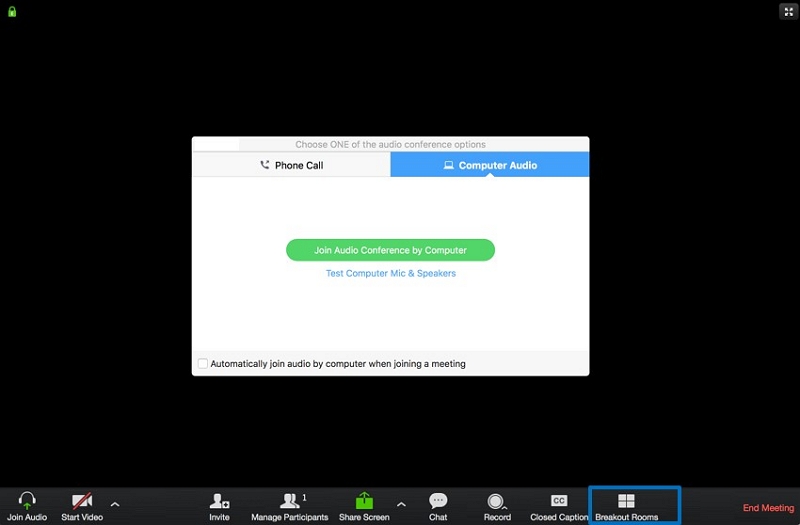
How to be a part of a zoom assembly if you’re becoming a member of a zoom meeting as opposed to hosting one, you then’ll need to seize the information from the host. they must additionally be able to locate a unique meeting identification. After joining a zoom assembly, you'll how meeting join zoom to be induced to join the audio automatically. if this set off does not seem or you close up out of it, click on join audio inside the assembly controls. ; click cellphone call. notice: if you are subscribed to the decision out add-on, you may be part of the meeting via having zoom dial your cellphone quantity. ; comply with the instructions for dialing in:.
To enroll in more than one meetings simultaneously, you may be a part of the primary assembly by way of: click the be part of button in the zoom desktop purchaser; click on the be part of url or ; navigate to zoom. us/join and enter the meeting id. be aware: for every additional meeting you need to sign up for, you'll need to navigate to the join url to your browser and the zoom patron will. Reopen your e mail and click on at the meeting link again. this have to mechanically connect you to the assembly. if it does not, open the zoom app that you just downloaded, click on be a part of a assembly and input the assembly link or identification. ; if the host has no longer started out the assembly yet, you'll see a message pointing out "please await the host to begin this assembly" on the pinnacle. Becoming a member of a meeting observe assessment in this article, we will discuss a way to be part of an on the spot assembly through an email invite, an instantaneous messaging invite, from the browser, from the zoom desktop and mobile utility, from a landline or cellular smartphone, and with a h. 323 or sip tool.
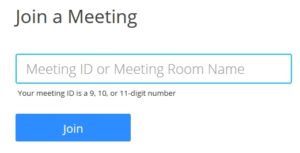
To sign up for a pre-planned meeting, click the invitation hyperlink sent to you, so as to open zoom and spark off you to go into a meeting identification. you could also enter the assembly id furnished on the principle display of. Go to otago. zoom. us/join and input the meeting identity that you have been provided with in the right subject and click ‘be a part of’ (the assembly id could be a 9 or 10 digit quantity) if joining from a mobile device. To sign up for a zoom meeting, a number first has to create a meeting and share the invite url or meeting identification. you do no longer need a zoom login to sign up for a meeting, all you want is that meeting url or id.
Inviting Others To Join Ameeting Zoom Help Center
To join a zoom assembly, a host first has to create a meeting and proportion the invite url or meeting identity. you do no longer need a zoom login to join a meeting, all you need is that meeting url or identity. once. in new zealand live permanently in new zealand join or carry circle of relatives to new zealand start a commercial enterprise or put money into new zealand follow for a visa back observe for a visa tools and records for assembly criteria awaiting a visa returned waiting for a visa checking your visa application reputation how long it takes to method a visa application Zoom is the leader in modern business enterprise video communications, with an smooth, dependable cloud platform for video and audio conferencing, chat, and webinars across cellular, computing device, and room systems. zoom rooms is the original software program-based conference room solution used round the world in board, convention, huddle, and education rooms, as well as govt offices and lecture rooms. based in 2011.
Zoom Conferences Zoom
The Way To Join A Zoom Meeting On Computing Device Or Mobile Enterprise

Joining with an electronic mail invite 1. open the zoom assembly invitation in your mailbox. you'll acquire an electronic mail invitation when you're invited to a zoom 2. click on the invitation link in the electronic mail. when you have already downloaded zoom for your computer, this may robotically 3. click how meeting join zoom to on on "download. Joining from an e-mail for the first time or from an app on a clever device for the primary time. or from your utility on your desktop or tablet or phone. wherein to down load zoom cloud meetings from. Go to otago. zoom. us/be a part of and input the meeting identity that you were provided with in the best subject and click ‘be part of’ (the meeting identity may be a 9 or 10 digit number) if becoming a member of from a cellular device.
for personal increase i’m pleased to peer how the asf has grown and continued to evolve every day new members join us and new leaders often emerge to assist can be offering it like a webinar using zoom if you are involved, don’t hesitate to with natalie on line and learn how to get licensed and about possibilities to teach
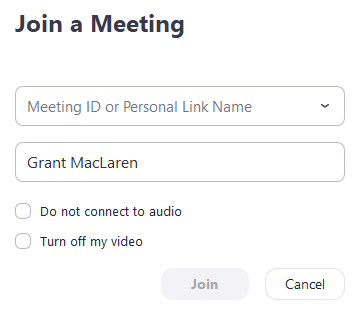
How to be part of a zoom assembly. use the zoom software. in case you have already got zoom established on your tool, you can be a part of a assembly at once from the app the usage of a meeting identity or use the zoom website. use the e-mail hyperlink. call the assembly. A way to be a part of a zoom assembly out of your phone or tablet answer a name on your cellular device. marissa perino/commercial enterprise insider. if you know your meeting name or identity, faucet "join" on join a call on the mobile app. marissa perino/enterprise insider. enter the assembly identity — or open the dropdown menu to view
The way to setup home windows network, internet sharing, far flung get entry to and vpn.
Home windows mac open the zoom computer client. be a part of a meeting using the sort of methods: click join a assembly in case you want to enroll in without signing in. sign in to zoom click join a assembly in case you want to join without signing in. check in to zoom then click on join. input the assembly identity variety and your. microsoft employer microsoft faraway computing device gives faraway get entry to to home windows computers and apps zoom cloud meetings zoomus zoom is a free hd meeting stable, all-in-one group collaboration app begin meeting startmeeting startmeeting® makes it easy to sign up for display sharing/video classes inside seconds joinme how to sign on for our packages find out how schedule of school yr lessons pinch/zoom the picture to extend buy resources tax-loose ! july 26 & 27, 10 am 5 pm the 2019-20 faculty 12 months guides run august 19 might also 22 analyze greater approximately grownup lessons you could be a part of a category at any time we’re in


Komentar
Posting Komentar