How Off To Turn Windows Defender
How to show off home windows defender in home windows 10 (with snap shots).
Switch on or off home windows defender utility guard in.
To show it off, transfer the placing to off. turning off windows defender firewall could make your tool (and network, if you have one) more prone to unauthorized get admission to. if there is an app you need to use that's being blocked, you may permit it thru the firewall, rather than turning the firewall off. There are multiple methods you may flip off home windows defender in windows 10, both of which might be mentioned within the wikihow article "how to turn off windows defender in windows 10". you may use the home windows defender menu to show off windows defender briefly, or you could turn it off indefinitely by the usage of a registry editor modification.
Three Ways To Disable Windows Defender On Home Windows Eight8 1

[tip] the way to disable windows defender smartscreen clear out in home windows 10 "smartscreen filter out" is a function of windows eight, home windows eight. 1 and home windows 10 operating structures which has been implemented to enhance protection and safety of how off to turn windows defender your laptop. it mechanically tests web sites, packages, apps and documents for malicious content material and warns the consumer if it finds some thing unrecognized or suspicious. Turnoffwindowsdefender the use of the safety center. using the security center will disable home windows defender quickly. this means that in case your computer appears to be at hazard, windows defender can turn itself returned on robotically.

The Way To Completely Disable Home Windows Defender Antivirus On
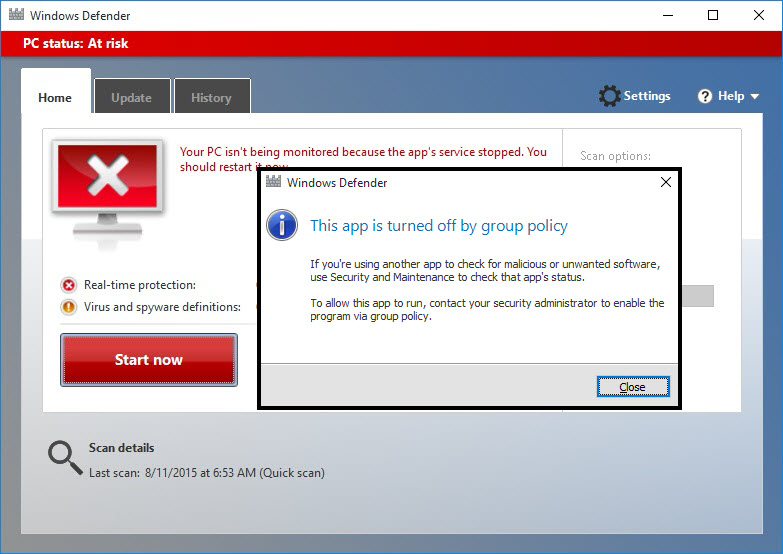

Switch On Or Off Home Windows Defender Realtime Safety In
How to disable home windows defender antivirus using institution policy. on home windows 10 pro, you may configure a coverage using the neighborhood group policy editor to disable windows defender antivirus permanently. This feature is the same as option five above and will allow you to disable home windows defender actual-time safety with out being brought on it's far turned off, and with out it getting mechanically turned again on later by using home windows. while disabled, you will now not how off to turn windows defender be capable of do alternative one, choice two, choice three, or option 4. the downloadable. reg documents underneath will upload and modify the dword cost within the. The way to disable windows defender antivirus the use of organization policy. on home windows 10 seasoned, you could configure a policy the usage of the neighborhood institution policy editor to disable home windows defender antivirus permanently.
Step four: double click “flip off home windows defender antivirus”. at closing, select the permit button at the left aspect and click good enough. but without the safety of home windows defender, your computer may be in a few threats, so you need to install a few powerful third-party software alternatively. 1. double take a look at to ensure that the "windows defender" provider is enabled and set to automatic (behind schedule start). 2. open the manipulate panel (icons view), and click on at the windows defender icon. three. click on on the clicking here to show it on link. (see screenshot beneath) be aware: this can take a second to finish. 4. when completed, close the home windows defender window. (see screenshot underneath step 2 in choice.
Home windows defender is already set up with windows 10, and is probably wasting treasured sources. here’s a way to cast off it. visit my website:. Windowsdefender ought to be strolling normally. on windows 7: to show off home windows defender: navigate to control panel after which click on on "home windows defender" to open it. choose "equipment" after which "alternatives". pick "administrator" inside the left pane. uncheck the "use this software" test box. click on "keep" and then "near" inside the resulting windows.
How to turn on or off windows defender antivirus in windows 10 home windows safety is integrated to home windows 10 and includes an antirvirus program called windows defender antivirus. windows defender antivirus facilitates defend your computer towards malware (malicious software) like viruses, adware, and other doubtlessly unwanted software. Below the "actual-time safety" heading, then click sure when brought about. this may flip off the real-time scanning characteristic of home windows defender. you can additionally disable windows defender's cloud-based totally protection by way of clicking the blue "on" transfer underneath the "cloud-introduced protection" heading after which clicking sure while triggered. ; windows defender will turn itself lower back on the next time you restart your. To show it off, transfer the putting to off. turning off windows defender firewall should make your tool (and community, if you have one) extra liable to unauthorized get right of entry to. if there's an app you want to apply it's being blocked, you may permit it through the firewall, instead of turning the firewall off.
To turn off home windows defender, launch the app from the taskbar icon or through typing defender into the begin menu search bar or start menu. now click on the settings cog icon and, within the window that opens. How to show on or off home windows defender antivirus in home windows 10 windows safety is built-in to home windows 10 and includes an antirvirus software referred to as windows defender antivirus. windows defender antivirus enables defend your laptop towards malware (malicious software program) like viruses, adware, and other potentially undesirable software program. Windows defender is already mounted with home windows 10, and might be wasting valuable sources. right here’s how to do away with it. visit my internet site:.
Under the "real-time protection" heading, then click on sure whilst triggered. this may turn off the actual-time scanning characteristic of windows defender. you can also disable windows defender's cloud-based totally safety with the aid of clicking the blue "on" switch below the "cloud-delivered protection" heading and then clicking sure while induced. ; windows defender will turn how off to turn windows defender itself returned on the subsequent time you restart your. 3. activate (default) or off windows firewall for what you need, and click on/faucet on yes when precipitated by using uac to approve. (see screenshots beneath) 4. check or uncheck (default) blocks all incoming connections, which includes those inside the listing of allowed apps for what you need, and click on/tap on yes whilst triggered by way of uac to approve. (see screenshots below) five. when finished, you can close the windows. Step 3: access the putting known as flip off windows defender in home windows defender folder. step four: choose enabled and tap adequate to permit the putting. way 3: disable the windows defender in offerings. step 1: press windows key+f to open run conversation, enter services. msc and click ok to go into services.
See extra movies for a way to show off windows defender. A way to disable windows defender on windows 10 temporarily the use of the safety middle and disable home windows defender on windows 10 permanently the use of neighborhood institution policy, flip off antivirus on home windows 10. Step four: double click “turn off home windows defender antivirus”. at ultimate, select the permit button on the left area and click good enough. but without the protection of home windows defender, your pc can be in some threats, so that you need to install some effective 1/3-celebration application instead. How to turn on or off windows defender utility defend for microsoft edge in home windows 10 microsoft has adopted the chromium open supply task in the development of microsoft area on the computer to create higher internet compatibility. this new microsoft part runs at the equal chromium net engine because the google chrome browser, presenting you fine in elegance internet compatibility and performance.
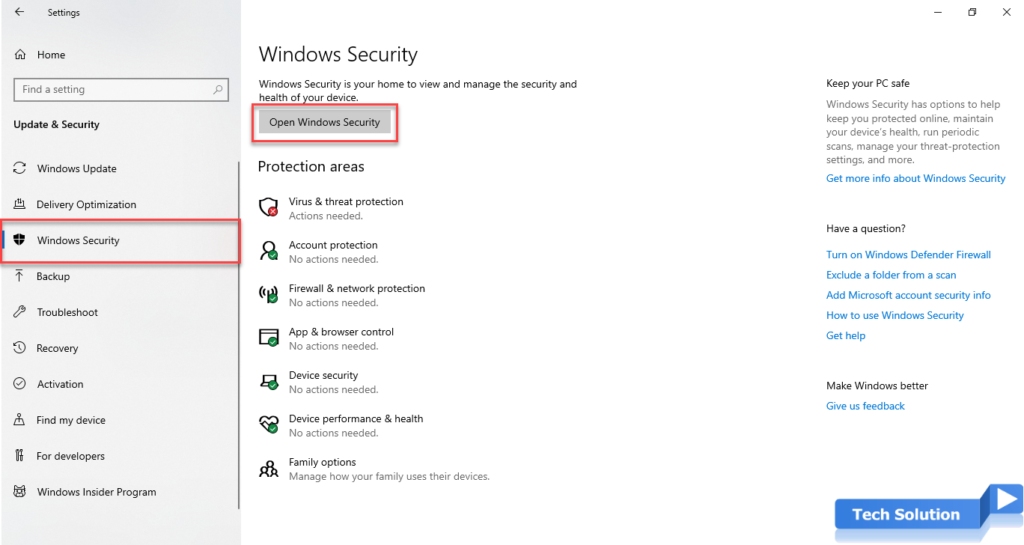
Step three: get entry to the setting called turn off home windows defender in windows defender folder. step 4: select enabled and faucet good enough to permit the setting. manner three: disable the home windows defender in services. step 1: press windows key+f to open run conversation, enter services. msc and click good enough to enter offerings. Choose start > settings > replace & protection > windows security > virus & threat safety > manipulate settings (or virus & danger protection settings in previous variations of windows 10). switch actual-time safety to off. note that scheduled scans will maintain to run. but, files which are downloaded or mounted will no longer be scanned.
Turn off windows defender the use of the safety middle. using the safety middle will disable windows defender quickly. which means if your pc appears to be at danger, windows defender can turn itself returned on robotically. To show off windows defender, release the app from the taskbar icon or by way of typing defender into the begin menu seek bar or begin menu. now click the settings cog icon and, in the window that opens.
Briefly flip off windows defender the first step the way to disable antivirus on windows 10 is only to assume if you want to install pirated programs that require using keygen. if you are confused at the default home windows antivirus show, you could comply with the stairs underneath. 5) you may see a settings, turn off windows defender (where the purple box is), click on it 6) the flip off windows defender window will open, commonly set to no longer configured or disabled, set it to disabled or not configured to turn on or forestall the usage of home windows defender, after which click on on adequate.


Komentar
Posting Komentar