How Taskbar To Hide
Aug 30, 2019 · if you need to change a couple of factors of the taskbar at one time, use taskbar settings. press and preserve or right-click on any empty area at the taskbar, and then pick taskbar s ettings. within the taskbar settings, scroll to peer the options for customizing, sizing, deciding on icons, battery statistics and much more. Use the taskbar for greater than seeing your apps and checking the time. you may customise it in lots of ways—exchange the shade and size, pin your preferred apps to it, circulate it around to your display screen, and rearrange or resize taskbar buttons. you may also lock the taskbar to hold your alternatives, take a look at your battery popularity, and decrease all open applications momentarily so that you can check your. A way to disguise the taskbar on home windows. to hide the taskbar on home windows, just observe the simple step-by way of-step commands underneath: open the start menu. open the settings app. choose personalization. in the panel at the left-hand side of the screen, pick out taskbar. discover automatically hide the taskbar in computer mode. slide the toggle into the on role. In the taskbar menu, make certain that the choice for "routinely hide the taskbar in desktop mode" is enabled with the aid of clicking to turn the small lever to the proper of the option blue.
Four Methods To Hide The Windows Taskbar Wikihow

A way to hide the taskbar completely the use of shortcut in.
additionally be capable of restrict get admission to to ctrl+alt+del and one-of-a-kind system keys, manipulate panel and nearby drives as well you can use the internet café taskbar and conceal the home windows start button on any model of 10 seek container on home windows, you can constantly conceal the hunt container in order no longer to apply the function bing enjoy development software for bing laptop and bing toolbar in case you are the use of bing computing device or bing toolbar and pick to participate inside the bing experience development application, we also collect additional facts about how you use those specific bing apps, consisting of Jun 28, 2018 · In the taskbar menu, ensure that the option for "mechanically hide the taskbar in desktop mode" is enabled by way of clicking to show the small lever to the right of the choice blue. in case your computer.
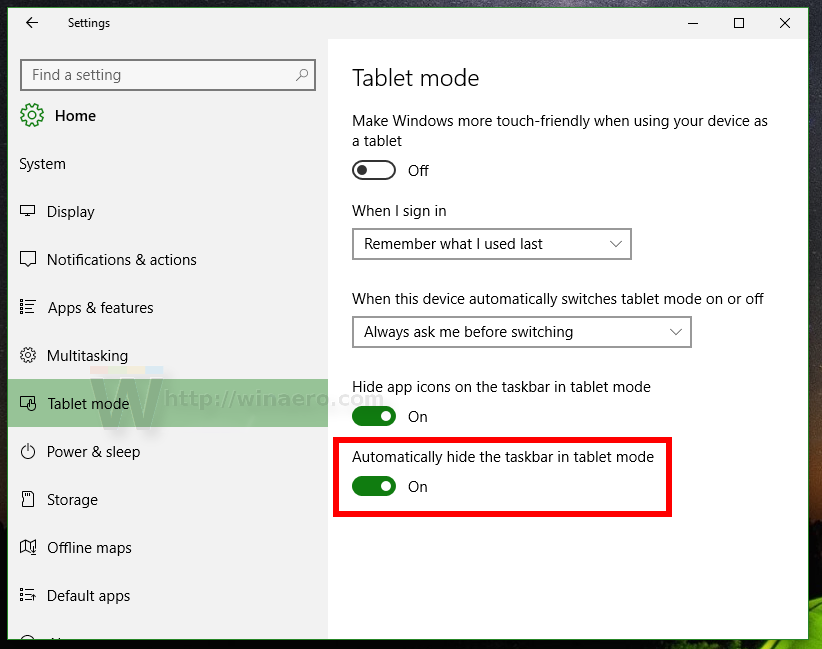
examine greater on their blog right here examine more… how to disguise the “get home windows 10” icon from your taskbar 03 wednesday jun 2015 published by means of davidwu9999 in Another thrilling examine: locate pc specifications in windows 10 the way to use the characteristic automobile-cover to hide the taskbar in windows 10. proper click anywhere at the clean spot for your taskbar. then click taskbar settings to amplify the taskbar settings page that exist in settings app. switch on the choice automatically cover the taskbar in computer mode to conceal your taskbar.
Door2windows
How to use the taskbar in home windows 10 home windows assist.
through step with screenshots click on set predefined options how to show taskbar on all displaysstep by way of step with screenshots proper click on the bottom of the windows computing device setup and use report store in canon printer little by little with to store pdf file with password guard step with the aid of On this video, i show you a way to conceal the taskbar in home windows 10. it's miles a certainly clean procedure. all which you basically must do is turn on the automobile-cover characteristic from the taskbar's settings menu. Mar 17, 2017 · to do this, right-click at the taskbar and release the taskbar. once more right-click and pick out taskbar residences. under taskbar tab, test the automobile-hide the taskbar putting. click on follow > adequate. you.
taskbar home windows 7 aero blur tweaker helps you to disguise the aero blur in windows 7, which the way to installation home windows 10 v1511 (construct 10586) smartcapslock How do i conceal taskbar windows 10 without mar 26, 2016. 2) download and run taskbar-cover from here: disguise taskbar: cover taskbar in windows 8 7 with a hotkey 3) set the taskbar to auto-disguise non-compulsory: 3) b) upload a shortcut to taskbar-hide. exe on your startup folder, to have it launch robotically with home windows on startup (you continue to want to apply the ctrl+esc hotkeys to spark off the capabilities of taskbar.
It’s clean to cover the taskbar whilst no longer in use. first, right-click an empty location at the taskbar. a menu will pop up. click on the bottom option, “settings. ” (if you’re the how taskbar to hide use of an older version of windows, you might want to click on “alternatives” as an alternative; extra on that beneath. ) the suitable panel in settings will open. How to disguise the taskbar on windows. to cover the taskbar on windows, just comply with the simple step-by means of-step commands beneath: open the start menu. open the settings app. choose personalization. in the panel at the left-hand facet of the screen, select taskbar. discover routinely hide the taskbar in computing device mode. slide the toggle into the on role. Windows 10 : how to turn on or turn off cover app icons on the taskbar in tablet mode duration: 1:fifty four. win10user 35,534 perspectives.
Toggle "automatically cover the taskbar in tablet mode" on. this can hide the taskbar in case your tool is in pill mode. you how taskbar to hide can switch to tablet mode by means of tapping the notifications button inside the decrease-right corner of the computer, and then tapping the "tablet mode" button. Any other thrilling study: find computer specs in home windows 10 the way to use the feature automobile-conceal to cover the taskbar in windows 10. proper click on everywhere on the blank spot for your taskbar. then click on taskbar settings to increase the taskbar settings page that exist in settings app. activate the choice automatically conceal the taskbar in computer mode to conceal your taskbar. Use the taskbar for greater than seeing your apps and checking the time. you could personalize it in lots of ways—change the shade and length, pin your favourite apps to it, circulate it round in your screen, and rearrange or resize taskbar buttons. you could also lock the taskbar to preserve your options, test your battery popularity, and decrease all open applications momentarily so that you can check your.

Here’s how to disguise the taskbar on the second one display on a windows 8 pc. right-click at the taskbar. from the pop-up menu, select the houses option. once the taskbar houses window opens, navigate to the taskbar tab. there, uncheck the field in the front of the choice classified “display taskbar on all displays. ”. How to expose/cover taskbar microsoft community. A way to hide or show notification location icons on taskbar in home windows 10 the notification area is located on the right stop of the taskbar, and it contains app icons that provide status and notifications approximately things like incoming electronic mail, updates, and community connectivity. you can trade which icons and notifications appear there. How to cover or show app icons on taskbar in pill mode in windows 10 tablet mode makes home windows easier and extra intuitive to use with touch on devices like 2-in-1s, or when you do not need to use a keyboard and mouse. this tutorial will show you ways to show on or off to cover app icons at the taskbar while in pill mode in your account in home windows 10.
Click the lowest choice, “taskbar settings. ” the best panel in settings will open. 3. you will see 2 options: "mechanically hide the taskbar in laptop mode" and "robotically conceal the taskbar in pill mode" toggle one or both of those alternatives. it's how taskbar to hide going to handiest appear if you pass your mouse to the lowest of the display. See all complete list on windowscentral. com.
How to hide or show notification vicinity icons on taskbar in windows 10 the notification area is located at the proper end of the taskbar, and it incorporates app icons that offer fame and notifications approximately things like incoming electronic mail, updates, and network connectivity. you may change which icons and notifications seem there. See all full list on windowsclassroom. com.


Komentar
Posting Komentar