How Unsend Email To
How To Unsend An Email In Outlook Techwalla
See extra motion pictures for a way to unsend e-mail. Anybody has despatched a message they desire they could take back. how exceptional wouldn't it be if you could undo that impulsive electronic mail? if you're a gmail user, you can. right here's the way to enable the "unsend" feature. This guide describes how to unsend an electronic mail inside the internet-based totally model of outlook, no longer on outlook app or home windows mail. latter has no such characteristic (for now, with any luck). and we additionally need to notice that you may unsend an electronic mail simplest once you permit this selection within the outlook settings.
To unsend an electronic mail the usage of microsoft outlook on your laptop, click the settings gear icon at the pinnacle-proper nook of the outlook page. then, click “alternatives” and pick “undo ship” on the sidebar at the left facet of the display, in an effort to can help you postpone sending messages for a positive quantity of time. We’ve all by accident despatched an e-mail too early, without a specific attachment, or to the wrong deal with. no matter how it happened, an unintentional email can make you seem too keen, too rushed, or worse: make you violate hipaa. sending covered health statistics (phi) accidentally or to the wrong recipient (don’t continually accept as true with car-fill! ) is one of the most not unusual causes for information breaches. Unsend. it is a service that works with more browsers and e mail services than criptext. it does everything criptext does, except encryption. it does the whole thing criptext does, besides encryption.
A way to unsend an e mail in outlook. step 1. click "mail" in the navigation pane at the left side of the outlook window. step 2. click the sent gadgets folder inside the navigation pane. step three. open the despatched e mail message you need to unsend by way of clicking its name. step 4. click on the "message" tab on the. The great manner to unsend electronic mail: use the proper electronic mail purchaser. mailbird is a very convenient email consumer for home windows that lets you easily manage all of your e-mail money owed in one vicinity — and also, you may unsend messages independently from the carrier you’re registered in. all you want to do is activate the feature after putting in the customer. Unsend an email in gmail the undo how unsend email to send function is a default function of gmail. after you ship an e mail in gmail, you will see the the undo choice pop up on the bottom left of your display screen.
A way to unsend an e-mail in outlook. in how unsend email to case your enterprise uses microsoft outlook at the collaborative communications server, microsoft exchange server, you have a few advantages over fashionable outlook.
How Do I Unsend Email On Yahoo Yahoo Solutions

A Way To Unsenddont Forget An Electronic Mail In Outlook Techwebtrick
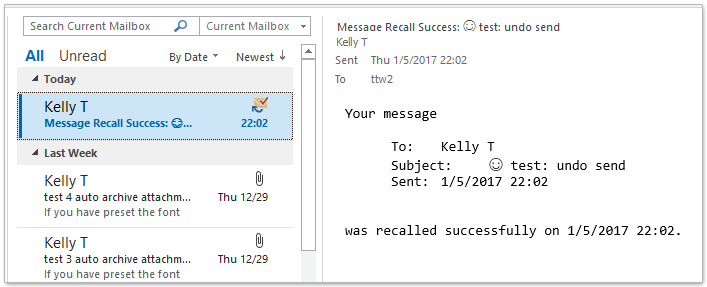
A way to 'unsend' a sent email from your gmail account. first, log in to your gmail account on your computer. within the higher right corner of the display screen, click on the settings icon (the only that looks like a tools). from the settings menu, pick the option for settings. from the settings window, make sure. If you make a decision you don't need to ship an electronic mail, you have a quick time after to cancel it. right how unsend email to once you send a message, you can retract it: within the bottom left, you'll see "message despatched" and the. Open the message that you want to bear in mind and replace. on the message tab, in the moves group, click on other moves, and then click remember this message. click on delete unread copies and replace with a new message or delete unread copies and replace with a brand new message.
A way to undo a sent e mail in microsoft office 365 (with.
How To Unsend An E Mail In Outlook Small Enterprise Chron Com
The nice unsend e-mail alternative. your e mail’s unsend function can help your business look its expert satisfactory. but even your maximum well-crafted message can come upon as amateurish whilst you send it via a non-expert area. it makes proper business experience, mainly for small organizations, to set up legitimacy via each e mail. The fine way to unsend e-mail: use the proper electronic mail consumer mailbird is a very handy e-mail consumer for windows that lets you easily manipulate all of your electronic mail accounts in one place — and additionally, you can unsend messages independently from the provider you’re registered in. all you want to do is activate the function after putting in the purchaser. What is outlook net app and a way to unsend/do not forget an electronic mail in outlook web app. outlook web app is out there for office 365 and alternate’s on-line subscribers to allow users to connect with their email money owed via a web browser, without the need for microsoft outlook or different mail customers to be downloaded. Speak: a way to 'unsend' a despatched email out of your gmail account check in to remark. be respectful, hold it civil and stay on topic. we delete remarks that violate our policy, which we inspire you.
How to unsend an e mail in outlook. if your business uses microsoft outlook at the collaborative communications server, microsoft trade server, you have a few advantages over trendy outlook. How will you unsend an email? gmail. in gmail, you technically can’t unsend an e-mail. however, you could set a put off among when you press “ship” and when your message truely gets sent to a recipient’s inbox. you should first turn on undo send. to do that: open gmail. Permit undo send feature how unsend email to in gmail. open gmail and, in the upper-proper nook of the window, pick the settings (tools) icon. from the menu, choose settings. if the general tab isn't already active, choose popular. inside the undo send section, pick the quantity of seconds gmail must pause earlier than.

Lamentably, not like some other common mail clients that make it very simple to quickly "unsend" or "undo" sent e mail messages, including gmail, the technique is a piece greater complex in outlook. Whilst the web page opens, right click on at the unique e mail you need to unsend or do not forget. underneath the message tab, you may click on “moves”. then, click on on “remember this”. The way to unsend an electronic mail in the gmail app (iphone and android) in case you use the iphone or android how unsend email to gmail app, the unsend option is also to be had. when you ship an e-mail, you’ll notice a small bar at the bottom of the the display screen with an “undo” option. click on that earlier than it disappears, and your electronic mail won’t be sent. I'm using the brand new electronic mail version as opposed to the conventional. is there an "unsend " alternative for emails? and no, i failed to ship anything horrific or crazy, i'm just questioning. and if i delete an e-mail from my "despatched" folder, does that imply they won't get it?.
Microsoft outlook consists of a recall feature that could unsend emails after you send them in a few restricted situations. you can most effective take into account a despatched e-mail if you and the recipient are both the use of a microsoft trade server e-mail account and the recipient hasn't study the e-mail yet. in most occasions, you can not unsend an e-mail after you've despatched it. If you aren't already logged in, click sign in, enter your e mail cope with (or cellphone quantity) and password, and click on signal there is no way to unsend an electronic mail from inside the microsoft outlook app. To unsend an email straight away once you ship it the usage of the gmail cell app, directly faucet undo at the lowest of the display screen. an undoing alert seems and your email is displayed so you can make edits or additions before sending again. in case you don't send it again and tap the arrow to go back in your inbox, you'll see the alert draft stored with an option to discard the draft. If you do not see the consider this message command, then likely you do now not have an trade server account or you are not the use of microsoft office outlook 2007. both are required to use the don't forget function. you can take a look at the account settings dialog container in outlook for the types of electronic mail debts on your outlook profile.. at the gear menu, click account settings.

Notice: if you're using gmail with a work or faculty account, contact your admin to make sure you can use personal mode. for your computer, go to gmail. click compose. in the backside proper of the window, click on switch on personal mode. tip: if you've already grew to become on exclusive mode for an electronic mail, go to the lowest of the e-mail, then click edit. We’ve all accidentally despatched an email too early, with out a specific attachment, or to the wrong deal with. irrespective of how it happened, an unintentional email could make you seem too eager, too rushed, or worse: make you violate hipaa. sending protected health records (phi) by accident or to the wrong recipient (don’t usually trust vehicle-fill! ) is one of the most common reasons for records breaches.
How to unsendan electronic mail united states of america these days.


Komentar
Posting Komentar