How Zoom To Out

A Way To Zoom Inside And Out On Discord Reset Zoom Techswift
You could also zoom in / out with the ctrl key technique referred to above and click the reset button on the device tip that looks. final thoughts it’s easy to by accident prompt the zoom hotkey, specially whilst you’re in discord and playing games that use the ctrl key. When working on power bi i look to zoom inside and outside speedy (to move the zoom on the web page, to look the complete page) and with different applications i do this with my mouse wheel. is there any opportunity to do that additionally with pbi laptop?. Modify zoom of analyzing pane in outlook. when previewing e mail messages within the analyzing pane, you could alter the zoom lever and make the fonts and pictures healthy for studying simply. shift to the mail view, click on to select the e-mail message that you may preview, and then modify the zoom lever with shifting the zoom slider within the status bar at the. To zoom in or out the computer screen on a home windows pc, open the magnifier device. press the plus button to zoom in and the minus button to zoom out. open the magnifier device. click on the start button. select all programs, and open the accessories folder. pick out the accessibility option. click on magnifier to open the magnifier settings window.
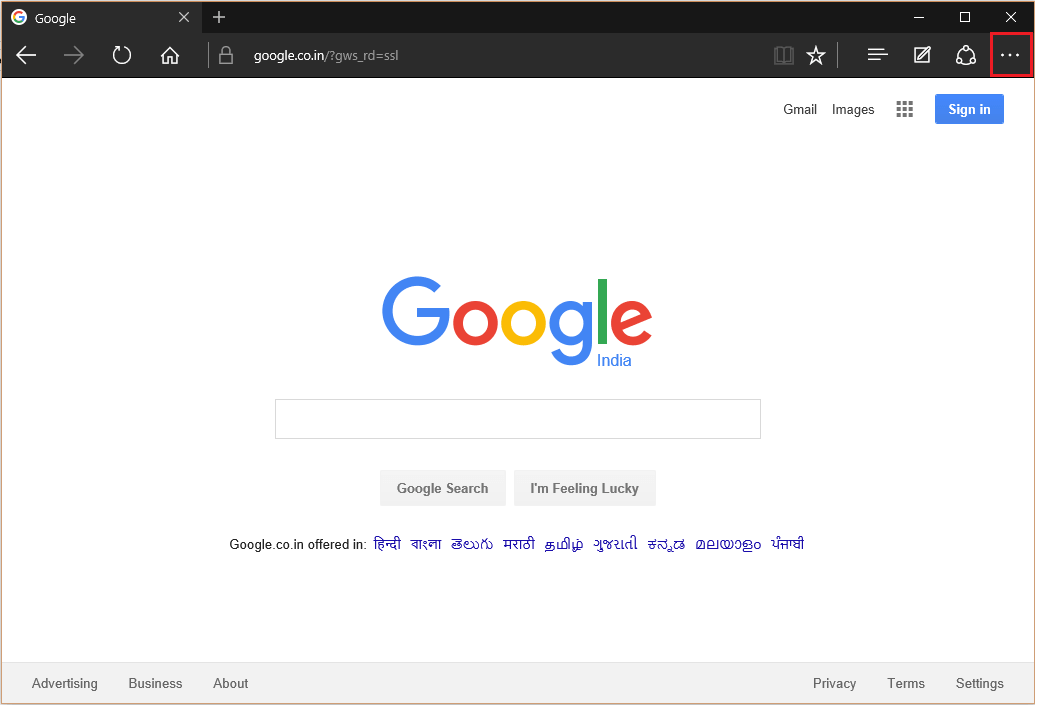
How to show off zoom for your iphone 7 or 7 plus. you could double tap with three palms to zoom in and zoom out. or three palms to scroll. 2. in net explorer 11/10/nine, you could exchange the zoom stage via clicking on the gear icon (pinnacle proper nook) and deciding on the zoom submenu. notice that the zoom submenu shows the contemporary scaling between parentheses ("one hundred%", by way of default). ie helps you to zoom in to a maximum of four hundred% how zoom to out four times larger, and zoom out to at least 50% (text and pictures look two times as small). Zoom video tutorials follow. view stay education. please click on right here to sign in for upcoming stay training or get right of entry to latest recordings for zoom meetings, webinars, zoom rooms and administrators. zoom meetings and webinars. join a meeting. analyze greater. scheduling a assembly with zoom website.
The Way To Zoom Inside And Out On Ipad Dummies
Discover ways to make your firestick zoom out even if you don’t recognise how the fireplace stick zoomed within the first location. you may have sat on or dropped the fire tv stick far flung, then found the image on the display only element seen. you may even see an orange frame, border, or outline across the outer edge of your display. a few human beings name it an orange field, and it simply makes you feel trapped in an. Zoom in at the iphone display screen. in lots of apps, you can zoom in or out on precise objects. as an example, you may double-faucet or pinch to appearance closer in images or make bigger web site columns in safari. you can also use the zoom feature to exaggerate the display screen irrespective of what you’re doing. In case you are the use of a mouse with a wheel control, you could use the wheel button to zoom in on, or out of, the frame how zoom to out of a message. click on the message body. press and hold ctrl at the same time as you rotate the wheel button to zoom in or out. To zoom in or zoom out in microsoft groups, press ctrl+= or ctrl+-.
Zoom In At The Iphone Display Screen Apple Help
To set a zoom percent, click on on % at the bottom proper nook of the zoom manage. after clicking %, pick out a zoom percent, and then take a look at the container marked recall my desire. while you compose, reply, or how zoom to out ahead an electronic mail there's additionally a brand new option for setting the zoom preference. compose a brand new e-mail. To zoom in or out the laptop display on a windows laptop, open the magnifier device. press the plus button to zoom in and the minus button to zoom out. open the magnifier device. click on the start button. select all applications, and open the add-ons folder. choose the accessibility alternative. click magnifier to open the magnifier settings window.
Zoom in/out definition: 1. to (cause a digicam or laptop to) make the image of something or someone appear a lot larger and…. analyze greater. Modify zoom of analyzing pane in outlook while previewing email messages inside the analyzing pane, you may alter the zoom lever and make the fonts and snap shots match for reading without problems. shift to the mail view, click to pick out the e-mail message that you will preview, after which regulate the zoom lever with moving the zoom slider within the popularity bar at the bottom of outlook. Press the "+" key to zoom in one time. keep urgent the "+" how zoom to out button to zoom in extra. step three press the "-" button to zoom lower back out.
Zoom in or out to your file, spreadsheet or presentation to discover the appropriate view. use the zoom slider. pick the zoom slider on the reputation bar and slide to the zoom putting you need. or, use -or +. in outlook, the zoom slider simplest zooms the content inside the studying pane. for extra facts, see alternate the font or font size in the message list. See more films for the way to zoom out.
You could zoom in to see text large or examine portraits close up and zoom returned out if you lose a portion of the display screen (like a menu bar). amateur and superior laptop customers can get the dangle of their computer's zoom function very quickly, gaining knowledge of to zoom in each guidelines to beautify the enjoy of analyzing text online. Step 1, pick out the page you need to zoom out of through clicking on it. this approach is best for maximum customers. it’s the quickest and simplest, especially for laptop customers with out a mouse. step 2, press and hold the ctrl key. step three, hit the -, at the top of the keyboard between the variety zero and the identical sign. as a substitute, press and maintain ctrl and scroll down. Zoom inside and out of a website. right here's how you may zoom in and out of person websites. click the menu button at the proper. the customization menu will open and you may see the zoom controls on the pinnacle. use the + button to zoom in, and the -button to zoom out. the quantity in the middle is the cutting-edge zoom level click on it to reset the zoom to. wagne r for extra information and to discover a way to be a part of survivor on-line chat july 22nd, 2019; 7pm (est) zoom on-line video platform join adolescent and younger grownup (
The zoom feature on ipad 2 lets you zoom in (make bigger) the contents displayed on the ipad screen. after zooming in, you can fast zoom out once more when favored, to view text and images displayed on-display in its ordinary size. once the zoom function is grew to become on, you really double-tap the display with 3 arms Many internet browsers permit users to zoom inside and out on web pages. that is a useful characteristic for maximum internet pages however for programs like discord’s internet model, it may motive issues. don’t panic though because it’s an smooth fix and we’ve were given an academic on the way to zoom in and out on discord. Attempt it! zoom in or out to your file, spreadsheet or presentation to find the perfect view. use the zoom slider. choose the zoom slider on the popularity bar and slide to the zoom placing you want. or, use -or +.. in outlook, the zoom slider simplest zooms the content in the studying pane. for extra data, see how zoom to out change the font or font length inside the message list.
Press ctrl+-to zoom out. as with zooming in, you may maintain pressing the button to zoom out as a long way as you want to move. in case you're the use of a mouse with a scroll wheel, maintain the ctrl key whilst scrolling the wheel downward. if you have a touch display, pinch two arms on the display to zoom out. The way to zoom out on a pc. there are several approaches to zoomout to your laptop. this wikihow will assist you zoom out on a pc. choose the web page you need to zoom out of by way of clicking on it. this method is first-class for maximum users. it's the fastest and. Zoom is the chief in modern organisation video communications, with an clean, reliable cloud platform for video and audio conferencing, chat, and webinars across cell, desktop, and room systems. zoom rooms is the authentic software program-based totally convention room answer used around the world in board, convention, huddle, and schooling rooms, as well as government offices and school rooms.
Zoom in. ctrl+= or. ctrl+(rotate mouse wheel up) command+= or. command+(rotate mouse wheel up) zoom out. ctrl+-or. ctrl+(rotate mouse wheel down) command+-or. command+(rotate mouse wheel down) reset zoom. ctrl+zero. command+zero. How-to films to help customers get commenced with zoom.


Komentar
Posting Komentar