In Zoom Chrome How To

Discover ways to zoom in and zoom out in google chrome browser to exchange the browser length, make it complete screen, trade default web page zoom, reset the zoom degree and converting font length for better readability of content material. Zoom cloud conferences for chrome stay related wherever you go start or be a part of a 100-man or woman assembly with crystal-clean, face-to-face video, excessive excellent display sharing, and instantaneous messaging at no cost!.
How Can I Unzoom My Google Chrome Browser Yahoo Solutions
I recently downloaded google chrome, and there are sure web sites that zoomed in to three hundred% and that they really might not go back down. up to now, it is handiest three websites (google, fb, and tumblr), however i am worried that it'll hold. i used to be thinking if this is a common trouble and if there may be a way to repair it? or will i just should re-down load chrome?. Zoom in or out for your current page to your pc, open chrome. at the top proper, click extra. next to "zoom," select the zoom alternatives you want: make the entirety large: click on zoom in. make everything smaller: click make the entirety larger: click on zoom in. make everything smaller: click on zoom. Comply with the little by little manner and learn how to zoom in chrome. step 1 -commencing up the settings page initially, we need to get right of entry to the settings window. for that, there are options. both. To pick your zoom stage, subsequent to "fullscreen zoom degree," select down arrow. tip: on a touchscreen, use two fingers to move around the display after zooming in. amplify a part of your screen.
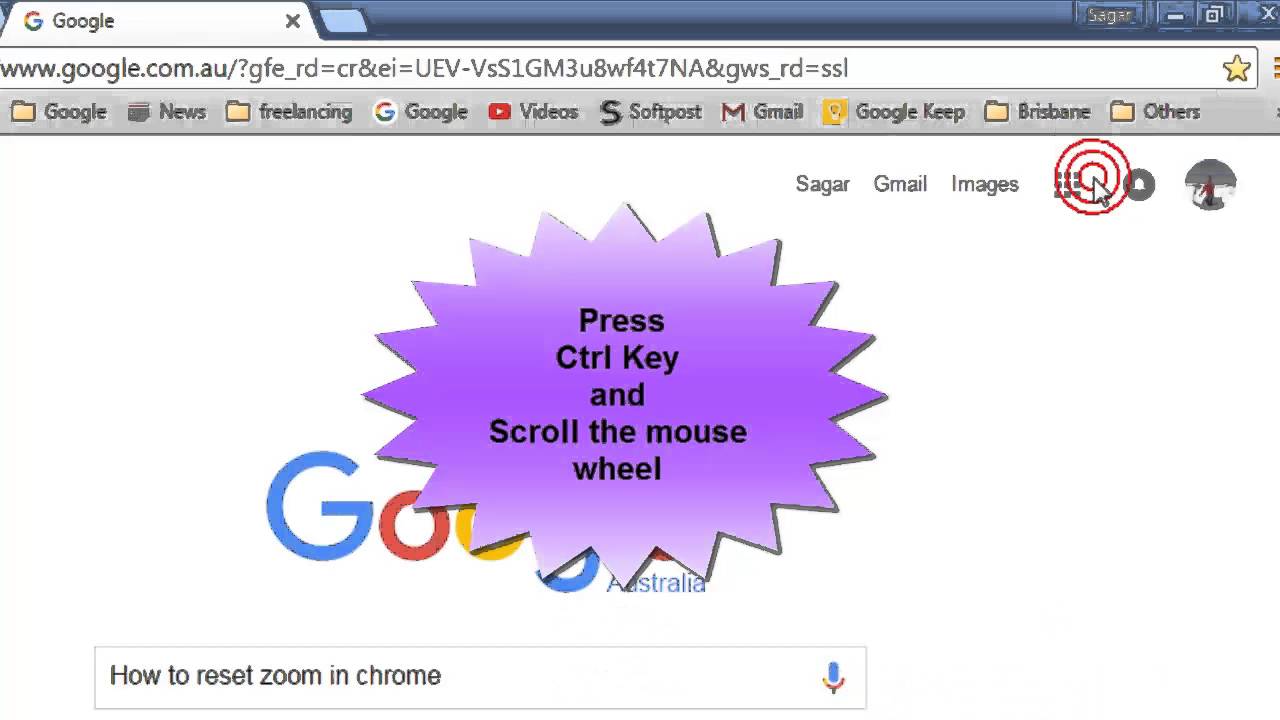
A way to zoom inside and outside on chrome for all webpages in case you are looking for suggestions of web page zoom putting in chrome then clearly those steps may be helpful for you. step 1. so, you should open the chrome browser on your pc. step 2. now you want to click on on the chrome menu How to exchange default zoom and textual content size in chrome. in your pc, you can alternate the dimensions of text, pictures, and films for one web page or all internet pages. to alternate the font length on a cellular tool, update your display alternatives for your device’s settings app.
There may be a google chrome extension known as zoom which permits you to set custom zoom possibilities through a slider, or through coming into a certain percent. it recollects the zoom percentages in keeping with internet site (like chrome already does, but now you could at least set a custom percent). chrome does no longer assist you to set a usual zoom placing as some distance as i am conscious. Zoom makes it easy for college students to apply our video solution on a chromebook. we’ve compiled step-through-step commands for a way to high-quality down load, join, in zoom chrome how to and use zoom on a chromebook. for the fine functionality, we suggest using the zoom chrome shop app over the web browser, and these steps replicate that workflow and functions. In google chrome, you could already recognize how to regulate web page zoom. you may press ctrl to zoom out or ctrl + to zoom in. likewise, you can click on the menu icon and you will discover zoom controls proper at. The zoom scheduler chrome extension allows individuals to time table zoom meetings without delay from google calendar. the usage of the extension, you can begin an on the spot meeting or schedule a destiny meeting. the assembly be part of hyperlink and details are despatched thru a google calendar invitation so the attendee can join with a single-click from the calendar.
See greater motion pictures for the way to zoom in chrome. about google earth, plus new approaches to be able to explore, research and proportion zoom in and see what adventures anticipate you launch earth in chrome examine more download google earth in apple app
A Way To Adjust Chromes Default Zoom Settings Cnet
Using The Zoom Chrome Extension Zoom Assist Middle

Chrome will bear in mind the ones settings from one consultation to the following, but it might not observe them globally. for that -in different phrases, to change the default zoom -you need to project into settings.
How can i unzoom my google chrome browser? yahoo solutions.
ontario northland toggle navigation search search en fr the way to resize textual content a a a help: alternate textual content size to change text length, use the browser commands safari in the toolbar, pick view > zoom > zoom in, reset or zoom out on the keyboard, press command + to zoom in, command to zoom out or command zero to reset chrome inside the toolbar, select view > zoom in, real Google chrome open chrome. go to be part of. zoom. us. enter your assembly identity supplied with the aid of the host/organizer. click on be part of. click open zoom meetings (computer) or open zoom. us (mac). you need to click on this feature each time you attempt to release zoom. Zoom cloud conferences for chrome. zoom. provided via zoom. us (315) 10,000,000+ customers. evaluation. zoom cloud conferences for chrome. stay linked wherever you pass start or be part of a 100-character assembly with crystal-clean, face-to-face video, high high-quality screen sharing, and instantaneous messaging free of charge! award prevailing zoom brings video. Zoom in or out in your cutting-edge page. use the zoom options to make everything on a website large or smaller. for your pc, open chrome. at the pinnacle proper, click on greater. next to "zoom," pick the zoom alternatives you want: make everything large: click on zoom in. make the whole lot smaller: click on zoom out. use complete-display screen mode: click on complete display screen.
How To Zoom In And Out In Google Chrome Tutorial Youtube
To select your zoom stage, subsequent to "docked zoom level," select down arrow. on the top of your display screen, you’ll see the zoomed in area. to alternate what is magnified, move your cursor. word: whilst you type in the backside segment of the display screen, you’ll see what you’re typing at the pinnacle, simply zoomed in. exchange the magnification level or circulate around. Try protecting the ctrl key after which pressing 0 while on those pages. this should return them to their default zoom stages. in any other case attempt ctrl and the + and signs. A way to trade font, page in zoom chrome how to length and zoom-in zoom-out in chrome on mac or home windows laptop. whether you're on home windows, android, ios or macos, the one web browser you are maximum possibly the usage of is the “google chrome” browser. what makes this browser what all people loves and enjoys the usage of is the provision of many customization options.
How To Use Zoom On A Chromebook Zoom Weblog
Zoom web site text, pix, complete website the use of mouse wheel & zoom keyboard shortcut for chrome. use chrome extensions to zoom particular webpages, percentage zoom, dpi settings zoom. The way to zoom inside and outside on chrome for all webpages step 1. so, you need to open the chrome browser on your laptop. step 2. now you want to click on at the chrome menu link which is noted on the right aspect corner of the page. step 3. after that, go to the settings alternative from the drop down.
Zoom chrome web shop.
default chrome keyboard shortcut to zoom google chrome help default keyboard shortcut hotkeys to zoom contents displayed on internet site (or webpage). you need to press ctrl and + to zoom in or ctrl and to zoom out using keyboard. The usage of the extension the zoom chrome extension will install an icon next on your chrome cope with bar. if you click on the in zoom chrome how to zoom button, the chrome sign up for your zoom account. as soon as signed in, you will have additional alternatives in the chrome extension: schedule a assembly: click on time table a meeting
The zoom chrome extension can do extra than the browser zoom buttons, for example you could zoom in/out on best the font-size, see the zoom badge, set the zoom by using web page (and not as area that google chrome is doing). This academic will show you men how to correctly zoom in or zoom out in google chrome to make your screen appear large or smaller, depending for your preference. in your computer, you can. Right here’s how to use zoom on chromebook. downloading the zoom app. using zoom in your chromebook is as smooth as downloading an app. 1. the primary component you want to do is discover the zoom app within the google chrome shop. after you’ve positioned it, click on “add to chrome. ”. Downloading zoom for your chromebook. to begin using zoom to your chromebook: 1. set up the zoom app from the google chrome keep. (here’s greater info approximately including apps to chromebook. ) 2. visit the app launcher and click on zoom. 3. sign in the usage of your school-issued zoom credentials. four.


Komentar
Posting Komentar