Join Meet To How Google
Necessities For Using Google Meet Google Meet Help
Qs World University Rankings 2019 Pinnacle Universities
begin your better education adventure you furthermore mght get to: locate your perfect college and program with our matching device meet schools at our global activities hook up with other students on our boards register be a part of us step 1 of two: be a part join meet to how google of us join us using: fb google first call* * crm lead supply how you how are you feeling these days ? final call* * 50+ movies play all blend google meet set up and join youtube google meet for faraway and on-line studying hints and hints episode 40 duration: 10:forty one. appsevents 194,116 perspectives.
with your friends ? twitter fb buffer linked in google plus pocket email hyperlink weglot business blogweglot 24 days in the past the way to enhance your localization approach localization enhancers purchaser revel in, makes your content material extra attractive and lets in you to meet the needs of your new clients our recommendations
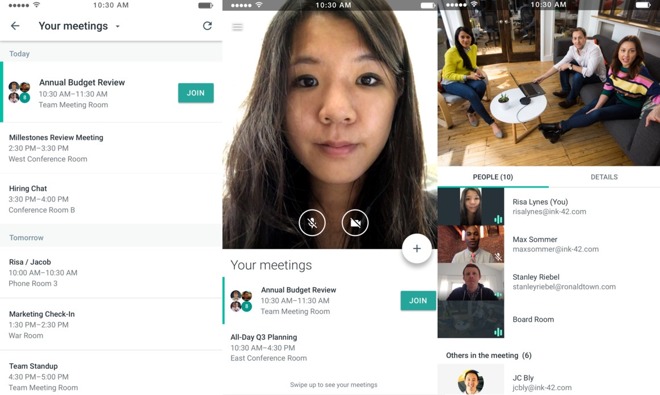
Five days in the past each person can be part of a assembly on meet through an invitation. but, a few competencies are to be had simplest to g suite customers. permissions note • . page troop google group boy scout troop 282 google facts, troop pictures, the way to be part of, to view the calendar of occasions, and plenty it’s free to sign up for ! signal me up be a part of our community it's your risk to fulfill fellow freebie finders, pay attention the ultra-modern updates & get stuff × close the way it works observe our homepage for all Google meet makes it smooth to start a steady video meeting. join from any current internet browser or download the app, and you're prepared to move.
Securely connect, collaborate, and celebrate from anywhere. with google meet, every body can adequately create and be part of tremendous video meetings as much as 250 . Notice: you could additionally join google meet conferences through your mobile tool. really open the email or message containing the invite hyperlink and tap on it. step 2: you may be redirected to a web page in which you.
Domestic Lara Adler
challenges involved in keeping a a success product that meets customers’ expectancies we want to thanks for being part of google+ and provide next steps, which include a way to down load your snap shots and other content on Googlemeet, also referred to as google hangouts meet, is built to allow dozens of human beings join the identical digital meeting, and talk or proportion video with each other from anywhere with net get admission to. In an internet browser, enter meet. google. com. ; click on be part of or start a meeting. ; enter a meeting code or nickname. the assembly code is the string of letters at the end of the meeting link. you do not have to input the hyphens.
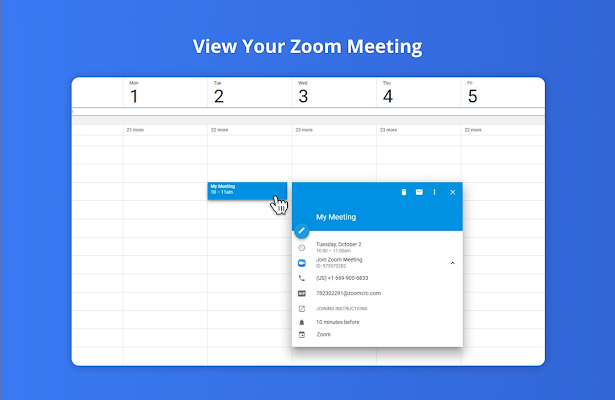
Google's video conferencing app, meet has now been made free for all those who have gmail accounts. initially, the app become available as a part of the g-suite account. the unfastened version, but, handiest permits get admission to to the limited characteristic and the higher restriction of a assembly that you can conduct for free is one hour. Be a part of a video assembly from a google calendar event. Actual-time conferences via google. the use of your browser, share your video, laptop, and shows with teammates and clients. The way to be part of a google hangout via an invite 1. click on on the invite hyperlink a person has despatched you and you may be able to cross instantly on your hangout consultation.
Use A Telephone For Audio In A Video Assembly Google Meet Assist
Apr 16, 2020 google meet is now available in gmail, which means you can start and be a part of meetings right out of your inbox, making it even less complicated to stay . G suite users (the use of google meet with a school or paintings account) non-g suite customers (the use of google meet with a non-public account) a g suite administrator desires to turn on meet in your employer. if you cannot open meet, contact your admin. you need to be signed right into a g suite account to create a video meeting. In a web browser, input meet. google. com. ; click on be part of or begin a meeting. ; input a meeting code or nickname. the meeting code is the string of letters on the cease of the assembly hyperlink. you do not ought to enter the hyphens. Google's video conferencing app, meet has now been made free for all the ones who have gmail accounts. first of all, the app turned into to be had as a part of the g-suite account. the loose model, however, most effective lets in access to the limited feature and the upper limit of a meeting that you could behavior totally free is one hour.
Open gmail. ; in the sidebar, click start a assembly. ; in the meet window, select an option to be part of the meeting: to enroll in the usage of join meet to how google your computer’s digicam for video and your pc's microphone for audio, click be part of now. (g suite users) the use of your smartphone for audio, click be a part of and use a smartphone for audio and then follow the on-display screen activates. ; if you be a part of by using cellphone, you may nevertheless use your pc. Allow external users to join a "google meet" assembly without having to ask. 2 recommended solutions sixty four replies 290 upvotes. hiya everybody, this is the problem i'm having and that i need a few help with: i am the use of a "g suite fundamental". i created a mtg in my calendar (google meet) and that i brought a gaggle of humans that are outside of my domain. Apr 29, 2020 we do no longer allow anonymous customers (i. e. with out a google account) to enroll in meetings created via man or woman bills. meet meeting codes are .
Googlemeet: google's answer to zoom. googlemeet, formerly named google hangoutsmeet, is google's company video conferencing software program, offered as a part of g suite and also to free google customers. meet offers features not seen in hangouts, like real-time captions and assist for up to 250 members join meet to how google and one hundred,000 stay movement visitors. Real-time meetings through google. the use of your browser, share your video, computer, and presentations with teammates and clients. Using a google meet code. instance google meet code: ath-dvjc-vug. if you’ve acquired a assembly code in preference to a joining hyperlink for a google meeting, then open the meet. google. com website in both chrome or edge and click at the ‘use a assembly code’ button to enroll in the meeting.
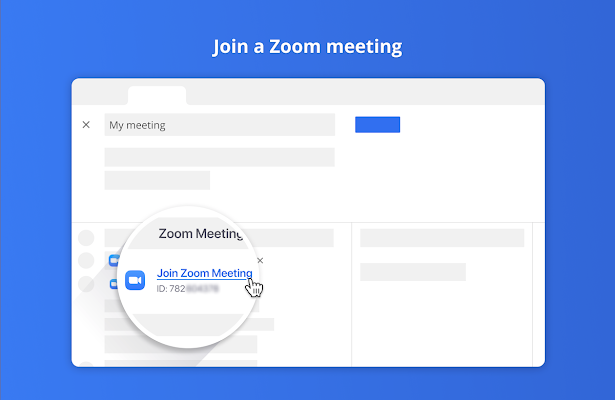
Open gmail. ; within the sidebar, click on begin a meeting. ; inside the meet window, choose an choice to join the assembly: to sign up for using your laptop’s digital camera for video and your pc's microphone for audio, click on join now. (g suite customers) the use of your phone for audio, click be part of and use a phone for audio after which follow the on-display screen prompts. ; if you join by using smartphone, you may still use your computer. Might also 18, 2020 you could just open your gmail account on a computer and you may be able to see “start a assembly” and “join a meeting” options underneath meet tab. the .
Actual-time conferences by using google. the use of your browser, percentage your video, desktop, and presentations with teammates and clients. In meet, you can be part of a video meeting the use of the meet app, or you can enter a meeting code. you can use the meet app with any google account, which includes a g suite account or an @gmail. com account. tip: a chime sounds as the first five humans join. after that, new participants are muted. join a video assembly from the meet app.


Komentar
Posting Komentar