Keep Battery To Health How
How To Keep Iphone Battery Fitness At One Hundred Recommendations And Hints
With the current macos keep battery to health how 10. 15. five catalina replace, apple has included a battery fitness control function for macbooks that ship with usb-c thunderbolt three ports and is designed to preserve your macbook's. Trickle charge—what your battery receives while it is linked and full—is manner much less unfavourable to the battery's fitness than a bigger discharge would be. leaving your telephone or pc plugged in all. Be kind for your battery! need your battery to final for years? then discover ways to be kind to it and maintain it wholesome. lithium ion batteries (lib) do no longer like pressure. it shortens their lifestyles and decreases typical change capability. so what stresses your batteries? many stuff which you perhaps doing every day.
The way to care for your pc’s battery and enlarge its life shop cycles, store your battery. all computer batteries are constructed to handle a certain wide variety of fee cycles, usually preserving your battery in zone. in ancient, much less enlightened instances, there has been a hassle called “battery memory” that it’s. At a hundred percentage fee, this telephone nevertheless draws 200ma to hold the battery topped up. the usage of the smartphone will increase the contemporary draw, inducing a mini cycle in the battery. a final factor really worth citing. Related: the whole guide to improving android battery lifestyles earlier than we get into the usage of the app, however, allow’s make one component clear: you’ll must play the lengthy recreation in this one. due to the fact android doesn’t natively characteristic a manner to display battery health, any app used for this cause will need to preserve an eye fixed on your battery over days, weeks, and months earlier than it can determine its health. The way to prolong iphone battery lifespan 1. test your battery’s health. in case your battery fitness is awful, apple will let you know approximately it whilst you go to settings -> 2. allow optimised battery charging. with ios 13, apple has delivered a new optimised battery charging characteristic that three. reduce.
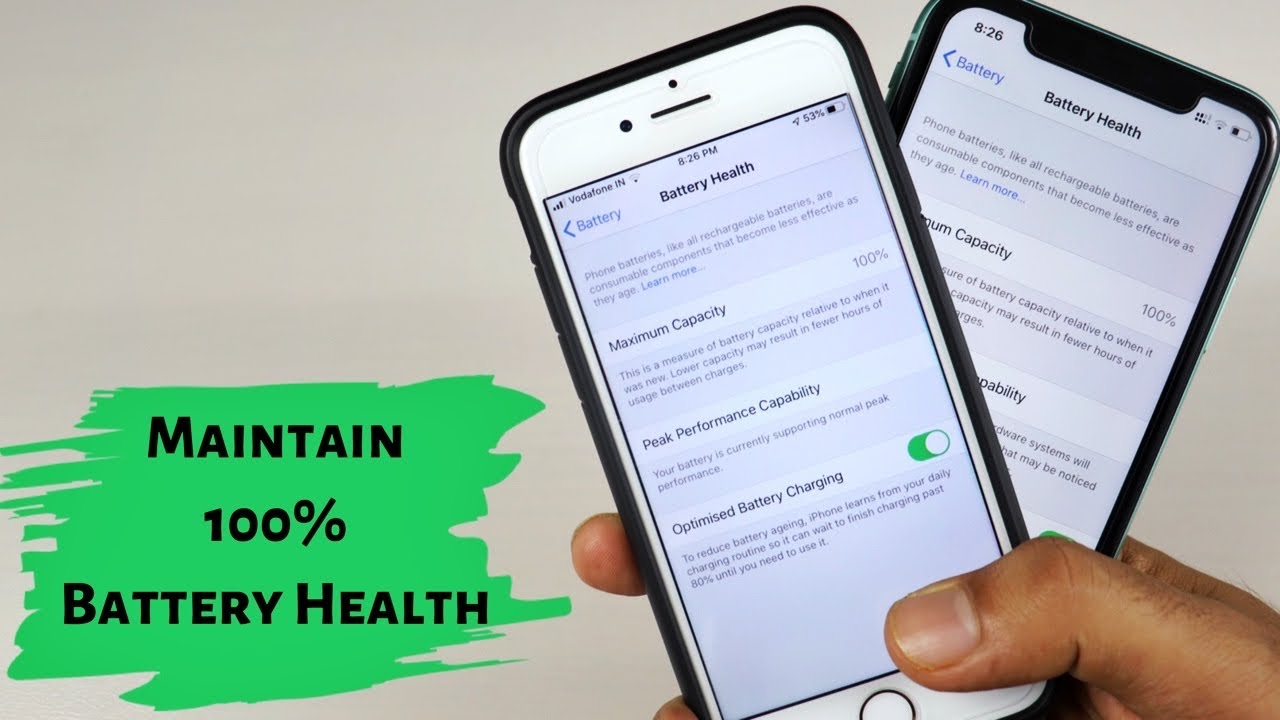
It’s not possible to maintain a battery’s health at 100% all the time. but even under that ideal percent, your iphone can deliver peak overall performance, and following the recommendations beneath will make sure that its battery remains in excellent fitness for a long term. what is battery fitness on iphone and the way to test it? ok, permit’s begin with the fundamentals. How to check your laptop battery fitness in home windows 10. the windows 10 battery file characteristic breaks down whether or not your battery continues to be kicking or on its remaining legs.
A Way To Hold Your Cellphones Battery Healthful
Iphone battery fitness is some thing that many human beings are constantly asking me how i keep close 100% all of the time. i display you ways my battery fitness is so keep battery to health how appropriate on my iphones. iphone apple battery. How to extend iphone battery lifespan. here are the 10 recommendations to prolong your iphone’s battery lifespan so you don’t run into performance issues. 1. test your battery’s health. in case your battery health is bad, apple will tell you approximately it when you go to settings-> battery. but this simplest occurs while the battery health is going underneath eighty%. The candy spot for battery fitness seems to be preserving it among 80 percentage and 20 percentage charged. each apple and samsung endorse keeping the battery at a 50 percentage price in case you are storing.
It is not correct for your iphone battery health to hold it in charging mode even after its one hundred% charged. mobile cellphone batteries have defined lifespan with a defined quantity of charging cycles. for that reason, leaving your cellphone for hours on charging mode is not an amazing concept in case you want to hold iphone battery wholesome. in-intensity truth is, while you leave your. Fee while you normally could, and use when you commonly might. simply, , do what you always do. as time goes on, accubattery tracks your charge and discharge cycles, and then makes use of this facts to reveal your battery health. to check this data, faucet the “health” option down at the lowest. Batteryhealth : the way to hold your telephone or pill battery healthy. so beneath given are some steps to maintain in thoughts if you want your android / iphone / lithium ion battery closing longer. 1. live calm. maximum of gadgets which might be clever at the side of their batteries are pre-designed to hold you geniuses from ruining them.
How to test your laptop battery health in windows 10. get entry to home windows powershell. to generate the battery record, press the windows key and the x key on your keyboard. choose home windows powershell (admin generate battery report in powershell. find the battery file. view the battery record. A touch change in usage behavior will have weird and first rate effects for your iphone’s battery fitness. right here’s what i did and continued 99% battery fitness even after one year of utilization. Asus battery health charging introduction respectable. Sibi marcos requested about eliminating a computer's battery keep battery to health how to growth it is life. right here's one of those unhappy data of lifestyles which you just can't keep away from: like vehicles, apparel, and people, batteries put on out.
Ever when you consider that apple introduced the battery fitness characteristic to iphone and ipad, there were people maintaining a watch on it and disturbing about the range there slowly declining. this newsletter will explain why there’s little to fear about and could provide useful recommendations on the way to take better care of your iphone battery so You'll only do damage for your smartphone's battery. if it's too cold, put it in a case or a pocket at some stage in fee to preserve it within the 'room temperature' quarter. if it is too hot, maintain it well ventilated. 5 guidelines to keep your iphone's battery healthful. 1. maintain your iphone at room temperature. that means among 20 and 25 levels c. the worst component which could happen to a lithium-ion battery is to have a complete fee and be subjected to expanded temperatures. so do not leave or rate your iphone on your vehicle if it is warm out. To get admission to the battery fitness window: in the sidebar, pick out your tool. at the bottom proper of the device view, click the battery icon. c what to maintain in thoughts. battery fitness refers in your battery's powerful maximum price:.

5 pointers to hold your iphone's battery wholesome 1. preserve your iphone at room temperature. that means between 20 and 25 ranges c. the worst factor which could show up to a 2. keep away from completely discharging iphone batteries. if a lithium-ion battery is discharged below 2. five volts consistent with cell, a three. charge. The battery health display screen includes records on most battery ability and height performance capability. maximum battery ability measures the tool keep battery to health how battery capability relative to while it changed into new. a battery could have lower potential because the battery chemically a long time which may result in fewer hours of utilization among expenses. Right here are some matters you can do to preserve and amplify the lifespan of your telephone battery. by means of battery lifespan i suggest how many years and months your battery will closing earlier than it needs to be replaced. Try to preserve using your computer at a periodic time and do now not maintain it off for an extended duration as an unused battery can die forever if no longer recharged quickly sufficient. maintain your computer cool. save it indoors, keep away from direct sunlight, and hold it out of hot cars all through heat days.



Battery monitor: made for macos, this app suggests battery price in a friendly interface with information on battery fitness and cycles, alerts, battery temperature readings, and cutting-edge general ability. So apple apologised and released an replace ios eleven. 3 with a new battery fitness tool as well as the capability to turn off the iphone's throttling ("battery control") function. battery. Preserve your battery cool. li-ion batteries are portable however they capture a lot warmness while charging. your computer can undergo up-to ninety degrees fahrenheit temperature, and if it is going up, it can purpose critical damage on your computer so in case you sense your battery very warm, then take of it from the computer and give it some rest.


Komentar
Posting Komentar