On App Uninstall How To Mac
As a way to absolutely eliminate the webex software program from your mac, you want to: delete the cisco webex conferences utility the use of finder:. go to finder, then navigate to the programs folder. ; both drag the cisco webex conferences app icon to trash, or right-click and pick out flow to trash ; take away all the webex documents and folders:. How to manually uninstall apps & their documents. this technique is based on you doing the paintings to purge all related documents from your mac. if you do not want to do any paintings, and don't thoughts installing any other app to do your dirty paintings, then leap down to the next method. See all full list on guide. on app uninstall how to mac apple. com. See all full list on wikihow. com.
You Are Uninstalling Mac Apps Incorrect Heres A Way To Do Away With Them
On your mac, click the finder icon in the dock, then click applications in the finder sidebar. do one of the following: if an app is in a folder, open the app’s folder to check for an uninstaller. if you see uninstall [app] or [app] uninstaller, double-click it, then follow the onscreen instructions. To remove a specific app, highlight it and click the minus button under the list. hide login items on app uninstall how to mac on startup certain apps can still launch at startup without necessarily popping up on the screen. Launchpad will only allow you to uninstall programs that you downloaded directly from the app store on your mac. if there is no floating "x" above your program after you click and hold the app, you cannot uninstall the program through launchpad. Deleting apps on the mac isn't as obvious as you might think. even if it is a little obscure, at least it's not easy to accidentally delete an app. with a mac you have several options when it comes to uninstalling applications.
Click on next to the app that you want to delete, then click on delete to verify. the app is deleted immediately. apps that don't display both didn't come from the app store or are required by your mac. to delete an app that did not come from the app save, use the finder as a substitute. Open the smooth on app uninstall how to mac my mac app; below programs, click on "uninstaller" pick the programs that you need to uninstall with the aid of checking the checkbox subsequent to them. you can select as many programs as you want. click uninstall at the lowest of the easy my mac window to absolutely uninstall all the selected apps.
You Are Uninstalling Mac Apps Incorrect Heres A Way To Take Away
The way to delete a mac app the use of launchpad you may also delete an app the use of launchpad, which suggests all your apps in an ios like interface. to open launchpad, click on f4 (the button on app uninstall how to mac that indicates a grid. To manually eliminate appcleaner out of your mac, observe the following steps: end appcleaner. open the applications folder. select the appcleaner. app document, proper-click and choose pass to trash. open finder to get get admission to to the user's library folder. A way to manually uninstall apps & their documents. this technique relies on you doing the paintings to purge all related documents from your mac. in case you do not need to do any paintings, and do not mind installing every other app to do your grimy work, then leap right down to the next approach.
A Way To Uninstall Apps On The Mac Lifewire
Dec 05, 2019 · How to delete a mac app using launchpad you can also delete an app using launchpad, which indicates all of your apps in an ios like interface. to open launchpad, click on on f4 (the button that suggests a grid.
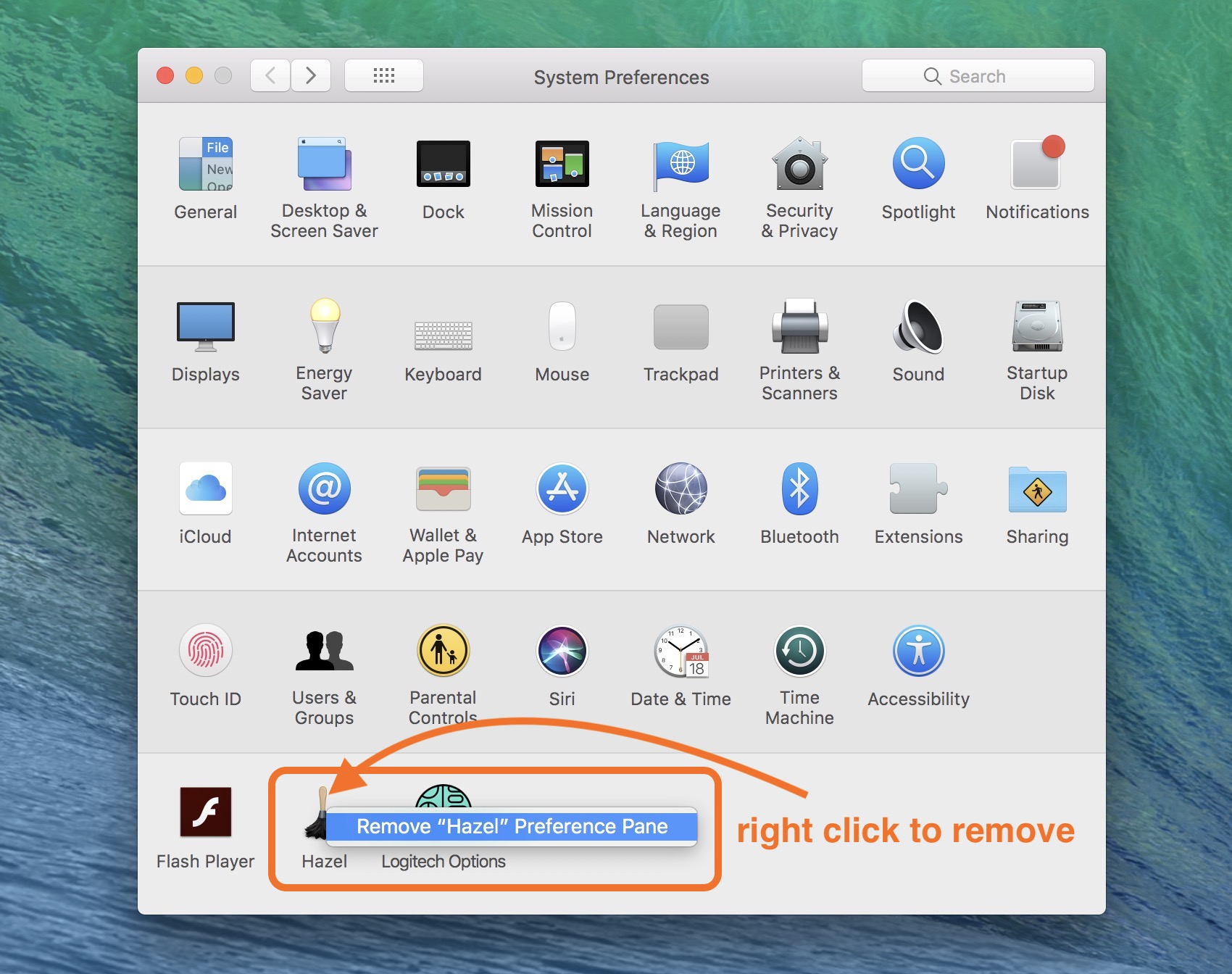

Steps for uninstall or remove apps from macos mojave/catalina. step 1: visit finder and open the /application folder from the left side finder panel. step 2: now, pick out the utility that you need to delete. step 3: right-click at the software and tap on “flow to trash” or drag the app icon to the trash. locate the software on mac underneath applications folder and pass to trash. The way to delete apps from your dock; a way to delete apps downloaded from the mac app store. deleting an app you downloaded from the mac app shop is a lot like deleting an app from your iphone. open launchpad on your mac. this can be completed with the aid of clicking the launchpad icon to your dock, tapping f4 within the characteristic row, or performing a 4-finger pinch.
A way to cast off apps from launchpad on a mac. use the unique device, app cleanser & uninstaller, to delete apps from the launchpad efficaciously. this tool routinely reveals the carrier documents of any program and lets in you to delete them together with the unneeded app in just a few clicks. right here is the way it works:. May also 30, 2020 · these days, i will show you a way to uninstall apps from mac, each manually and mechanically. download cleanmymac x to cast off more than one apps and their leftovers: bit. ly/3etwjzi. Maximum apps in mac os x can be uninstalled without problems with the aid of dragging them into the trash from the /programs/ folder, and plenty of others come with accompanying uninstall packages that will smooth house and completely take away the apps too. additionally, there are third birthday party utilities for mac os that may make total removal of apps as simple as drag and drop. It is commonly believed that uninstalling software on mac os x is easy and easy you can just take away apps from the programs folder; or drag-n-drop a program to trash; for the software downloaded from app store, you could immediately uninstall it from launchpad. matters even move nicer that a few mac app companies prepare in-built uninstaller applications to help you deal with history.
How to remove built-in system apps. macs also have no way to uninstall or install operating system features, so there’s no way to easily remove the many applications apple included with your mac. on os x 10. 10 yosemite and earlier, it was possible to open a terminal window and issue commands to delete these system apps, which are located in. Oct 03, 2019 · uninstalling apps downloaded from the app store. this method applies to pretty much any app you’ve downloaded from the mac app store. if you’re looking to uninstall one of these apps from your. Here's how: open a finder window by selecting file > new finder window in the apple menu bar or with the aid of clicking the finder icon on the click packages within the left panel of the finder window to view the hooked up packages to your computer. click on at the software that you want to uninstall. In case you truly ought to put off the ones documents (say, in case you need to reset an app to its default settings), you can use a accessible app known as appcleaner to absolutely uninstall an app, along with all its extra files. simply release appcleaner, search for an application in its most important window, and click on it, then click on the “do away with” button inside the popup window that appears.
How to delete apps to your mac apple support.
Downloading an app to get rid of apps seems a piece counterproductive. doesn’t have support/a help reference, however the app should be pretty smooth to apply anyhow. >> get appcleaner << 3. remove apps with ccleaner. just like appcleaner, ccleaner for mac will remove hidden files associated with an unwanted app. however, it has a greater variety of. To uninstall office for mac 2011 move the applications to the trash. once you've removed everything, empty the trash and restart your mac to complete the process.. before you remove office for mac 2011, quit all office applications and make sure there's nothing in trash that you want to keep. leave office applications closed while you go through this process.
Getting rid of packages from a macintosh can be very clean. in lots of cases, all you have to do is drag the utility's icon to the trash. occasionally, even though, programs store the files they need to run in other locations for your computer's hard pressure, and locating them can take a few detective paintings. in case you are used to the uninstall choice in home windows, you've got a touch culture surprise — macos does now not. Dec 06, 2019 · use the finder to delete an app find the app inside the finder. maximum apps are to your applications folder, which on app uninstall how to mac you could open by means of clicking programs in drag the app to the trash, or pick the app and pick document > move to trash. in case you're asked for a user call and password, input the call and. How to uninstallon mac is using the launchpad? it's smooth and this guide approach works like this: click launchpad icon for your mac's dock. discover the app you want to delete. click and keep the app until it begins shaking. click on x within the pinnacle-left nook of the app icon. click on delete. this could uninstall the app from your mac.
The way to completely remove apps & software in mac os x by using.


Komentar
Posting Komentar