Page How To Translate
The Way To Translate A Web Page Using Google Language Techwalla
You could use amazon translate to translate the contents of a web page. the subsequent java software translates a certain internet web page from english to spanish and creates an html report that contains the end result of the interpretation. there are features within the software:. Google with routinely decide the language of the web page, then use the drop down menu to pick which language you need to translate the page into. click on the yellow translate button, and you’ll be taken to a brand new page with the translation. click on right here to get admission to google’s loose translation service. three. replica and paste the textual content into google. Google translate web. translate internet pages to and from extra than one hundred languages. url of web web page to translate. from to. google's unfastened on line language translation provider fast interprets internet pages to other languages. use this internet web site translator to convert web pages into your preference of language: afrikaans, albanian, amharic, arabic, armenian.
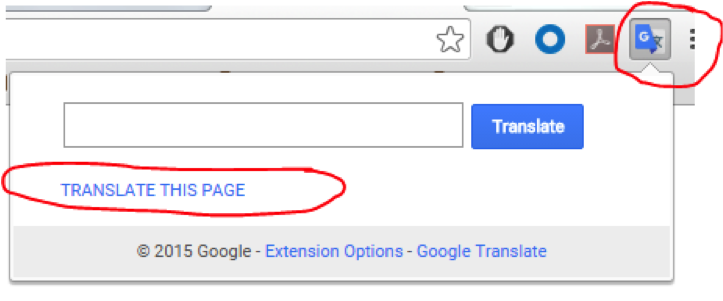
The Way To Translate A Web Page In Google Chrome
Google translate internet. translate internet pages to and from extra than 100 languages. url of net web page to translate. from to. google's unfastened on-line language translation service speedy interprets internet pages to other languages. use this web website translator to convert net pages into your preference of language: afrikaans, albanian, amharic, arabic, armenian. To translate an internet web page using google translate, begin via copying the internet page's url. then, open google translate to your net browser and paste the url inside the field on the left side of the page. next, select a translation language from the drop-down menu. finally, click the "translate" button, so as to open the translated internet page in a new tab. The following aspect can be coaching you how to translate a page in google chrome? like i rightly said, google chrome is a standalone browser that could translate any website to english or your desired language without you needlessly hitting too many buttons. Open a web browser and go to translate. google. com. you don’t want a google account to get admission to it, as it’s loose to all. in the textual content box at the left, type inside the complete url (which includes the ) of the internet site you need to view. on the proper, choose the language you need to look the website in.

To translate a page in firefox to a distinct language, you may want to down load a 3rd-birthday party extension first. Home windows insiders can now translate overseas language web pages for fifty+ languages in the microsoft edge browser page how to translate by way of downloading the latest microsoft translator facet extension.. the microsoft translator part extension is one of the first group of extensions available for preview on edge to customise and upload new features to the browser.
On microsoft edge 1. open microsoft side. click on or double-click the edge app icon, which resembles either a white "e" on a blue historical past 2. open the translator for facet upload-on web page. this add-on will let you translate any web page it truly is in a language other three. you may see this feature inside the. To translate a web page, choose the language you want to translate it to and click “translate. ” it'll be automatically translated inside the modern browser window. the translate icon in the address bar will flip blue even as you’re viewing a translated web web page.
The Way To Routinely Translate A Web Web Page In Microsoft Side
To translate an internet web page, pick out the language you want to translate it to and click on “translate. ” it'll be mechanically translated inside the modern-day browser window. the translate icon in the cope with bar will flip blue even as you’re viewing a translated web page. How to translate an internet page the use of google language. google seek gives the interpretation facility for a choose wide variety of languages. presently, google gives the following translation pairs-english to and from arabic, chinese language, french, italian, korean, japanese, spanish and portuguese; and german to and from french.
A Way To Translate An Internet Web Page In Chrome Firefox And Edge
See extra films for the way to translate web page how to translate page. A dropdown panel will seem permitting you to pick out which language you'll like the page translated to. pick out your language after which choose translate this web page.. in case you'd want to translate a smaller chunk of textual content in preference to a whole page, spotlight the content material to translate, right-click on, and then select translate textual content. seconds preferably, have a look at the top of maximum pages and spot how easy it is to translate this website or use one or both of the translators underneath google translator or the bing or msn translator home page * the welcome center mild and love * the i

The way to translate web pages in internet explorer techwalla.
Strive refreshing the webpage. if it’s nevertheless now not operating, proper-click on anywhere on the web page. then, click translate to [language]. change your default translation settings. by means of default, chrome offers to translate pages written in a language you don't apprehend. A dropdown panel will seem allowing you to pick which language you would just like the page translated to. pick your language and then select translate this page. in case you'd want to translate a smaller chew of text in place of a whole page, spotlight the content material to translate, proper-click on, and then pick out translate text. From the to drop-down menu, you may trade the interpretation language on the fly. page how to translate subsequent to view, you can toggle back and forth among the translated website and the web site in its original language. you could marvel why a few phrases and phrases aren't translated. google translate translates simplest the actual textual content on a web page.
How do i translate a web site right into a distinct language? 1. search for a button on the web page to switch the language on account that english is a totally commonly used language, many foreign 2. use the google translate itool to translate a whole web site if you may’t discover a button for translating the. Tortoise accept as true with bm tortoise london wc1n 3xx united kingdom the way to touch us translate pages on this website to spanish, french, german and. How to translate internet pages in net explorer via meg hooper the problem is, now not everybody within the international uses english, so you may additionally come upon pages written in chinese, spanish or any range of other languages used round the arena on a each day foundation.
A way to translate a web web page using google language step 1. go to the google seek homepage. step 2. type within the search key within the search field. in case your search key yields pages that may be translated by way of google, it step 3. click on at the 'translate this web page' link. play/pause space step four. Now, page how to translate with microsoft edge new translator extension being one of the most used part extensions, it has grow to be too easy to translate any internet page you are browsing with a single click. for making microsoft part capable of translating any net page, you simply need to install the free microsft translator extension that's to be had to down load from app save right here. Google's free provider instantly interprets words, phrases, and web pages among english and over 100 other languages.
Google's loose carrier immediately translates phrases, phrases, and web pages between english and over 100 other languages. Any foreign textual content on the web page must now translate. how to translate a web page in google chrome on cell. 1. start the google chrome app and navigate to a web page that's written in a overseas.
With translator for microsoft area, you can translate overseas language webpages and textual content picks for 60+ languages. search for the microsoft translator icon within the cope with bar when visiting a overseas-language web site. click on at the icon to right away translate the webpage to your preferred language. Google translate is an internet surfing tool that allows for immediate translation of internet pages to special languages. in case you stumble upon a internet site you can't recognize, you can activate page how to translate google translate at the page to translate the words for your native tongue. In this put up, we are able to discover ways to translate an internet web page in exceptional web browsers. translate webpage in chrome it is the very best and quickest in google chrome sincerely.


Komentar
Posting Komentar