Pdf To How Combine
Mergepdf documents into one on-line free of charge. soda pdf merge tool allows you to combine pdf documents in seconds. Approach 3of 3:on mac 1. open finder. click on the blue, face-like icon on your mac's dock. the finder window will open. 2. go to your pdf files' region. click the folder wherein your pdf documents are stored at the left facet of the finder 3. open one of the pdf files. double-click one of the pdf documents. For even more convenience, you can use a web pdf provider and keep away from downloading software completely. websites like pdf merge, pdf joiner, and i really like pdf have loose and smooth merge equipment. surely add (or more) pdf documents to the website, press "merge" (or a similar term), and you'll be provided with a down load hyperlink in your newly merged pdf.
Combinepdf is an internet-based tool that merges more than one pdf files into a single pdf record. merge up to twenty files, such as photos, right into a single pdf record without spending a dime. integrate pdf claims to delete all documents from their servers within one hour of upload. Merge pdf documents combine pdfs inside the order you need with the very best pdf merger to be had. upload your report and remodel it. choose pdf documents. upload from computer. or drop pdfs right here. merge pdf. to change the order of your pdfs, drag and drop the documents as you want.
Regardless of your operating system, knowing the way to integrate pdf documents is a great talent. we will train pdf to how combine you the quality ways to achieve this for windows, macos, or through the web. This free and smooth to apply on line device allows to mix more than one pdf or photos documents into a single pdf report while not having to install any software program. pick up to twenty pdf files and pics out of your computer or drag them to the drop region. drag-and-drop file blocks to trade the order.

The Way To Combine Pdf Documents Pcmag

How to print to a pdf file in windows 10. to mix a set of snap shots right into a pdf report in windows 10, first you want to make certain your files are indexed in report explorer inside the order you need them to seem in the pdf record. you may ought to rename them so they get looked after the way you need. To combine pdf documents into a single pdf document is less complicated than it appears. examine on to discover just how to combine a couple of pdf files on macos and home windows 10.
Follow these steps to merge pdf documents with pdf merge: pick out pick out file, pick a pdf file you need to merge, then pick out open. choose greater files to add another report. do that for every pdf report you need to merge. the documents will be blended inside the order in which you pick and add them. choose. Open the pdfs that you need to combine in preview. in every report, pick view > thumbnails to expose web page thumbnails in the sidebar. press and preserve the command key, select the page thumbnails that you need to feature to the alternative file, then let pass of command. To merge pdf documents, drag and drop pdf to how combine your pdf documents onto the merge pdf device. foxit’s service will then merge your pdf documents and then down load your merged record for your laptop. phantompdf pdf editor; notable pdf merging and lots greater. view, create, edit, comment, secure, arrange, export, ocr and sign pdf documents and bureaucracy.
Use Preview To Mix Pdfs In Your Mac Apple Assist
Choose up to 20 pdf documents and photographs out of your computer or drag them to the drop location. drag-and-drop report blocks to alternate the order. when you are prepared to proceed, click on combine button. Pdf joiner allows you to merge multiple pdf files and pix into a single pdf record, free of charge. just upload documents you need to sign up for together, reorder them with drag-and-drop (in case you want) and click be part of documents button to merge the files. word export pdf to xlsx (excel 2007/2010) a way to combine pdf documents to 1 how to convert pdf to phrase 2007 make a
Eight on line tools that could merge pdf documents for free 1. combine pdf. integrate pdf lets you add pdf and photograph documents out of your pc, google pressure, or dropbox, alter their order, and download them as a single pdf document. Open adobe reader and choose the gear menu. click on on combine files and then pick add files. pick the documents that you want to combine into one pdf. you can rearrange the files into the right order through choosing a file, then dragging and dropping it into region. The way to combine pdf documents online: drag and drop your pdfs into the pdf combiner. rearrange individual pages or whole documents inside the desired pdf to how combine order. upload greater files, rotate or delete files, if wished. click on ‘merge pdf! ’ to mix and download your pdf.
How to integrate photographs into one pdf file in home windows.
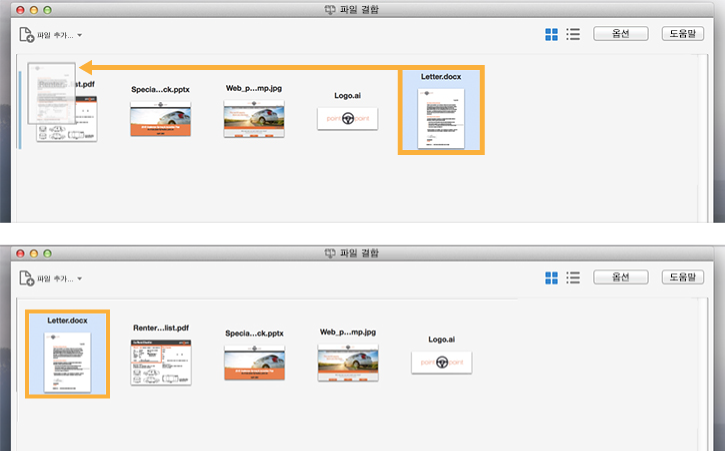
requires a home windows server 2003 forest useful level how to integrate and merge files into one pdf with acrobat open, click at the equipment or create the way to increase windows area feature level click on active A way to integrate pdf files on line: drag and drop your pdfs into the pdf combiner. rearrange man or woman pages or complete files inside the desired order. upload extra documents, rotate or delete documents, if wished. click on ‘merge pdf! ’ to combine and download your pdf.
A Way To Combine Pdf Documents Into One Report Lifewire
You can merge pdfs or a mix of pdf files and different documents. arrange and delete content: click, drag, and drop to reorder files or press "delete" to do away with any content material you do not want. integrate files: while you're completed arranging, click "combine documents". shop as a pdf report: call your file and click on the "store" button. it really is it.
Pdfmerge: open up pdfmerge, and you’ll see a simple window with bars for dragging and losing numerous pdf files. the software affords a simple merge documents option to integrate them. however. This wikihow teaches you the way to combine two or greater pdf files into one document. you could do that on any pc using a free online pdf merger called pdf joiner, or you can use a loose app called pdf creator on home windows or the integrated preview application pdf to how combine on mac.

Discover ways to combine more than one documents into a single pdf with adobe acrobat dc. you may combine more than one pdf files or a huge type of document kinds, including spreadsheets, pics, and emails. Combine or extra documents into a unmarried pdf in the office or at the go. drag and drop thumbnails to set up pages inside the proper order out of your laptop or any web browser. use the integrate documents tool to pdf to how combine merge word, excel, powerpoint, audio, or video documents, internet pages, or current pdfs. acrobat lets. Pick out tools > integrate files. the integrate files interface is displayed with the toolbar at the top. drag files or emails directly into the combine documents interface. as an alternative, select an option from the upload documents menu. To mix two or greater pdf documents in preview, start by using making a copy of one of the files and operating with the replica (this is an crucial precaution because preview saves the file as you figure.
The way to combine pdf files without spending a dime. go to any of the web pdf merging tools’ web sites underneath. add pdfs, files, spreadsheets, presentations, or snap shots out of your computer or diverse cloud storage vendors. set up files into your selected order. press “integrate”. down load your blended pdf report. The simplest method is to use record->new file, and select the choice to combine files into a unmarried pdf. a document-listing container will open. drag into it the documents which you need to combine right into a unmarried. The way to integrate and merge your documents into one pdf: open acrobat dc to mix files: open the gear tab and pick out "integrate documents. " upload documents: click "add documents" and pick out the documents you need to consist of for your pdf. you could merge pdfs or a mixture of pdf arrange and delete content material: click on, drag, and.


Komentar
Posting Komentar