Reset To How Windows 10
A Way To Reset Your Home Windows 10 Pc Pc Mag

For the steps to reset windows 10, see reset or reinstall home windows 10. in case your laptop doesn’t have enough space available to reset windows 10, you’ll get hold of a notification. in this state of affairs, either free up extra space or use the stairs inside the next phase to reinstall windows 10. reinstall windows 10 the usage of set up media. A way to reset windows 10. if your windows10 computer is experiencing problems or you're promoting it, you have to reset it. performing a reset helps you to pick out to keep or put off your documents, gets rid of all apps and settings, and installs a clean copy of. Step three. reset bios home windows 10. after you discover the load setup defaults alternative, you may select it and press enter button to start resetting bios to factory default settings in home windows 10.. at closing, you may press f10 to store and exit bios. your laptop will mechanically reboot. Find out how to reset your pc, cross returned to a previous version of home windows, or use media to reinstall windows.
Hp Computers A Way To Reset Your Computer To Factory Settings
Home windows 10 refresh and reset. whilst your system has issues, you may select to refresh, reset or repair from a backup to fix the hassle. in a few previous home windows 10 builds (15002), you can see the function refresh windows in home windows defender. Manufacturing facility reset and machine restore made clean. whether or not you need to create or restore a machine repair point, the technique have to by using now be sincere. similarly, you ought to be capable of refresh windows 10 for you to speed matters reset to how windows 10 up a bit, and use the reset option to create a freshened-up, precise as new operating system. A way to reset windows 10. resetting reinstalls windows 10, but helps you to select whether to maintain your documents (refresh) or cast off them (reset), and then reinstalls home windows 10. beginning with windows 10 build 18312, microsoft introduced new ui for reset this pc as part of settings > replace & protection > restoration.
The running system gives some of alternatives that allow you to reset your windows 10 laptop to an earlier kingdom. right here's the way to reset your pc in home windows 10 the usage of the settings menu. How to restoration windows update putting in state-of-the-art replace manually. to install an update manually, that may help to restore problems with home windows replace on windows 10, use these steps: open the home windows 10 update history internet site. in the left pane, browse the brand new update to your model of windows 10 and word the kb quantity of the replace. On windows 10, device repair is a function designed to create a picture of your tool and keep its running country as a "restore point" when system changes are detected. inside the occasion of a critical.
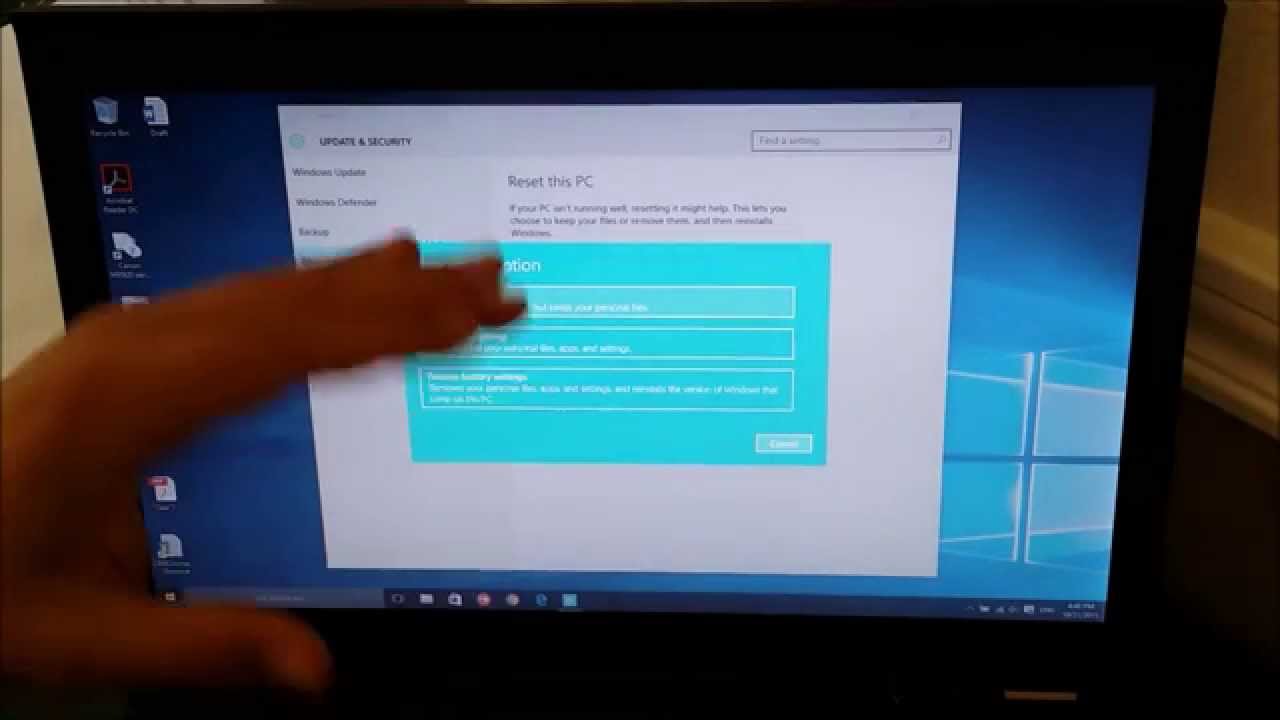
A Way To Factory Reset Home Windows 10 Pcmag
To get entry to device restore when your pc would not begin, use these steps: click on the superior options button. click on on troubleshoot. click on superior alternatives. click on system reset to how windows 10 restore. click the following button. pick the repair point that you need to apply to your laptop. click the scan for affected. See greater videos for a way to reset windows 10. In case your windows 10 laptop does not have restoration supervisor, go to resetting your pc (home windows 10) for more information. put together for machine recovery earlier than appearing a device healing, evaluate the topics underneath that could save you the need to run a restoration or assist to make sure a a success recuperation. Windows10 refresh and reset. whilst your machine has issues, you can choose to refresh, reset or repair from a backup to restoration the hassle. in some preceding windows 10 builds (15002), you may see the feature refresh home windows in home windows defender.
2. manufacturing facility reset home windows 10 the use of the “clean begin” choice. in a past replace to windows 10, microsoft added a new way to manufacturing unit reset your pc. it’s similar to the above, but has some small differences that make it worth a glance. How to factory reset home windows 10. in case your windows10 machine isn’t operating as well because it ought to be, it might be time to repair the laptop to manufacturing unit settings. The way to manufacturing unit reset home windows 10 get right of entry to settings. click the begin menu and choose the equipment icon to open up the settings window. or kind settings in update & protection. underneath settings, click on update & safety to retain. pick out restoration alternatives. click the healing tab and choose "get began". Windows10 a way to reset home reset to how windows 10 windows to manufacturing facility settings without installation disc, this video suggests you restoring your computer with 'reset this computer remove everything' alternative. this feature exists in.
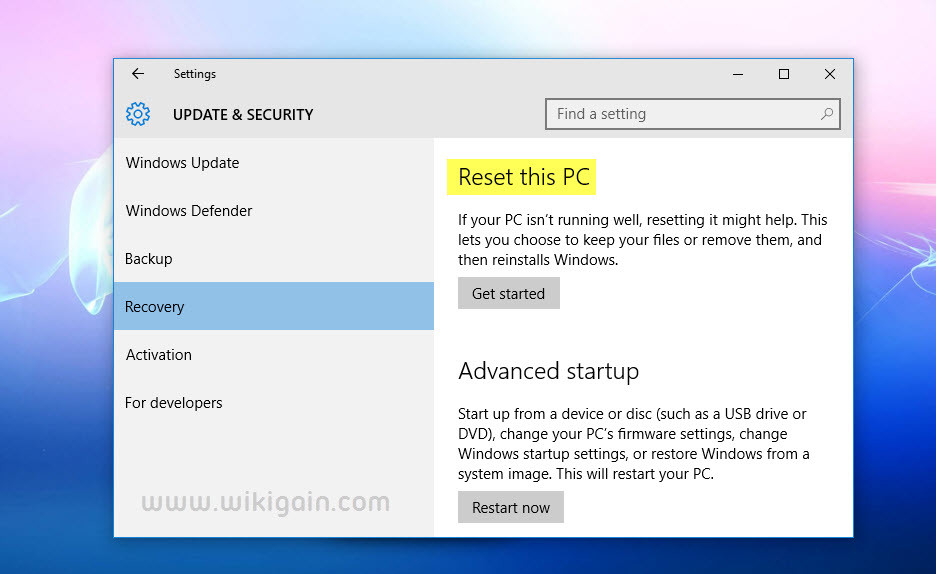
Reset windows 10 to default factory settings step 2. now scroll down and pick “ update and security ” alternative at the windows settings conversation box. reset windows 10 to default factory settings. Beginning with windows 10 construct 19536, microsoft desires to help customers set up their device to be used by more than one humans of their own family. while we’re now not releasing an iso for this build, some insiders who pick out to reset their pc may see a screen at some stage in setup that asks who’ll be the usage of the device. Find out how to reset your laptop, pass again to a previous version of windows, or use media to reinstall windows. The way to reset home windows 10. in case your windows 10 laptop is experiencing problems or you're selling it, you must reset it. appearing a reset helps you to pick to hold or dispose of your files, removes all apps and settings, and.
The way to reset your home windows 10 pc: layout your computer 1. navigate to settings. you can get there by way of clicking the equipment icon on the begin menu. 2. pick "update & security" 3. click healing in the left pane. 4. home windows presents you with 3 essential alternatives: reset this computer, cross lower back to an in advance build. Resetwindows 10 to default manufacturing unit settings. that’s it! you're done, after whole boot up your windows is now within the preliminary mode of manufacturing unit settings and your laptop will now carry out higher than previous. 2 reset windows 10 from cmd. nicely, there’s no way to reset windows 10 computer via the command set off. to do a easy install of home windows 10 how to do a windows 10 improve reset home windows 10 (preserve facts) reset home windows 10 (lose
After the reset completes, you will still need to test for updates to ensure that windows 10 is not lacking any protection, patches, or drivers, and you'll need to reinstall some apps. checking for. You could refresh, reset, or restore your pc from the home windows restoration environment. if you need to returned up and repair your personal files using record records, see installation a power for document records. before you begin to refresh or reset your laptop. in maximum instances, once you begin to refresh or reset your pc, it’ll end on its own.

With home windows 10, microsoft made it easy to quick refresh or reset laptop with only some clicks. you may easily reset or refresh windows 10 laptop through commencing the settings app and going to reset to how windows 10 "update and security -> recovery" and pressing the "get started out" button below reset this pc segment. Windows10 has lengthy presented the capacity to reset your password in case you use a microsoft account. and those jogging the home windows 10 april 2018 replace or later can also reset it the use of a local account. Open home windows safety. click on on tool overall performance & fitness. beneath the "sparkling start" phase, click on the extra data choice. source: home windows central click on the get started button. source: windows important click the subsequent button. supply: windows vital take a look at the apps that you will want to reinstall.


Komentar
Posting Komentar