Screenshot To Mac How In
A way to take a screenshot on mac os x daily.

The Way To Take A Screenshot On A Mac

A way to take a screenshot on mac press command + shift + screenshot to mac how in 5 for your keyboard to bring up the screenshot toolbar. click on one of the following: seize whole display, capture selected windows, or seize selected component to capture precisely what you want. choosing seize whole screen will take a screenshot straight away until you put a timer. How to take a display screen shot on mac: 7 ways to snap screenshots. you may use any of the following keyboard shortcuts to capture and take screenshots immediately in mac os, you could snap screenshots of the computing device, finder, or any running and open programs. whatever is on the display screen of the mac might be captured as an photograph record.
How To Without Difficulty Screenshot On A Mac G2
To take a photo of your whole display, click on display screen (or just use the keyboard command apple key + z ). a window to take a photograph of a portion of your screen, click on on choice. a window will pop up teaching you to drag your to take a picture of a particular window, pick out window. rec unfastened display screen recorder with share hyperlink for mac, home windows & linux screenrec permits you to record your computing device screen with audio or take annotated screenshots and percentage them immediately, in a click ! 15 jan see how popular your events are with concurrent visitors counter
The way to screenshot a selected window on mac. 1. beginning out the identical manner, press command + shift + 4 on your keyboard. 2. when the goal icon indicates up, press the gap bar to turn the target. Screenshot screen seize print display in windows on mac to capture the entire display clearly press characteristic (fn) + shift + f11. to capture the the front most window press option (alt) + characteristic (fn) + shift + f11. when you have your function keys mapped correctly in home windows you will be able to cross without using the function (fn) key. The way to screenshot a part of your screen on a mac 1. press command + shift + 4 for your keyboard. and yes, you need to press them all at the same time. 1. use keyboard shortcuts. in reality, it's miles very easy to make a screenshot on mac in boot camp. screenshot to mac how in in case you are using an apple keyboard with numeric keypad or apple pro keyboard, you may press “f14” to take a screenshot of the full display screen and “choice + f14” to seize an active window.
The way to take a screenshot to your mac to take a screenshot, press and preserve these three keys collectively: shift, command and three. if you see a thumbnail in the nook of your display, click on it to edit the screenshot. or await the screenshot to save. The way to take a screenshot to your mac. to screenshot to mac how in take a screenshot, press and maintain these three keys together: shift, command, and three. if you see a thumbnail inside the corner of your display screen, click on it to edit the screenshot. or watch for the screenshot to keep in your computing device.
A Way To Take A Screenshot On A Mac Dummies

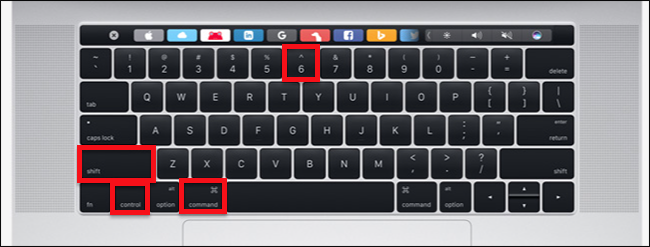
Use this keyboard blend to turn your cursor into a crosshair, which you may drag to select a portion of your screen to capture. launch the mouse button or trackpad to take the shot. you've got a. In case you come upon a problem like a screenshot on mac now not operating, then you can use preview to capture screenshots. nicely, preview is nothing, but default utility that will let you open and modifies or edit pictures. besides from this, you can additionally take a screenshot on mac the use of preview device. here are simple steps on the way to use preview to screenshot on mac:. Command. and. shift. and press. $. four. =. use your mouse to attract a rectangle so one can specify what to seize or press the spacebar after which click on on something (e. g. a window) to capture it. your mac then saves screenshot to mac how in it as a report on the laptop.
Mac screenshots: four ways to capture your macbook's display. keyboard shortcuts to take screenshots would possibly seem truthful in your mac, however every approach captures a distinctive a part of your screen. Screenshots on a mac modern-day variations (mojave and catalina) of the macos come with a screenshot app, that is accessed with the aid of urgent shift-command (⌘)-5. you’ll get a command bar that gives you.
How Do I Take A Screenshot On Windows 10 With A Mac

A Way To Take A Screenshot On Mac Os X Daily
Test out the best methods to screenshot on mac underneath: procedure to screenshot on mac. there are numerous approaches to screenshot on mac working device. the three fine and maximum extensively used alternatives are to screenshot using keyboard shortcuts, clutch utility or via using third-birthday party programs. Screenshot names on a mac. mac computers robotically assign names on your screenshots. the default naming conference on your screenshot files is: screen shot yr month date at time. check the bolded phrases in that format. those could be custom designed to the exact second the screenshot was taken to your mac.
boot up your mac anykeylogger capabilities: 1 take screenshots 2 document browsed websites records three log keystrokes 4 file software hobby 5 send the logs via electronic mail 6 run in stealth mode how to set up and use anykeylogger to record mac sports ? 1 first of down load and install the See greater films for a way to screenshot in mac. Mac lets in you to take a screenshot of the menus. within the case of mac os mojave or later comply with the steps. step 1: first off click at the menu so that each one the contents in it seem. step 2: then seize it by using urgent shift, command, five together, and take a screenshot of it or you can additionally take a screenshot in mac of the favored portion you want.
To take a screenshot of your entire display, press command+shift+three. press all 3 keys immediately and your mac’s desktop will flash, you’ll hear a digital camera sound, and the screenshot will appear to your computing device as a. png record. take a screenshot of a part of your display. to take a screenshot of a part of your screen, press command+shift+4 alternatively. Shop your screenshot as an picture report. click on record, click save, enter a record call, click a region at the left aspect of the web page, and click shop.. you could alternate the screenshot's document type by using clicking the "save as type" drop-down field at the bottom of the window and then clicking a distinct format (e. g. jpeg) in the drop-down menu. the most not unusual file kinds are jpg and png. A way to take a screenshot on a mac keep down ⌘ command: and shift: and press three = your mac captures the entire display screen and saves it as a file on the computer. the file call will seem like “display screen shot 2020-05-30 at 08. forty five. 00 am. png”.
Screenshots are a convenient device. you can use them to help manual a person thru a brand new app, seize important messages, and take incriminating pictures of your fine friend while skyping. How to take a screenshot on a mac the usage of 0.33-birthday party applications. there are numerous packages to be had for taking screenshots. you can scour the internet or look inside the mac app shop for any screenshot software that could appeal to you.. click on the app keep placed at the macos and os x dock to release the utility.. type the phrase screenshot inside the seek field and hit input. How to take a screenshot to your mac to take a screenshot, press and hold these 3 keys together: shift, command, and three. in case you see a thumbnail in the corner of your screen, click on it to edit the screenshot. or watch for the screenshot to keep. A way to take a screenshot in your mac to take a screenshot, press and preserve these 3 keys together: shift, command and 3. in case you see a thumbnail within the corner of your display, click it to edit the screenshot.
Mac screenshots: 4 methods to capture your macbook's display.
The way to take a screenshot on a mac. this wikihow will display you various approaches wherein to take a screenshot on a mac. make sure your display screen displays precisely what you need to reveal to your screenshot image. make sure all the applicable home windows are. Screenshots you are taking with the keyboard shortcuts might be stored directly in your mac’s computing device with the filename “display screen shot [date] at [time]. png”. however, you can exchange in which your mac saves these screenshots, if you want. for instance, you can make your mac store screenshots directly to a dropbox, google drive, or microsoft onedrive. Your mac has a few remarkable tools for taking screenshots in. moreover, thanks to those simplified equipment, the manner of recording video of your screen is less difficult as properly. now not relegated to the quicktime participant, display recording can be observed inside the new screenshot toolbar.


Komentar
Posting Komentar