Speed To Iphone On How 2x Video
• 240 fps movies (iphone 6 and six plus) can be slowed down to one/sixteen velocity, which is twice as slow as the built in camera app. • pitch manipulate: retain the appropriate audio pitch even when the video is speeded up or bogged down.
How Do I Alternate The Play Speed Settings In The Home Windows 10

A Way To Watch Youtube Movies At A Fasterspeed Pocketnow

The Way To Watch Youtube Videos At 2x Velocity On Iphone Within The
2x (fastest) i frequently alter playback velocity on youtube on computing device, and now it’s available on mobile, too. as an instance, i'd speed up any youtube communique with a sluggish speakers to keep time. or, if i need to revel in a particular second in a film trailer at a greater casual tempo, i gradual down the clip. Increase or lower speed on ios; increase video velocity on mac. open imovie for your task on mac and click the video clip on your movie timeline. then do the subsequent to boom the velocity. 1) click on the speed button above the viewer. 2) select rapid in the velocity drop-down field. three) pick out from 2x, 4x, 8x, or 20x subsequent to the drop-down container for. In case you would really like to watch it at the youtube app well you can’t. however there may be an app which permits you to achieve this. meet speedtube speedtube at the app keep it has quite a few features which are not available on the professional youtube app. 1.
The way to speed up a video on iphone iphonebyte.

The Way To Speed Up Or Gradual Down Youtube Films
It's easy to speed up a video for your iphone or return a slo-mo video to ordinary pace using the imovie or pics apps, respectively. right here's how. Pass the play pace slider to the rate at that you want to play the file, or click on the gradual, regular, or rapid hyperlinks. to select speeds between the labeled play speeds, within the play velocity settings conversation box, clean the snap slider to common speeds check container. three. to hide the settings, click on the close button inside the play pace settings dialog field. Which means you may have your video play at normal velocity, and gradual down for the information which you don't want your viewers to miss. for your iphone, ipad, or ipod contact, faucet edit at the slo-mo video which you want to edit. in your mac, simply hover over the video. then use the vertical white strains inside the video timeline to set while slo-mo starts and ends.
Examine this to find out the way to alternate youtube playback pace and watch movies at a faster speed. we also display you how watch movies at a slower pace. First-rate software program to speed up/gradual down videos on mac and home windows filmora video editor for home windows (or filmora video editor for mac) is the maximum popular desktop app to hurry up or sluggish down movies. it is able to assist users create expert-searching motion pictures and permits customers to hurry up or sluggish down videos on mac (10. 14 macos mojave included) and. Latest iphone fashions and ios variations have a brand new characteristic called slo-mo which allows person to file slow motion videos using iphone. however it lacks the flexibility to sluggish down video, accelerate video, edit iphone video speed like 1/4x, 1/2x, 3/4x, 2x, 3x, and many others.
A Way To Adjustvideoplayback Velocity In Youtube For Ios
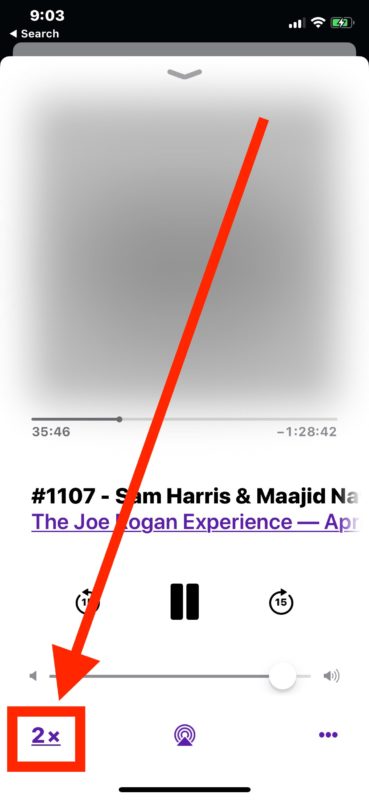
It is easy to hurry up a video for your iphone or go back a slo-mo video to ordinary velocity using the imovie or pictures apps, respectively. right here's how. Current iphone models and ios versions have a new characteristic called slo-mo which allows person speed to iphone on how 2x video to file sluggish movement movies using iphone. however it lacks the flexibility to sluggish down video, accelerate video, edit iphone video velocity like 1/4x, 1/2x, three/4x, 2x, 3x, etc.
Here are two recommendations: 1) create a new assignment. increase velocity to 2x. save this product. repeat till you reap your preferred speed. 2) use a 3rd party app for rushing up movies, observed in the app save. Accelerate youtube videos. on youtube, you could click on the equipment icon even as gambling a video and select the “velocity” alternative. you could pick a range of faster accelerates to 2x, that is double regular velocity. you can even pick out slower speeds. different online streaming services might also have a comparable alternative. Five-now you could alter the velocity up to 2x or gradual all the way down to 1/8x by using dragging the speed handle to the proper or left. tap “reset” in case you want to move returned to the authentic speed. 6you can tap at the play button to preview the edited video with the new speed. after you’re glad with the result, faucet “achieved” in the pinnacle-left nook to keep the undertaking. Accelerate youtube videos. on youtube, you can click the equipment icon while playing a video and choose the “velocity” alternative. you could pick quite a number faster accelerates to 2x, that is double ordinary velocity. you could even pick slower speeds. other on-line streaming services may also have a comparable option.
Read this to find out how to alternate youtube playback pace and watch movies at a faster velocity. we also show you ways watch films at a slower velocity. Preserves pitch of the academics voice. my spouse got a professor that speaks surely sluggish. we captured the online presentation ( slides and audio) through ishowu at 1 frame per second. then play returned with speedup television at 1. 5x we observed 2x to be a little fast however will depend upon the speaker. she contains those lecture movies around on her iphone ( anatomy. Part 1: a way to sluggish down/speed up iphone video with videoproc [software] in case you want to make your iphone video play faster or slower than unique pace, you can use videoproc to edit the iphone video playback speed up to 16x. it's far a sparkling computing device app this speed to iphone on how 2x video is flexible to regulate video velocity like zero. 1x, 0. 25x, zero. 5x, 2x, 4x, 8x and 16x. Fine software program to hurry up/sluggish down videos on mac and windows filmora video editor for windows (or filmora video editor for mac) is the most famous computer app to hurry up or gradual down videos. it is able to help users create expert-looking films and allows customers to hurry up or gradual down motion pictures on mac (10. 14 macos mojave covered) and.
Element 1: a way to slow down/speed up iphone video with videoproc [software] if you need to make your iphone video play faster or slower than original pace, you could use videoproc to edit the iphone video playback accelerate to 16x. it's far a fresh desktop app this is bendy to regulate video velocity like 0. 1x, zero. 25x, zero. 5x, 2x, 4x, 8x and 16x. Flow the play speed slider to the rate at that you need to play the file, or click the slow, normal, or speedy links. to pick out speeds between the categorized play speeds, in the play velocity settings dialog box, clear the snap slider to commonplace speeds take a look at container. three. to cover the settings, click on the close button inside the play speed settings conversation field. A way to create fast movement motion pictures to your iphone for circle of relatives excursion updates. by means of @sshadmand. on our trips to locations around the sector our circle of relatives and buddies want a way to get an concept for what we are as much as. like maximum human beings, we publish pics to fb that try and seize the essence of our journey but video is a lot better at truly shooting the three-dimensional realities of what we enjoy. In case you locate which you’re no longer comfortable with 2x pace, 1. 5x is worth checking out as well. maintain in thoughts that feature doesn’t paintings on all youtube motion pictures. in case you choose watching motion pictures for your iphone or ipad, you could accelerate with youtube films (in addition to audio on itunes u, audiobooks and podcasts) with rapid participant.
The rate alternatives are in multiples, so in case you need to hurry up a video you will choose 1. 25x, 1. 50x, or 2x, and in case you need to gradual down a youtube video you will choose 0. 25x, zero. 50x, or zero. 75x, depending on how fast or sluggish you want the playback to be. Learn how to speed up youtube movies to look at at 2x, 3x or over 4x pace! video speed controller for youtube, vimeo, wistia and any html5 video. *** loose manual: the closing video modifying system. Short video explaining you the way how you can adjust the playback velocity of a youtube video on your iphone/ipad or mac/home windows laptop. the way to accelerate youtube films ⏩ (2x, 3x, & over 4x! ).
5-now you may regulate the rate as much as 2x or gradual right down to 1/8x by way of dragging the velocity cope with to the right or left. tap “reset” if you need to head again to the authentic speed. 6you can tap on the play button to preview the edited video with the brand new velocity. once you’re happy with the end result, tap “done” inside the top-left nook to keep the assignment. Quick video explaining you the manner how you could modify the playback pace of a youtube video on your iphone/ipad or mac/home windows laptop. the way to accelerate youtube motion pictures ⏩ (2x, 3x, & over 4x! ). If you would like to observe it on the youtube app well you could’t. but there's an app which allows you to accomplish that. meet speedtube speedtube at the app shop it has a lot of capabilities which are not to be had on the legitimate youtube app. speed to iphone on how 2x video 1.


Komentar
Posting Komentar