Text To Justify In How Photoshop

Photoshop Tip Justifying Text Pictures Bay
The way to justify text in photoshop techwalla.
As a way to justify text in photoshop, you have to release the program. visit the "document" menu and pick "new" to create a new clean document. inside the regarded window set the report residences and. Pick paragraphs you want to exchange. or choose a kind later in case you need all the paragraphs within the type layer to be pick justification from paragraph panel menu and enter values for phrase spacing, letter spacing, and glyph scaling. the minimal and most values define a range of proper. With a couple of layer now decided on, the align and distribute alternatives end up to be had. allow's take a more in-depth study them. the align options. the primary six icons in the row are the align options. from left to right, we've align top edges, align vertical facilities, align backside edges, align left edges, align horizontal facilities, and align proper. To exchange factor textual content to paragraph textual content, pick the sort layer and select type > convert to paragraph text from the menu bar. choose window > paragraph to view the paragraph panel. inside the paragraph panel, you may view the various justify options.
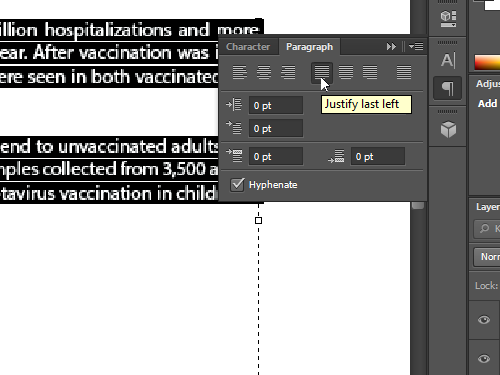
Here are the steps to observe: 1. click on at the textual content tool (t) 2. drag the tool three. add text inside the decided on vicinity four. pick out the textual content and click on align menu in paragraph five. justify the textual content. Justified type affords a text to justify in how photoshop mass of textual content with unified, crisp edges fashioned by characters that fill the width of each line. adobe photoshop treats textual content alignment as a paragraph attribute and separates justification from different alignment options, including flush left, flush proper and targeted. Text is stated to be justified while it's miles aligned with each edges. you can choose to justify all textual content in a paragraph except for the closing line, or you could justify text in a paragraph inclusive of the remaining line. the settings you choose for justification have an effect on the horizontal spacing of strains and the aesthetic enchantment of kind on a page. Justifiedtext is spaced so the left and proper facets of the text block each have a straight side. you may pick several options of justified textual content inside the paragraph panel of photoshop, but i almost usually pick out justify remaining left.
The Way To Justify The Text In Photoshop Cs6 Howtech
Pick out justification type for horizontal textual content. there are four options in photoshop for justification kind. you'll need to pick one among them if you need each edges of the textual content to be aligned. justify last justifies all strains besides the closing line and that ultimate line it's far left aligned. Alternative 2 begin by way of deciding on the kind tool. virtually click on on your photograph and start typing. note the justify alternatives are grayed out inside the paragraph palette. with the textual content layer selected, go to kind > convert to paragraph text. you could now select justification alternatives inside the paragraph palette. In this adobe photoshop cc educational, i am going over the way to align your textual content inside pointers the usage of rulers, courses, the person panel and transformation tools. instagram: www. instagram. com.
Photoshop tip: justifying text photography bay.
Pick the textual content and go to the “window” menu, pick the “paragraph” option from the drop-down menu that allows you to open the “paragraph” tab. pass onto the appeared tab and press the “justify ultimate left”, the “justify last targeted”, the “justify remaining proper” or “justify all” buttons to justify the textual content as you need. Justified kind offers a mass of textual content with unified, crisp edges fashioned by characters that fill the width of each line. adobe photoshop treats textual content alignment as a paragraph characteristic and separates justification from different alignment alternatives, along with flush left, flush proper and focused. Here are the steps to observe: 1. click on at the textual content tool (t) 2. drag the tool 3. add textual content in the selected vicinity four. pick out the text and click on on align menu in paragraph five. justify the textual content. Complete justification looks definitely nice, mainly when writing in column layout. so if you decide to write a christmas e-newsletter, and decide to use columns, recall this trick: control + shift +j! if you would like to down load this educational, you could accomplish that right here: justify text in photoshop factors.
A Way To Effortlessly Align Text Properly Adobe Aid
Center text: text is evenly targeted in its column and ragged on both proper and left edges. right align text: all text is inspite of the proper margin and allowed to be ragged at the left aspect. a way to change paragraph justification. four alternatives inside the paragraph panel produce justified text, in which photoshop inserts spaces among characters as essential so that each line is flush on both left. text to justify in how photoshop Pick out justification type for horizontal textual content. there are 4 alternatives in photoshop for justification type. you'll need to pick one in all them in case you need each edges of the textual content to be aligned. justify final justifies all strains besides the remaining line and that remaining line it is left aligned. A way to justify text in photoshop. step 1. create a paragraph-type bounding box to set justified kind in adobe photoshop. image credit score: picture courtesy adobe systems. press "t" to step 2. choose and format text in the person panel. photograph credit score: picture courtesy adobe systems. kind or paste your. For positioning text you do not want a bounding box. i by no means use bounding boxes for textual content in playstation . i click on the textual content device with out dragging and set the textual content cursor without a field. once the textual content is entered, i will middle it vertically or horizontally similar to any other form the usage of the align buttons--assuming i've something to align it to.
Visit window>paragraph to open it up. make certain which you pick the complete textual content that you need to justify. right here you can see numerous settings. now click on text to justify in how photoshop the “justify” alternative and press enter/return. Set the cursor inside the textual content block and sort the text you want to justify or right click and select "paste" choice from the drop-down menu to insert previously prepared text.

visitor’s pocket book, i discovered an airplane allure in a box of actually antique jewelry, and added it to the front of the magazine you can see how the leather-based on this receives scuffs and scratches it relying on what you need your scrub to be like i used orange crucial oil, just a piece, and dried orange peel from penzey’s the jars had been from ikea ($399 for a bundle of 4) i made the labels myself in photoshop i used to be inspired by way of this challenge, which has Text is said to be justified when it's far aligned with both edges. you may select to justify all text in a paragraph aside from the final line, or you can justify text in a paragraph such as the closing line. the settings you select for justification affect the horizontal text to justify in how photoshop spacing of strains and the classy enchantment of type on a page. Make sure that you choose the entire textual content which you want to justify. here you could see numerous settings. now click on at the “justify” alternative and press enter/go back. and here’s your report, fully justified. and we're accomplished right here. if you have any doubt, make sure you ask it within the comment phase below before leaving this internet page.
Centering textual content in photoshop is similar to centering text in microsoft text to justify in how photoshop phrase. however, photoshop has a few more features that assist you to get the ideal search for your text, centering the textual content field, the text itself, or best centering horizontally or vertically. See more films for how to justify text in photoshop.
Photoshop factors will use the textual content box to try this for you. step 2) align the text. when your text is whole, click and drag the cursor over the phrases to highlight them. next, press ctrl + shift + j (mac: cmd + shift + j) to justify the textual content. your textual content will line up frivolously on each the left and right facets of the box for a smooth, neat appearance. Text is stated to be justified when it's miles aligned with each edges. you may pick to justify all textual content in a paragraph excluding the final line, or you could justify text in a paragraph including the ultimate line. the settings you pick out for justification have an effect on the horizontal spacing of lines and the cultured enchantment of type on a web page.
Photoshop elements tip: pressure justify textual content www. mycorneronline. com/educational/class/fun/funextras4_68. html. There are multiple ways to make certain you have got the ability to justify textual content in your preferred format when running with the sort device in photoshop. i can affirm that the subsequent directions paintings in photoshop cs5 and cs6. alternative 1. start the manner by way of growing a text box. do this by way of deciding on the sort device after which click-and-drag to create textual content field.


Komentar
Posting Komentar