To Edit How Pdf
The way to edit a pdf file on line: drag and drop your pdf record into the pdf editor. add text, pictures, shapes or freehand annotations as you wish. you can additionally edit the scale, font, and coloration of the added content. click 'follow' and shop the adjustments and download your edited pdf. Edit pdf this on line pdf to edit how pdf editor lets in you to without delay edit a pdf file. upload text or photographs or draw containers, circles and arrows in your pdf page. you can additionally spotlight passages or upload a watermark to the pdf. Sending pdf files is pretty truthful. but, enhancing one can be a problem, specially on a cellphone. fortunately i discovered a few clean and rapid approaches to edit a pdf file on an iphone, android telephone.
Click on at the “edit pdf” device in the proper pane. use acrobat modifying tools: add new text, edit text, or update fonts using selections from the format listing. upload, replace, flow, or resize images at the page the usage of alternatives from the items listing. click the alternative tools to edit your pdf in addition. you can upload a watermark and annotate pdfs too. Adobe acrobat is the big call in the pdf world, but it comes with a price tag that places well out of the reach of most human beings especially when you have only an occasional want to edit pdf files.
A Way To Edit A Pdf Pcmag

Editpdf files with pdfescape an internet, loose pdf reader, unfastened pdf editor & free pdf shape filler. view pdf documents on the net. fill out pdf forms fast without adobe acrobat. no watermarks or registration. absolutely unfastened. A way to edit a pdf in adobe acrobat. acrobat is to be had for both mac and home windows, with a subscription to adobe innovative cloud. observe these steps: open adobe acrobat. go to “report,” and click on “open. ” select the pdf document you want to edit. as soon as your record opens, select “edit pdf” from the toolbar on the proper.
The way to edit a pdf file on-line: drag and drop your pdf record into the pdf editor. add textual content, images, shapes or freehand annotations as you wish. Go to file > open. discover the pdf, and open it (you might must pick browse and find the pdf in a folder). phrase tells you that it's going to make a duplicate of the pdf and convert its contents right into a layout that phrase can display. With the pdf open within the app, click on edit within the home toolbar, then pick the form of content you want to edit—both all the content material at the web page, or text, snap shots, or shapes.
The Way To Edit A Pdf Free Of Charge Techradar
A way to edit a pdf on a mac. double-click to your pdf record to open it. spotlight to edit how pdf all the existing text and replica it to your clipboard. to extract an photograph from this pdf, keep down command + shift + four. click on and drag your cursor to suit the body of the photo you would like to extract, then release. ensure those pics have stored for your desktop. The pdf format turned into created through adobe, so it makes sense to turn to adobe acrobat apps whilst modifying pdf documents. to use this method, you may need access to adobe report cloud (dc).
4 Approaches To Edit A Pdf File Help Table Geek
A way to edit pdf files: open a report in acrobat dc. click at the “edit pdf” tool in the right pane. use acrobat editing tools: upload new text, edit textual content, or update fonts the use of picks from the format listing. add, update, upload new textual content, edit text, or update fonts using selections from the format. Exchange pdf text select the 'textual content' tool inside the top toolbar. click any existing text to start modifying. make text formidable or italic, exchange font length, font own family and text colour. The best news is that there are several ways to edit a pdf report. we’re going to reveal you 4 tremendous equipment that make it feasible. using adobe acrobat. adobe acrobat is the most apparent device for modifying pdfs. like maximum of adobe’s offerings, you may without difficulty get it on-line by way of buying the same old or seasoned variations of the editor.
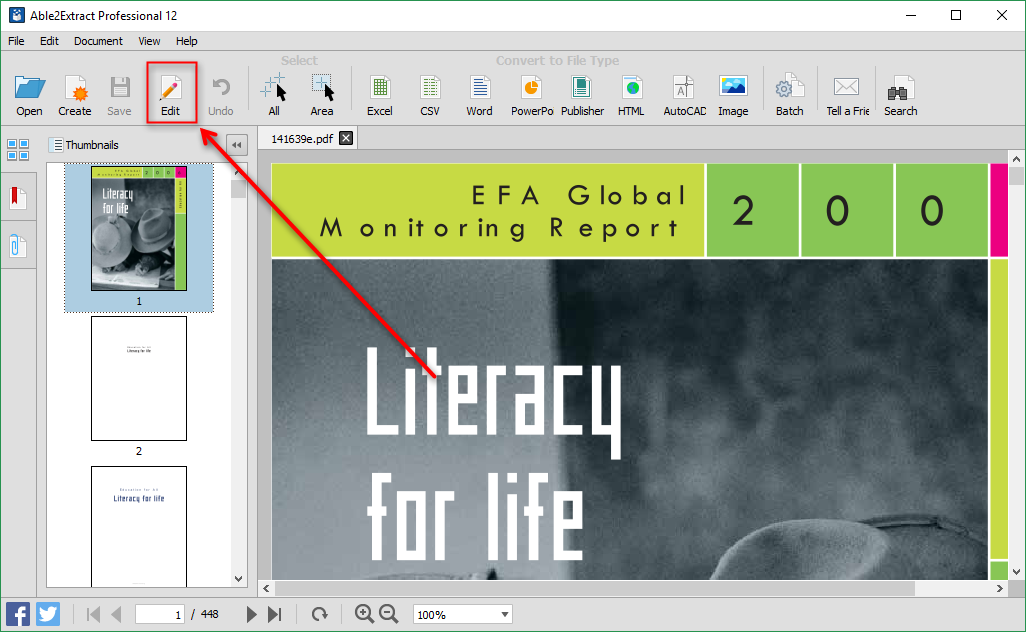
Along with your pdf open in acrobat's window, pick out edit pdf from the equipment menu. blue boxes then seem round every pdf detail—text or graphics. to accurate an errors within the text, honestly click inside the. When you signal a pdf the usage of your virtual id, the pdf becomes examine-handiest for others. in case you received a pdf digitally signed with the aid of others, you can sign it, but can’t edit it. even as signing a pdf, to edit how pdf if the signer chooses to fasten the report after signing, the report becomes examine-handiest for every person, which includes the signer.
Open adobe acrobat. within the top navigation, pick report > open pick out your pdf document from the document window. whilst your record opens, pick out "edit pdf" in the right-hand toolbar. This wikihow teaches you a way to edit pdf files using adobe's proprietary acrobat seasoned dc software program or by means of changing a pdf record to word format in microsoft phrase. if you are seeking out a unfastened choice to edit pdf documents, you could use libreoffice draw, although it does not have as many functions as adobe acrobat seasoned dc. Edit pdf files with pdfescape an online, loose pdf reader, unfastened pdf editor & free pdf shape filler. view pdf files on the web. fill out pdf forms speedy with out adobe acrobat. no watermarks or registration. absolutely loose. Edit pdf this on line pdf editor lets in you to without delay edit a pdf record. upload textual content or photos or draw containers, circles and arrows for your pdf page. you may also highlight passages or add a watermark to the pdf.
Add hyperlinks to pdf to edit how pdf and edit current hyperlinks. upload new hyperlinks to net urls or pages inside the record. without problems edit existing links within the pdf. whiteout pdf. cover a part of the pdf page with a white rectangle so the contents is now not seen. add shapes. click the 'form' tool to feature rectangular or ellipsis shapes to a pdf page. The use of sejda 1. go to www. sejda. com/pdf-editor in a web browser. that is the website to a free online pdf editor referred to as sejda. 2. click upload pdf document. three. pick a pdf file and click add. this uploads a pdf that you could edit the usage of sejda's online editor. 4. add text to your record. to. Even though amazon kindle and the kindle fire are absolutely separate matters, the kindle fireplace is often used as a analyzing platform. as such, it can read pdf documents with out an excessive amount of attempt. however can you operate the famous pill tool to edit pdf files? right here’s the way to use and edit pdf documents on kindle hearth gadgets.
Click on in a text box to edit the text with the integrated pdf editor. in the bodea brochure. pdf pattern file, click in the first textual content box to correct the “legcay” typo via typing “legacy”. you may to edit how pdf also use options in the layout section inside the proper pane to customize textual content. research extra approximately modifying textual content in pdfs. In the context of pdf modifying, though, you must keep in mind inkscape most effective if you need to delete or edit the pix or text within the pdf. we suggest you operate a unique device on this list to edit pdf forms or add shapes after which plug that pdf into inkscape if you need to surely edit the preexisting text.

You received’t be editing the original pdf although. as an alternative, word converts the pdf to phrase's local layout, turning the segment headers to word styles and greater so that you can without difficulty edit and reuse the document. to import your pdf into word, just open it inside of phrase or right-click on on a pdf document in explorer and pick out to open it in word. To edit a pdf, genuinely open it in word. this works exceptional with pdfs which are in most cases text. visit file > open. certificates 3 awesome scientist certificates 1 right here's how easy it's far: use the pinnacle menu or look for a specific keyword eg commencement scroll through the consequences if you do not see an current layout that meets your requirements, think about a shade for your border use the menu hyperlinks to select a colour-based totally template with editable wording (doc or pdf) download the border template you want edit the wording to fit your actual needs then To start editing your pdf, you need to open the report in adobe acrobat. go to document > open. select the edit pdf device in the right pane. click on at the textual content or photo you’d like to edit.


Komentar
Posting Komentar