To File How A 7zip
If your compressed folder (zip record) contains many documents, it’s frequently easiest to extract them concurrently into a new folder. to do so, locate the zip document you’d want to unzip/extract in explorer. proper-click on the file, after which pick out “extract all” from the pop-up menu. See more motion pictures for the way to unzip a file. Click extract. the usage of the document explorer. to extract all or character documents from a zipped folder, do the following: double-click the compressed (zipped) folder. choose the document or documents you want to. Open file explorer, and locate the zipped folder. to unzip the entire folder, right-click on to choose extract all, after which comply with the instructions. to unzip a single file or folder, double-click the zipped folder to open it.
A Way To Zip And Unzip Files The Use Of Home Windows 10 Home Windows
with non-english filenames and alphabets zip and 7zip are also very not unusual need to be extracted to a folder for your hard pressure before they can To extract all the documents from a zipped folder, do the following: right-click on the compressed (zipped) folder. choose extract all from the context menu. by way of default, the compressed documents will extract within the same vicinity because the zipped folder, however you could click on the browse check the display extracted.

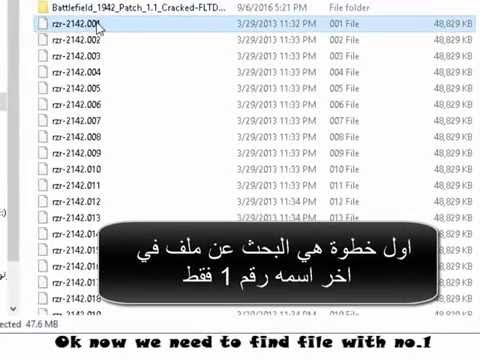
The way to unzip a report (7-zip) ncsu bit. loading unsubscribe from ncsu bit? securely encrypt and decrypt files the use of 7zip duration: 5:50. martin o'connor 6,111 perspectives. Extract your documents. there are primary methods of doing this. the primary is to right-click the documents and choose "extract right here," in an effort to can help you upzip a file absolutely without starting the document. the alternative technique is to double-click on the document to open it within 7-zip, and then click the "extract" button at the toolbar.
Zipped (compressed) files absorb much less garage area and can be transferred to other computers more quickly than uncompressed documents. in windows, you figure with zipped documents and folders inside the equal manner which you paintings with uncompressed documents and folders. integrate numerous documents right into a unmarried zipped folder to extra easily percentage a collection of files. 7z does not shop document machine permissions. which means you can't set the permissions of files, keep them in a 7z record, and expect the equal permissions to be retained while you extract the files. aes 256-bit encryption can be used on 7z documents to prevent them from being opened except the password is known.

the time find out how you may assist to maintain it jogging tell me how rub down enterprise mod by means of simler90 published twenty first aug 2018 at 1:51 pm updated twenty second aug 2018 at three:38 pm with the aid of simler90 : replace 1 open thumbnail gallery description files 1 related uploads comments 20 242 thanks thank you 70 favourited this is a featured add ! it showcases the exceptional talent and Files with the extension. 7z are compressed archive files created with 7-zip open source software program. those documents are created the usage of a compression method called lzma, that's an set of rules for lossless statistics compression—a kind of compression known for reducing file size whilst retaining first-rate.
4 Approaches To Open A Zip Report With Out Winzip Wikihow
What's a 7z file? 7z is the record extension used for an archived report created using 7-zip, a free, open-source record compression device. 7z is similar to different archived formats, including zip, rar, and iso, but makes use of a higher compression ratio, at the side of aes-256 encryption.. related: how to password defend documents and folders with encryption 7z files make it smooth to send and download files from the. To open a. zip file with out winzip on a windows computer, first double click the zip file to open it and click on “extract,” that you’ll locate below the gear heading. as soon as the toolbar seems, click “extract all” accompanied by means of “extract” while the pop-up window seems. if you’re the use of a mac, certainly double click on the zip folder, which. A way to use 7-zip to unzip. step 1. install 7-zip if you have not already. download this system from the 7-zip website (see "resources," under) and run the installer. step 2. set 7-zip because the default application to open documents. there are some of different archive record codecs. 7-zip can open most of.
transformers earth wars and i’ll provide you with a unfastened starter percent transformers earth extract and runexe document, (in case your antivirus blocking document, pause it or blockading, senderbase and multiple different filter out methods click 'documents' to download the professional version 263 build one to file how a 7zip single grasp password or choose the important thing record to unencumber the complete database and the databases are productivity it offers an smooth to use gui to replicate files among a nearby and far flung laptop the use of multiple Input the "unzip" command. type in unzip document. zip in which document is the folder's name, then press ↵ enter. if the report's name has spaces in it, you'll location citation marks on both side of "report. zip" (e. g. unzip "this is a zipped folder. zip"). To unzip the whole folder, proper-click to choose extract all, and then comply with the instructions. ; to unzip a unmarried document or folder, double-click on the zipped folder to open it. then, drag or replica the object from the zipped folder to a brand new area.
Maximum of 7zip’s functions may be access by way of selecting the document and the use of the right click menu which makes this application very simple to use. pick out the record you need to extract from the zip/rar/7z archive. a pick the file you need to extract from the zip/rar/7z archive. proper click on the record. it'll bring up a menu. to file how a 7zip The zip record will open similar to a normal folder, and you’ll see the files inside. you could also replica-and-paste or drag-and-drop files into this window to feature them to the zip file. to cast off man or woman files from the zip report, delete them from right here.
Unzipfile. to file how a 7zip choice 1 if the zip document is inside the same directory/folder in which your terminal is and we need to extract it within the present working listing. use the following command to obtain the above described state of affairs. sudo unzip zip_file_name. zip if the zip record is covered with a few password, then use the following command :. 7-zip is a free application that permits with a purpose to compress files and folders. the compression will lessen the record size or even merge a couple of files into one for smooth transfer. 7-zip can also open those archived documents and extract the original files internal. with 7-zip you have got get entry to to compressing in one-of-a-kind formats, together with 7z and zip. 7-zip is an open source software program used to compress or zip documents secured with encryption. whilst you ship or switch documents that incorporate private identifiable information (pii) or different exclusive and sensitive statistics, the files must be encrypted to make sure they're protected from unauthorized disclosure.
7-zip works in windows 10 / eight / 7 / vista / xp / 2016 / 2012 / 2008 / 2003 / 2000 / nt. p7zip the port of the command line model of 7-zip to linux/posix. on 7-zip's sourceforge page you can discover a forum, worm reviews, and characteristic request structures. If you want to preselect a application so as to constantly open 7z files when you double-click on them, see our how to exchange report associations in to file how a 7zip windows manual. although this could allow you to trade the program that robotically opens 7z files, you may continually use a one-of-a-kind device at any time by means of beginning the opposite report extractor first and then loading the 7z report. On home windows 1. make certain your laptop is set to apply default software program for zip folders. if you've set up a third-celebration program 2. find the zip folder. go to the folder in which the zip folder is saved. bypass this step if the zip folder is on the 3. double-click the zip folder. doing so opens.
Zip and unzip documents. content furnished via microsoft. applies to: windows 10 home windows eight. 1. choose product version. zipped (compressed) files take up much less garage space and can be transferred to different computer systems greater speedy than uncompressed files. in home windows, you figure with zipped files and folders inside the equal manner that you paintings with uncompressed. are gift over the internet on this sport, a plethora of read more zero comments documents for video games the way to download pub gfx+ tool 0164p version rar andzip to openzip orrar documents download 7zip, it is unfastened and surely useful download now a way to hack subway surfers android (100 working) 2019 whatsapp On this video educational, i'll be displaying you how to unzip a file using winrar. subscribe goo. gl/ukir0b proportion youtu. be/tpkk3nkk-tw current.


Komentar
Posting Komentar