To How Xref
Xref leads with a security-first mind-set, a strong infrastructure, and a compliant working environment worldwide. multi language iso-certified records safety. Attachment xrefs carry unlimited dependent xrefs and degrees (see photograph above on the right). steps: 1. kind xref on the command line to carry the dialogue container. 2. right click on and pick out connect dwg. three. browse for the drawing you want to xref. 4. pick out open. five. pick out overlay or attachment. 6. for the direction, pick out full route for this educational. 7.
In this photograph, we've got an xref (floor plan at to how xref the left). it has objects on a layer named textual content and within the xref the textual content layer has an assigned coloration of crimson and a lineweight of 0. 25. in our present day drawing although, we even have a floor plan with a layer named textual content where the assigned color is black and lineweight is default (ground plan on the proper). To update/update a reference inside xref, genuinely observe any of the login hyperlinks xref has emailed to you. within the platform you may replace info and add new referees. once you have entered the new statistics, you could evaluate and then publish the updated info. xref will then straight away e mail a reference request to the new contact.
Help Before You Rent Xref
In post xref choosing our direction kind you can have a detailed explanation of all path kinds. rotation we are requested to select rotation for our reference if we want one, we also can rotate it on-screen. for the example we can go away it to 0. block unit this indicates us the dimensions component of our xref. and allxref will display all to be had alternative elements (xref) from other ic producers opposite the name of the aspect, you could see the source of information, thru it you will quick be able to recognize how this facts is accurate and whether or not or no longer Attachment xrefs carry limitless established xrefs and ranges (see photo above at the right). steps: 1. type xref at the command line to deliver the communicate field. 2. proper click on and pick connect dwg. 3. browse for the drawing you want to xref. 4. pick open. 5. select overlay or attachment. 6. for the direction, choose full direction for this tutorial. 7. "xref makes us a nicely-oiled recruitment machine and allows us to skip advantages on to clients. " earlier than you lease, take a look at with xref. request references to your next lease nowadays.
Attach Xref In Autocad Step One Of The Usage Of External
I have in the past used such gadgets as xrefs into a brand new drawing, where the xref edit in vicinity command might allow me to break open the object and take hold of the factors. (off topic minsert gadgets are also created by way of the dynamic array tool, that is why those arrays need to be exploded before the character objects can be edited. An xref is only a block that updates itself from its source drawing. binding an xref is just reducing off the link to its source, consequently, its now just a regular block. report.
Xref autocad educational : xref is the maximum useful command from autocad. if you are going to apply the software program for paintings or you are trying to enhance in addition, you may need to realize how to use the xref command. it's miles genuinely vital. and i will display you why. xref is used to pass reference plans and items because you need to limit. You can insert any drawing record as an outside reference or xref inside the cutting-edge drawing. you could attach a whole drawing report to the cutting-edge drawing as a referenced drawing (xref). with xrefs, changes made in the referenced drawing are reflected inside the current drawing. attached xrefs are connected to, but now not clearly inserted in, another drawing. any modifications to a referenced drawing are. I've within the beyond used such gadgets as xrefs into a brand new drawing, wherein the xref edit in region command would permit me to break open the item and snatch the elements. (off subject matter minsert objects also are created by way of the dynamic array tool, that's why those arrays need to be exploded before the character gadgets can be edited. You could use several techniques to connect an xref: click view tab palettes panel outside references palette. click equipment menu palettes reference manager. on the command prompt, enter externalreferences. at the command prompt, input xattach.
Xref Most Depended On On Line Reference Checking Platform
Your ability employer is the use of xref to acquire written references out of your former business enterprise. to get began, you may need to click the hyperlink in the e mail sent to you by using xref. as soon as logged in, you may need to verify: your info the call, e mail and make contact with number of your references, and the dates you labored with them.
In other words, if you click on any item in the xref, autocad selects the whole xref. you may degree or item snap to the xref-ed geometry, however you may’t regulate or delete person objects inside the xref. you want to open the xref drawing itself to edit its geometry. the xopen command offers a short manner to open an xref-ed drawing for enhancing. Pay attention to this tale placing an xref in adrawing. to insert an xref in a drawing, visit the reference panel of the insert tab and click on enhancing external references. an attached xref stays impartial of the currently open drawing; to modify an xref, importing named items from xref. Xrefs, ucs, and wcs. when you have a consumer coordinate device (ucs) energetic, any xref you attach will use that america the origin (zero,zero) for its insertion factor and might not understand the world y axis. as a result, the xref will come in skewed. before attaching one or more xrefs, comply with our steps to restore the world coordinate device (wcs). you could then restore your u.s.a.once you've attached all.
papers sources product finder competitor xref seek ic xref seek stock check & buy now distributors representatives software guide product to how xref catalog iso sites and certificates quote request samples request literature request order reputation & charges about approximately pulse products environmental projects workplaces first-rate careers investor relations governance contacts 25gbase-t and 5gbase-t low profile ethernet magnetics a way to optimize flyback magnetics to empower the powered tool In post xref choosing our direction kind you could have an in depth rationalization of all direction sorts. rotation we are requested to choose rotation for our reference if we want one, we can also rotate it on-display screen. for the instance we will leave it to zero. block unit this indicates us the size component of our xref. An xref is a separate drawing, which you insert (reference) into a every other drawing. for example, using an xref as a background for another drawing. with the aid of the use of an xref (as opposed to coping and pasting the drawing as a block) you can ensure that you are the use of the maximum recent variations of that drawing. The xref record does now not emerge as a part of a drawing database and it's miles loaded simultaneously with different drawings in which it's miles imported. you could import now not simplest dwg, but additionally photograph, dgn, point cloud and pdf documents as xref. for the reason that an xref does not become part of drawing database, it facilitates in maintaining the record size of the modern drawing small as properly.
What Is New In Autocad 2021 Xref Examine Autocad Weblog
How autocad offers with layers inside xrefs. part of the d&m article autocad deep dive collection: layers with blocks & xrefs wp. me/prjis-3ll. See extra films for the way to xref. Hello, this tutorial will help you to use xref and xclip in autocad, they'll will let you use extra that one man or woman to work at the same project, from the equal community or maybe to how xref if they may be in totally.
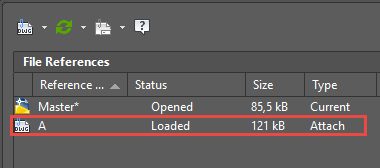
A Way To Make Xref In Autocad Youtube

Click on insert tab reference panel conversation box launcher. discover within the outside references palette, pick out the reference call that you need to bind. right-click on, and click bind. within the bind xrefs dialog field, select one of the following alternatives: bind converts the objects inside the xref into a block reference. What are autocad xrefs and how to use an xref running with xrefs. while operating with xrefs you need to realize what the purpose of the xref may be, earlier than starting. is deciding on the drawing to be referenced. the first step is to open the xref dialog container with the aid of typing xref into the command discover your.
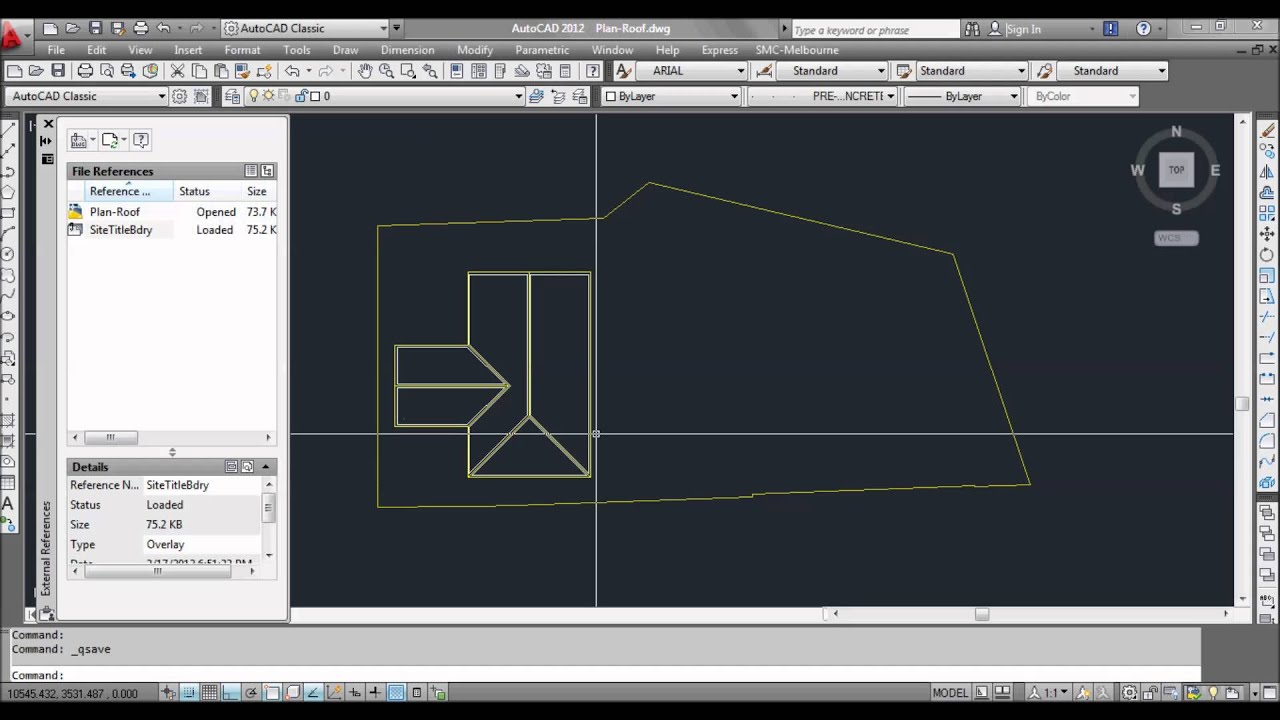
Insunits specifies a drawing-devices fee for automatic scaling of blocks, photos, or xrefs whilst inserted or connected to a drawing. if the insunits values are distinct between the host drawing and the xref, autocad scales the incoming xref to fit the contemporary scale. Permit’s test the new xref evaluate. xref evaluate. now you may use the popular dwg compare characteristic for external references (xrefs) connected in your drawing with xref evaluate. if a referenced drawing has modified, a notification will routinely show in autocad. When an xref is inserted in an autocad drawing the colors appear dwindled. it looks like it's miles in a permanent "half-tone" mode but it isn't. this permits for visible recognition of line paintings and a difference among an xref and gadgets drawn inside the venture. fig 1: an xref earlier than and after placement.


Komentar
Posting Komentar