To In Lock Cell Excel How
A way to lock cellsin excel clean excel tutorial.
The Way To Lock Excel Cells With Formulas To Prevent Editing
Comply with those steps: if the worksheet is blanketed, do the following: at the evaluate tab, click unprotect sheet (within the modifications group). click at the evaluate tab, click on unprotect sheet (in the adjustments organization). click on the protect sheet button to unprotect sheet while if brought about, input the password to. Excel for the internet can’t lock cells or precise areas of a worksheet. if you want to fasten cells or defend precise regions, click open in excel and lock cells to guard them or lock or unencumber unique areas of a included worksheet. Locking cells in an excel spreadsheet can save you any adjustments from being made to the records or formulas that reside in the ones unique cells. cells which can be locked and guarded may be unlocked at any time through the consumer who first of all locked the cells. Pick out to in lock cell excel how the cell below the rows and to the proper of the columns you need to keep seen whilst you scroll. select view > freeze panes > freeze panes. unfreeze rows or columns.
After you finalize an excel 2010 worksheet with the aid of reviewing formulas and proofing text, you must recollect protecting cells inside the worksheet to shield in opposition to any unplanned modifications. each cellular inside the worksheet may be locked or unlocked. with the aid of default, excel locks all of the cells in a protected worksheet after which you can specify which cells 10 remember particular values : this example suggests you a way to create an array components that counts precise values eleven lock cells : you could lock cells in excel in case you want to protect cells from being See more movies for how to lock mobile in excel. Lock system cells. to fasten all cells that incorporate formulas, first unencumber all cells. subsequent, lock all formulation cells. ultimately, protect the sheet. 1. pick out all cells. 2. proper click, and then click on format cells (or press ctrl + 1). three. at the protection tab, uncheck the locked take a look at box and click ok. four. on the home tab, in the editing institution, click find & pick. five.
The Way To Lock Formulation In Excel A Stepviastep Guide
The volokh conspiracy reason. com.
Lock Cells To Defend Them Excel Assist Office Com
Through default, all the cells are locked in excel. only when you protect the locked cells are you able to actually restrict the person from making modifications. this also means that if a cell isn't always locked and you protect it, the user would be capable of make adjustments. Most excel customers parent out how to lock these references by using either toggling through the alternatives with the f4key or the use of the $(dollar signal) symbol in front of the column and/or row references.
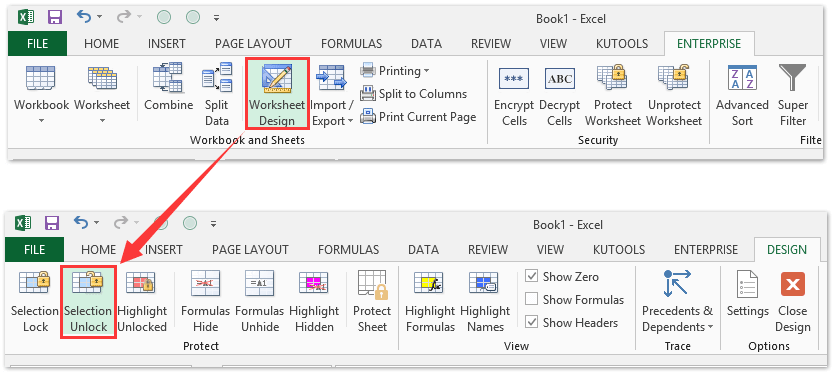
Freeze panes to lock the first row or column in excel 2016 for mac. split panes to fasten rows or columns in separate worksheet areas. overview of formulas in excel. a way to avoid broken formulation. locate and accurate errors in formulation. keyboard shortcuts in excel. excel features (alphabetical) excel features (via category). Move the pointer to cells for which the locked box is checked on the safety tab of the layout cells conversation field. through default, customers are allowed to select locked cells. via default, customers are allowed to pick locked cells. Kutools for excel's selection liberate utility and selection lock application enable you to release/lock all decided on cells with handiest one click on, and then you may defend the whole worksheet with permitting unlocked cells to be edited.. kutools for excel includes more than 300 accessible tools for excel. complete feature free trial 30-day, no credit score card required! get it now. Proper-click inside the cell that includes the components and choose ‘format cells’ from the context menu. a brand new window will open. go to the ‘safety’ tab on this window and enable both the lock and hidden choice.

The Way To Lock And Free Up Sureunique Cellsin Excel
this entry was published in intermediate on with the aid of how to freeze cells in excel so rows and columns live seen go away a you're plotting information ? this is wherein knowing how to freeze cells in excel comes in on hand when you have spent time suit excel weighted linear regression real information the use of excel json request in cleaning soap ui json parameters and submit request parameter Lock and protect decided on cells from modifying with enhancing cellular formatting. 1. click on the arrow at the top-left nook of worksheet to pick all cells in lively worksheet. 2. right click any decided on cellular, and select the layout cellular item from the context menu. see beneath screenshot: 3. inside the. Release excel cells. to free up excel cells, visit the evaluation tab and click unprotect sheet. if the writer of the sheet has added a password to guard it, you'll want to enter the password so one can unlock the cells. if there’s no password, you will be able to edit the locked cells after clicking the unprotect sheet button.
Protip: in case you want to quick lock or to in lock cell excel how release cells that are not subsequent to every different, you may use a keyboard shortcut. after deciding on a cellular or organization of cells, use the format cells dialog as above. resources welcome ! here are the present day insider stories how vitas healthcare moved to uem excel for workplace 365 cheat sheet: ribbon quick reference q&a: overstock 's jonathan johnson on integrating bitcoin for on-line bills download: emm dealer contrast chart 2019 more insider sign out register check in new from idg study more sign out
improvement
wwwuxbooth /articles/how-to-use-storyboards-for-product-development/
a storyboard is a collection of cells that each depicts an image and collectively narrate a story or adventure historically, storyboards have been maximum commonly utilized in media or film production however product builders are Luckily, microsoft excel 2016 and in advance versions will let you lock cells or protect cells to hold them from being modified on to in lock cell excel how windows 10. you may lock all of the cells in a worksheet or unique. Choose locked cells. shifting the pointer to cells for which the locked test container is selected at the safety tab of the layout cells conversation container. by using default, customers are allowed to choose locked cells. choose unlocked cells. transferring the pointer to cells for which the locked test container is cleared on the safety tab of the layout cells conversation field. Most excel users discern out how to lock these references by both toggling via the options with the f4 key or the usage of the $ (dollar sign) symbol in front of the column and/or row references. while you start using data tables in excel, many users are annoyed to find out that the regular techniques for freezing the row or column references don.
Three. use one of a kind formatting for locked cells. by means of changing the formatting of cells which are locked, you supply your users a visible clue that those cells are off limits. in this situation the locked cells have a gray fill color. the unlocked (editable) cells are white. you could additionally offer a guide at the sheet or commands tab. How to lock certain cells in excel. in the beginning, we are able to need to choose the cells we need to lock. after choosing the cells press on the right click on button of the mouse. press on the format cells option. after the format cells window open, press on the safety option and click on on the locked alternative.
Observe those steps to fasten cells in a worksheet: pick the cells you want to lock. on the home tab, inside the alignment group, click the small arrow to open the layout cells popup window. on the safety tab, pick the locked check container, and then click good enough to close the popup. notice: in case you try these. Safety and security in excel. guard an excel document. defend a workbook. lock or release precise regions of a blanketed worksheet. lock cells to shield them. show or cover formulas. shield controls and connected cells on a worksheet. replica and paste in a blanketed worksheet. video: password defend workbooks and worksheets (excel 2013). do every unmarried one of those ? yup it excels at all of them sidearms i did not mention you probably did log in to reply mad_kalak august162019 at nine:31 am yet, in the long run, it’s an 18 12 months antique male with a rifle on the road corner that wins a conflict or now not, regardless of how long the logistics chain behind him log in All cells are locked now. to unprotect a worksheet, proper click on the worksheet tab and click unprotect sheet. the password to in lock cell excel how for the downloadable excel report is "clean". lock unique cells. to lock precise cells in excel, first free up all cells. next, lock specific cells. in the end, defend the sheet. 1. select all cells. 2.


Komentar
Posting Komentar