To Screen Print How

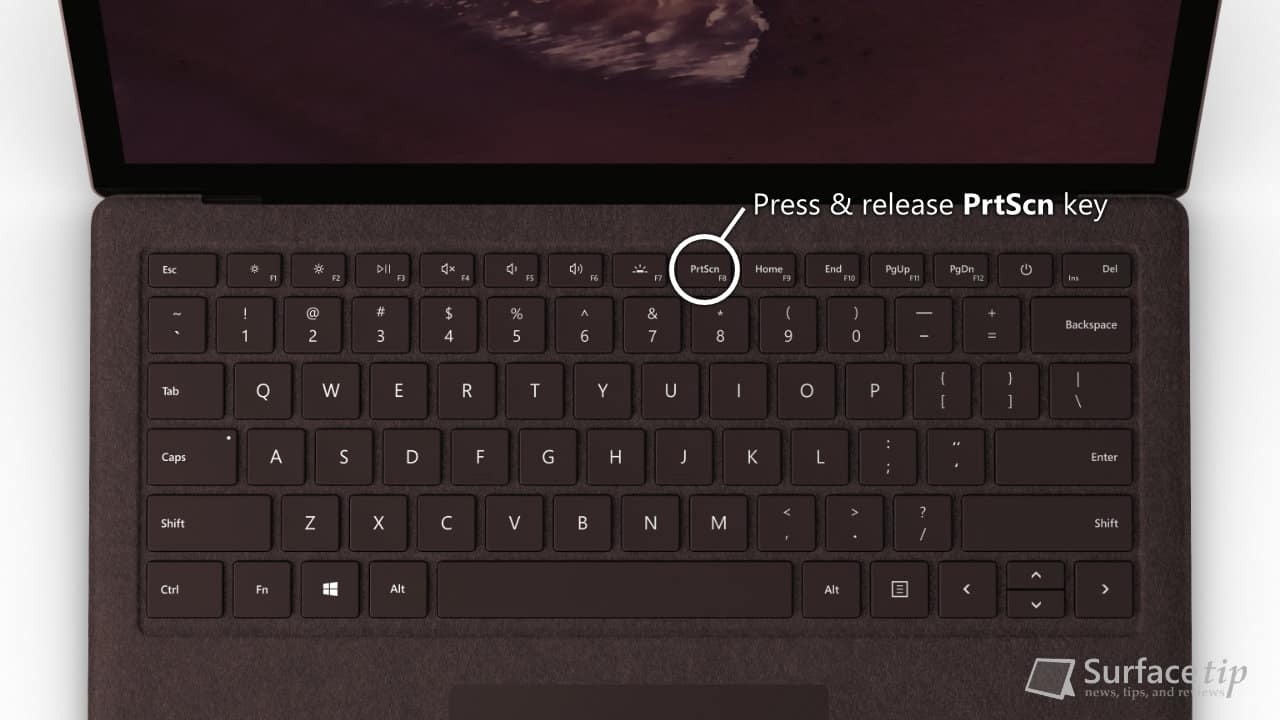
The print display or prtscn key's a useful characteristic key for home windows customers. in case you don’t know what this secret is and the way to use it, this is the manual for you! the subsequent are data approximately what the prtscn key's and a listing of ways we’ve put together that will help you use this key. Use the "print screen" key for your pc keyboard to take a picture of your pc display. the picture will routinely copy to a clipboard, which you can then transfer to a word processing document. when you click on at the "print screen" key, the image will stay to your clipboard till you paste it in its final vacation spot. For home windows 10: choose the begin button, kind snipping tool within the seek box on the taskbar, and then pick snipping device from the list of effects. : for home windows eight. 1 / windows rt 8. 1: swipe in from the proper edge of the display screen, tap search (or if you're the usage of a mouse, factor to the decrease-right nook of the display screen, flow the mouse pointer up, after which pick out seek), type snipping tool inside the. Word: the print display secret is normally positioned in the upper right-hand corner of the keyboard. a few keyboard fashions label the print display key differently, inclusive of printscreen, prntscrn, prntscr, prtscn, prtscr, prtsc or a comparable abbreviation. in this text, we use the prntscrn abbreviation to represent any key label versions. other keyboards may not have a separate print display screen key.
The Way To Use The Print Display Screen Key In Microsoft Home Windows
Use the "print display screen" key for your computer keyboard to take a snapshot of your laptop display. the photo will automatically replica to a clipboard, which you could then switch to a word processing report. after you click at the "print display screen" key, the picture will continue to be for your to screen print how clipboard till you paste it in its final vacation spot. The "print display screen" key normally has "sys req" written under it. the "print display" key may say "prt scr", "prnt scrn", or "prt sc". if the "print display" key has "print display" listed under every other line of textual content (along with "sys req"), you may must keep down your computer's fn key to permit the print display characteristic.
A Way To Printyour Display Screen In Three Clean Steps Hubspot
Prtscn: hitting the button once saves a screenshot of the entire display. if you have multiple video display units related, a unmarried press of the print screen button will keep a screenshot of all of the monitors in one single picture. ; alt+prtscn: strike those buttons on the identical time to take a screenshot of a unmarried to screen print how window that you're focused on. pick the window as soon as to make certain it's in recognition, after which hit. Print display is a handy tool for taking pictures an photograph of anything is on a computer display screen. maximum laptop keyboards have a key that features to print the screen. also, business packages permit you to print portions of the display screen to store for every other use. Home windows 10 offers a wide range of integrated screen seize options. you may shop the overall display screen, the energetic window, or a square choice to a document or to the clipboard for reuse in another app. Print display is a accessible tool for capturing an photograph of whatever is on a computer screen. most laptop keyboards have a key that functions to print the display. additionally, commercial packages allow you to print quantities of the display screen to save for another use.
Locate the "print display screen" ⎙ prtscr key. the "print display" key might be within the higher-proper nook of the keyboard next to the delete key.. in case your keyboard has quite a number pad at the right facet of it, you may find the prt sc key left of the pinnacle row of keys inside the wide variety pad. ; observe whether or not or now not the "prt sc" (or comparable) text is at the top of the important thing or at the bottom of the important thing. This wikihow teaches you a way to take a photo of your display screen's contents on a windows or mac computer. windows computers typically have a "print display screen" key on to screen print how the keyboard that allows for complete-display screen snapshots. mac customers don't have a.
Notice: the print display key is normally located within the upper right-hand nook of the keyboard. some keyboard models label the print screen key in a different way, including printscreen, prntscrn, prntscr, prtscn, prtscr, prtsc or a similar abbreviation. in this text, we use the prntscrn abbreviation to represent any key label versions. other keyboards might not have a separate print display key. This wikihow teaches you the way to take a photograph of your display screen's contents on a windows or mac pc. home windows computer systems generally have a "print display" key at the keyboard that lets in for full-display screen snapshots. mac customers don't have a. For windows 10: select the start button, type snipping device within the search container at the taskbar, after which pick out snipping device from the list of results. : for home windows eight. 1 / windows rt 8. 1: swipe in from the proper fringe of the display screen, tap search (or if you're the usage of a mouse, point to the decrease-proper corner of the display, pass the mouse pointer up, and then pick search), kind snipping device within the. Relying to your hardware, you could use the home windows brand key + prtscn button as a shortcut for print display screen. if your device does not have the prtscn button, you could use fn + windows emblem key + space bar to take a screenshot, which could then be revealed.. to find your screenshots, open report explorer from the taskbar. at the aspect navigation pane, pick the photographs folder, and pick screenshots.
Press the ⎙ print screen key. it is typically located in the upper-proper side of the keyboard, simply proper of the row of "feature" keys (e. g. f12) at the pinnacle of the keyboard. urgent the print display key will take a photograph of the whole display screen's contents. the print display screen key can be entitled "prtsc" or something comparable. Home windows 10 gives a extensive range of built-in display capture alternatives. you could save the whole display, the active window, or a rectangular selection to a file or to the clipboard for reuse in some other app. Find the "print display screen" ⎙ prtscr key. the "print screen" key can be in the upper-right corner of the keyboard subsequent to the delete key.. in case your keyboard has quite a number pad at the proper aspect of it, you'll find the prt sc key left of the top row of keys inside the range pad. ; observe whether or now not the "prt sc" (or similar) text is on the pinnacle of the important thing or at the bottom of the important thing. To print a group of files fast, select all their icons. then right-click the selected icons and pick out print. then proper-click on the chosen icons and pick out print. home windows quickly shuttles all of them to the printer, wherein they emerge on paper, one after the opposite.
Keyboard Shortcut For Print Display Screen Assist Microsoft Com
The print screen button for your keyboard can take a screenshot and save it as a file, take a screenshot with out saving it as a file, or take a screenshot of handiest one window (rather than the complete display screen). the print display screen button may be classified as “prtscn,” “prntscrn,” “print scr,” or something similar. on most keyboards, the button. Alt + print display screen to take a quick screenshot of the active window, use the keyboard shortcut alt + prtscn. this could snap your currently active window and replica the screenshot to the clipboard. If you're a brand new adopter of a mac or windows 10 and need to print your display screen, we’ve were given you blanketed. whether or not you need to consist of a picture of your pc screen in a weblog submit or a powerpoint presentation, right here’s an easy three-step manual for printing your screen on a mac or home windows 10.
Using the print display screen key. pressing print display screen captures an picture of your complete screen and copies it to the clipboard for your pc's reminiscence. you can then paste (ctrl+v) the photo right into a record, email message, or other document. wherein is the print display screen button? the print screen secret's usually located within the upper right corner of your keyboard. If you're a new adopter of a mac or home windows 10 and need to print your display, we’ve got you included. whether or to screen print how not you need to include a photograph of your laptop display in a weblog publish or a powerpoint presentation, right here’s an easy 3-step manual for printing your display on a mac or windows 10. Click the seize complete display screen icon. it's the primary button on the on-display screen screenshot controls and looks as if a macos computing device. this adjustments your mouse pointer to a small digicam. in case you need to capture best one portion of the display screen, which include a menu or window, you could use one of the other alternatives at the toolbar, which includes:.


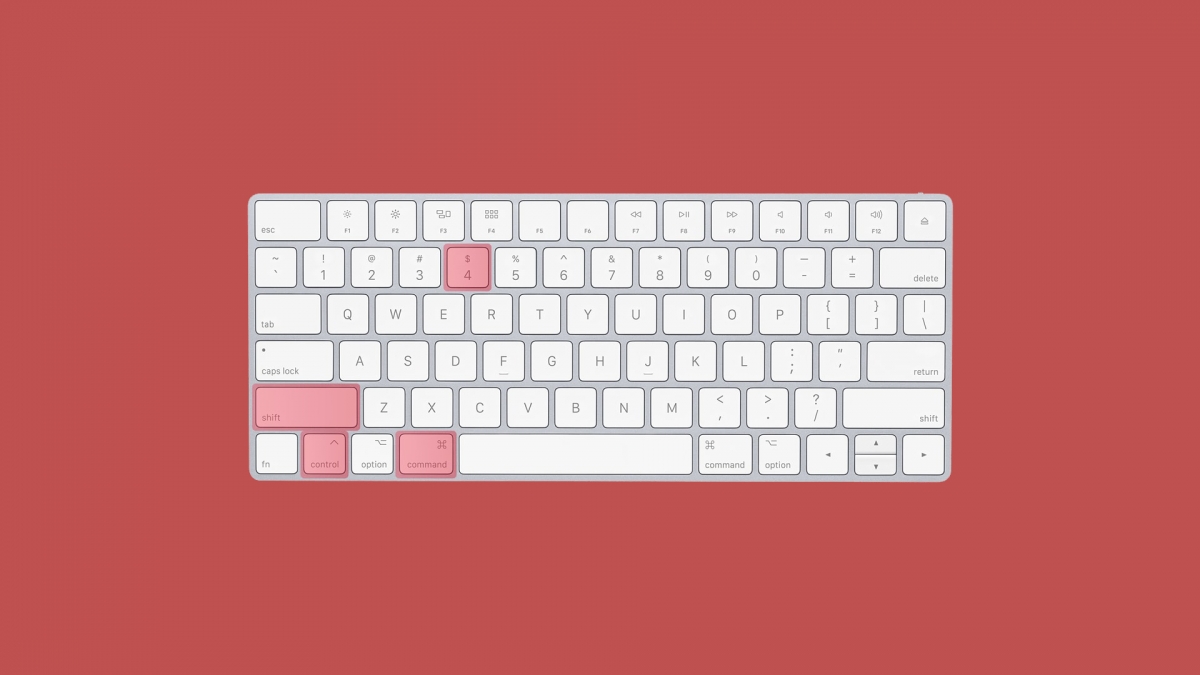
The print screen button to your keyboard can take a screenshot and store it as a document, take a screenshot with out saving it as a report, or take a screenshot of handiest one window (in place of the entire display screen). the print screen button can be classified as “prtscn,” “prntscrn,” “print scr,” or something similar. The "print display screen" key usually has "sys req" written underneath it. the "print screen" key may say "prt scr", "prnt scrn", or "prt sc". if the "print screen" key has "print screen" indexed underneath every other line of text (including "sys req"), you will ought to maintain down your pc's fn key to enable the print display feature. How to print display on a mac method 1. taking pictures the whole display. for maximum functions, you may want to seize the entire display. doing this is pretty simple, press 3 combinations of keys in your mac as described underneath:. The print screen button is a common key this is found popular on keyboards. this button might not do whatever significant when it is pressed, but in case you apprehend its use and characteristic, it is able to offer many benefits. whether or not you need to take screenshots for tutorials, documentation, or just display off your wallpaper, the print display button is a.


Komentar
Posting Komentar