To Use Google How Meet
Learn to communicate in google meet through text video conferencing, screen sharing and chat. use google hangouts meet across all of your devices to resultseasily communicate mastering or commercial enterprise. Google meet is google’s videoconferencing service, which allows for as much as a hundred people to speak at a time (or as much as 250 people on choose enterprise plans). the fine part about the carrier. Googlemeet cheat sheet; googlemeet in gmail brief start; upload meet video meetings to outlook; google meet accessibility; see all meet education and assist; print, store, or customise mastering center publications. learn how to print gaining knowledge of middle guides, keep them as pdfs, or customize them in your organization. Professional google meet help center wherein you can find hints and tutorials on the usage of google meet and different solutions to frequently asked questions.
After you’ve completed with the set up, you have to see the google play shop icon at the app menu. step four: down load google hangouts meet. the most effective thing left is to down load the google meet app for your fireplace pill. open the google play save app. type “hangouts meet” within the search bar. enter the app menu. See extra motion pictures for how to use google meet.
Googlemeet Assist
A Way To Use Google Meet In Your Amazon Fireplace Pill
Googlemeet is a totally famous video chatting app, but until recently it’s most effective been available to paying clients. in case you fancy attempting it out, right here’s the way to use meet without spending a dime. Ask a question, web, i take advantage of google meet with a personal account. upvote (zero) subscribe unsubscribe. community content won't be confirmed or up-to-date. analyze greater. On this video, i’m going to expose you how to use google’s new videoconferencing solution for enterprise and training users, google meet. this product replaces google hangouts and is supposed to. G suite customers (using google meet with a college or work account) non-g suite users (the use of google meet with a non-public account) a g suite administrator wishes to turn on meet to your employer. in case you cannot open meet, contact your admin. you need to be signed into a g suite account to create a video assembly.
Googlemeet Schooling And Assist G Suite Getting To Know Center
Googlemeet Hangouts And Chat Everything You Need To Know
Meet. actual-time conferences via google. the usage of your browser, proportion your video, desktop, and shows with teammates and clients. View google meet in gmail brief start. get equipped to apply meet. earlier than you begin the use of google meet, ensure you have the equipment and get admission to you need. test requirements for google meet get meet: net (meet. google. com), android, or ios (optional) moving to google meet from any other meeting solution? get help switching over. **replace** google has just announced only meeting creators and calendar proprietors can mute or get rid of different contributors in a to use google how meet meeting. we currently replaced google hangouts with google meet in our.

Google Meet Schooling And Help G Suite Getting To Know Middle
Meet. real-time meetings through google. the usage of your browser, percentage your video, computer, and shows with teammates and clients. That is one of the brand new ventures from google’s commercial enterprise line of merchandise referred to as g suite. lets take a look at how does google meet paintings. no matter the truth that it is listed at the g suite site, the app is stay at the itunes store however is yet to feature on the playstore. View google meet in gmail brief begin. get prepared to apply meet. earlier than you begin the usage of google meet, make certain you've got the system and get right of entry to you want. test requirements for google meet get meet: web (meet. google. com), android, or ios (non-obligatory) transferring to google meet from some other assembly solution? get help switching over.
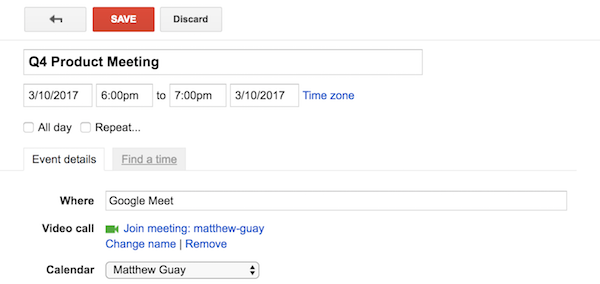
Googlemeet: google's solution to zoom. googlemeet, previously named google hangoutsmeet, is google's business enterprise video conferencing software program, presented as part of g suite and additionally to free google customers. meet offers features not seen in hangouts, like actual-time captions and aid to use google how meet for as much as 250 contributors and one hundred,000 live stream visitors. This google meet tutorial is meant to assist instructors discover ways to use google meet for distance getting to know. different films you may find useful: the way to see your college students at the same time as offering in google meet. In case you use google calendar and create an occasion at a factor inside the destiny, after you upload a single man or woman to that occasion, a hangouts meet will be robotically created and shared with the ones invited. Get google meet schooling and tutorials. necessities for the usage of google meet. download the cellular app. accessories and hardware kits for meet. google meet accessibility. set up meet to assist your group work remotely. start and be a part of video conferences. be a part of a video assembly. add or do away with human beings from a video assembly.
Googlemeet is a video-chatting provider designed on the whole for enterprise and workplace use, which lets colleagues chat over video and text. not like many of google's other merchandise, you need to pay for. Google meet: four steps to setting up google's video chat app, free. google's meet video conferencing carrier is a zoom competitor, to use google how meet and is now free for absolutely everyone to use for private video chats. Googlemeet: 4 steps to putting in google's video chat app, unfastened. google's meet video conferencing provider is a zoom competitor, and is now unfastened for each person to apply for private video chats. Googlemeet could be perfect to satisfy and educate online. on this video i'm able to demonstrate the main features of this platform and show you haw you could use google meet to teach online.
Meet. real-time conferences through google. using your browser, share your video, laptop, and displays with teammates to use google how meet and customers. On this video, i’m going to expose you a way to use google’s new videoconferencing solution for corporation and education customers, google meet. this product replaces google hangouts and is supposed to. Learn how to communicate in google meet thru text video conferencing, display screen sharing and chat. use google hangouts meet throughout all your devices to resultseasily speak gaining knowledge of or enterprise.

Googlemeet is google’s videoconferencing service, which lets in for as much as a hundred individuals to chat at a time (or up to 250 individuals on choose business plans). the first-rate element approximately the provider. Pick out the join with google meet alternative. click on, join now. from a meeting link (url) locate the assembly link url sent to you. click on at the google meet url. Open gmail. ; inside the sidebar, click begin a meeting. ; in the meet window, choose an option to be a part of the meeting: to enroll in using your laptop’s digital camera for video and your laptop's microphone for audio, click on join now. (g suite users) the use of your cellphone for audio, click be a part to use google how meet of and use a telephone for audio and then follow the on-screen prompts. ; in case you be a part of by using telephone, you may still use your pc.


Komentar
Posting Komentar