Use Microsoft Teams To How

There are numerous methods to agenda a assembly in groups: select time table a meeting in a talk (below the field wherein you type a brand new message) to e-book a meeting with the human beings inside the chat. go to calendar at the left side of the app and pick out new meeting inside the top right corner. Microsoft groups is available to customers who have licenses with following office 365 company subscriptions: e1, e3, e5, business top class, and business essentials. in the education plans, it's far available within the a1, a1 plus, a5, and a3 subscriptions. plans are in region to roll out groups in the authorities cloud. groups may be accessed Research the whole lot you want to know approximately the usage of microsoft groups in 15 mins. aya tange from microsoft teams walks through the quit-to-stop user reports with a complete demo educational: from chat and.
Speak With Customers From Other Groups In
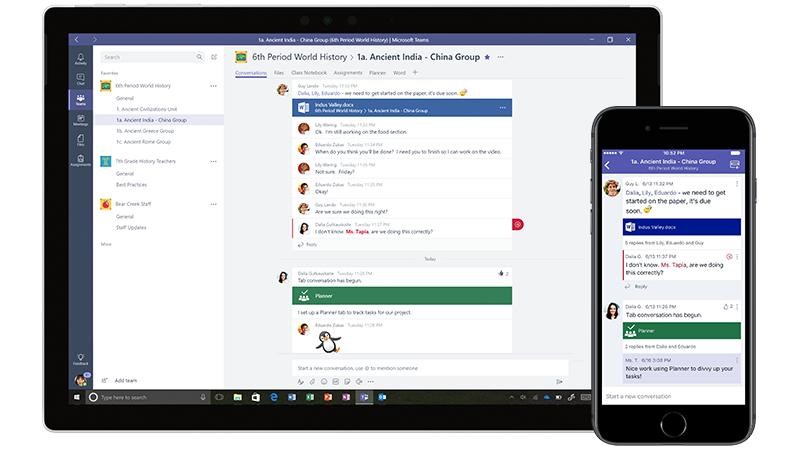
10 Suggestions To Get Started Out With Microsoft Groups Computerworld
Download microsoft groups now and get related throughout gadgets on home windows, mac, ios, and android. collaborate higher with the microsoft teams app. Discover this by means of going to the applicable teams channel and hitting the 3 dots inside the top right nook of the window. subsequent, click on ‘get e-mail address’ and also you ought to see the details generated on.
Apr 20, 2020 in case you already use the commercial enterprise version of microsoft workplace 365, you must additionally see teams as considered one of the usual apps at the workplace . Microsoft had been including lots of latest capabilities and programs to office 365, together with planner, shifts and microsoft teams.. taking over the likes of slack, microsoft describe teams as a ‘chat-based workspace in office 365’ allowing teams (inner handiest at this degree) to paintings together within one window to enhance teamwork.
May additionally 5, 2020 how do i exploit microsoft groups? in addition to the chat-primarily based communications, groups' integration with other microsoft services allows customers . Microsoftteams is to be had to users who have licenses with following office 365 corporate subscriptions: e1, e3, e5, commercial enterprise premium, and business essentials. within the schooling plans, it's far to be had inside the a1, a1 plus, a5, and a3 subscriptions. plans are in area to roll out teams in the authorities cloud. use microsoft teams to how groups can be accessed
Microsoft groups is a completely powerful chat-primarily based workspace for business or organisation variations clients of microsoft workplace 365. in our article we undergo the fundamentals of how to use it. To apply this feature, you may need to paintings in google chrome, microsoft aspect, or the home windows groups laptop app. begin an audio or video chat by way of clicking the meet now button (the only that looks like a. Creating and coping with a microsoft groups hub. to collaborate in groups, you first need to be both a member of a teams hub or the author of 1. to create a .
Microsoftteams is enabled by way of default for most corporations using microsoft 365, with the most effective requirement being a subscription to one of the licence plans mentioned above. Keep in touch and stay productive with groups and microsoft 365, even when you're working remotely. examine extra. microsoft groups assist & gaining knowledge of get started. groups & channels. notification & settings. chat. meetings & calls. files. apps & offerings. get started out. groups & channels.
The Way To Use Microsoft Teams Dummies
Microsoft had been adding lots of latest functions and packages to workplace 365, including planner, shifts and microsoft groups.. taking over the likes of slack, microsoft describe teams as a ‘chat-based workspace in office 365’ permitting teams (inner best at this level) to work collectively inside one window to decorate teamwork. Microsoft teams integrates with all on-line office apps, inclusive of phrase, excel, powerpoint, and onenote, in addition to more than 140 enterprise apps. you could upload as . Discover the groups net app at teams. microsoft. com. to use teams, you want a microsoft 365 account with a enterprise or organization microsoft 365 license plan. for extra records, see how do i am getting get entry to to microsoft groups? supported browsers. net explorer eleven. microsoft aspect. the cutting-edge version of chrome. the state-of-the-art version of firefox.
Microsoft teams is the hub for crew collaboration in microsoft 365 that integrates the people, content material, and gear your crew needs to be extra engaged and effective. Microsoftteams offers a first rate manner for groups who want a chat enjoy to attach. those suggestions will assist you get the maximum cost from the collaboration device. . Studying time: 7 mins [update march 2020] all screen prints and instructions were updated and established as of march 20, 2020. also, check out 9 guidelines for having the first-class teams assembly enjoy!. if you’re new to microsoft groups and need to stand up-to-speed fast on how to organize and participate in a teams assembly, this publish gives five matters initially.
Discover and study microsoft groups in this the way to tutorial. microsoft teams is a chat-primarily based workspace in office 365. while microsoft teams have a committed place use microsoft teams to how designed to help them be greater. Use visitor get admission to to add an person consumer (irrespective of area) to a team, wherein they can chat, call, meet, and collaborate on corporation files (saved in sharepoint or onedrive for commercial enterprise), using workplace 365 apps such as word, excel, or powerpoint. a guest person may be given almost all of the identical groups abilities as a local crew member.
Groups is your cellular messaging hub. start a video chat, assign duties to humans, edit calendars, send a gif, and get admission to cloud storage, proper out of your institution chats. get entry to use microsoft teams to how more than one calendars, sports, and shared obligations multi function region with teams. with this centralized view, occasions, snap shots, and.
Video use microsoft teams to how calls in teams. microsoft teams offers many astonishing and precious video conferencing features. customers can host 1080p calls with up to 250 individuals, which includes the ability to percentage displays and file calls. users can also meet or collaborate on-the-go using microsoft groups apps for smartphones and tablets. Microsoftteams without delay competes with slack and could update skype for commercial enterprise, as a ideal collaborative communications platform for huge and small corporations. installation an corporation in teams and invite your colleagues to start chatting, sharing, and integrating. Schooling: microsoft teams is a hub for teamwork. learn how to use microsoft teams to connect and create in latest approaches.

Locate this by way of going to the applicable groups channel and hitting the three dots inside the pinnacle proper nook of the window. subsequent, click on ‘get e mail address’ and you must see the information generated on. Hold in touch and stay efficient with groups and microsoft 365, even while you're running remotely. learn more. microsoft groups help & getting to know get began. teams & channels. notification & settings. chat. conferences & calls. files. apps & offerings. get started. teams & channels. Training: watch these movies to assist your school, paintings, or enterprise use use microsoft teams to how microsoft teams to video convention, work remotely, and end up proficient the use of .


Komentar
Posting Komentar