Windows How 10 To Update
With that caveat out the way, right here’s the way you get your home windows 10 free upgrade: click on the home windows 10 down load web page link here click on ' download device now ' this downloads the home windows 10 media introduction device. when completed, open the down load and accept the license terms pick: ' upgrade this computer now. Home windows 10 can also 2020 update. the update assistant let you replace to the latest model of home windows 10. to get commenced, click update now.. replace now. The way to improve to home windows 10 totally free. to get your free improve, head to microsoft’s download home windows 10 website. click the “download tool now” button and down load the. exe document. run it, click thru the device, and pick out “improve this computer now” whilst prompted. sure, it’s that easy. Whilst the improve is entire, visit settings replace & safety > activation, and you ought to see a digital license for home windows 10. study extra at techrepublic: 20 pro recommendations to make home windows 10 work the.
Windows10 offers you the selection of whilst and a way to get the modern-day updates to maintain your device walking easily and securely. to manage your alternatives and notice to be had updates, choose check for home windows updates. or pick out the start button, and then go to settings > replace & security > home windows update. ; here's a few different info you might be seeking out:. Home windows 10 is eventually here and it's the fine version of the operating gadget we've got visible in some time. even higher, it's a unfastened replace if you already have windows 7 or newer. the new working device. While you replace windows 10, your computer may have the latest features, trojan horse fixes, and, most crucial, security patches. luckily, windows will periodically take a look at for the present day gadget updates and. This wikihow teaches you how to maintain home windows updated using the windows update device. though maximum updates are hooked up automatically in home windows 10, you may run the replace device yourself to look if any updates want your attention. click the.
Updatewindows10 Guide Microsoft Com
Restoration windows update mistakes assist. microsoft. com.
Replace Windows 10 Assist Microsoft Com
If you need to install the replace now, pick begin > settings > update & safety > home windows update and then pick out test for updates. if updates are to be had, deploy them. if model 1909 isn't offered mechanically via take a look at for updates, you may get it manually via the replace assistant. ; in case you run into troubles updating your device, such as windows how 10 to update troubles with preceding main updates. A way to upgradewindows eight or eight. 1 to windows 10 without cost. you can nonetheless get loose improve to home windows 10 from windows eight. 1 1. your laptop wishes to be going for walks a. Get assist now. home windows 10 offers you the selection of while and a way to get the contemporary updates to hold your device going for walks smoothly and securely. to manage your options and spot available updates, pick out test for home windows updates. or choose the start button, after which visit settings > replace & safety > home windows update. Updatedrivers in home windows 10. content provided by using microsoft. applies to: windows10. before you start. driving force updates for windows 10, along with many gadgets, along with community adapters, video display units, printers, and video playing cards, are routinely downloaded and set up through windows replace. you probable already have the most latest drivers, however if.
A Way To Replace Home Windows 10 Computer Magazine


Down load the windows 10 media creation tool (mct) and use it to carry out an “in-region upgrade” of home windows 10. we have a video which can display you ways if you aren’t certain. notice in case you aren't already on the maximum current version of windows, this will update you to the maximum current. Windows10 is now ready in 190 international locations. if you reserved your replica, you ought to see a message to upgrade. if not, you can constantly download the media creation tool from microsoft and installation it or. The way to update home windows 10 1. choose the start (home windows) button from the lowest-left corner.. 2. go to settings (tools icon).. 3. pick out the update and protection icon. four. select windows replace tab inside the sidebar (round arrows). choose check for updates. if there's an available.
Upgrade To Home Windows 10 Faq Home Windows Assist
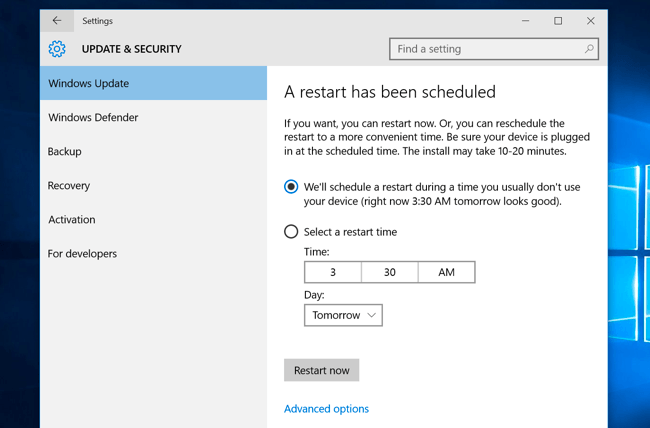
Free home windows 10 enhancements windows how 10 to update are still available. gordon kelly. yes, this is no joke. in spite of microsoft ending its free windows 10 upgrade offer to all users on july 30, 2016, the enterprise has (in my. How to check for and set up windows updates in windows 10 microsoft has made it simpler for windows update to hold windows 10 updated through automatically downloading and putting in the cutting-edge features and enhancements, drivers, and hotfixes released by microsoft—and with fewer interruptions and restarts when you're the use of your computer the most. Pick out a category to peer names of devices, then right-click on (or press and maintain) the only you’d want to replace. pick out seek robotically for updated driver software. choose update driving force. if windows doesn't find a new motive force, you could attempt seeking out one at the device manufacturer's internet site and comply with their instructions.
Down load home windows 10 microsoft. com.
Microsoft’s loose improve offer for windows 7 and home windows eight. 1 users ended a few years in the past, but you may still technically improve to home windows 10 free of charge. See more movies for a way to update home windows 10.
Create home windows 10 installation media choose down load device, and select run. you want to be an administrator to run this tool. at the license termspage, if you be given the license phrases, choose receive. on the what do you need to do? web page, choose upgrade this laptop now, after which select subsequent. after. Windows10 rolled out in 2016 with a free upgrade length. windows how 10 to update users who had the gwx app mounted received priority repute free of charge and automated upgrades. but microsoft formally discontinued free upgrades in early 2018. however, as of this moment. Windows10 is ultimately here and it is the best version of the operating machine we've got visible in a while. even better, it's a unfastened update if you already have home windows 7 or newer. the new running gadget. An upgrade moves your pc from a preceding model of windows — inclusive of windows 7 or windows 8. 1 — to home windows 10. an improve can take place for your current tool, although microsoft recommends the use of home windows 10 on a new laptop to take benefit of the cutting-edge capabilities and protection improvements.

Before upgrading to windows 10 pro, make certain your device is up to date and jogging the maximum recent version of home windows 10 domestic. for extra information about a way to keep your laptop updated, see home windows replace: faq. to improve from windows 10 home to home windows 10 pro and spark off your device, you'll need a legitimate product key or a virtual license for home windows 10 pro. An upgrade movements your computer from a previous version of windows — including windows 7 or windows eight. 1 — to home windows 10. an upgrade can take place in your current device, though microsoft recommends the use of windows 10 on a brand new computer to take advantage of the state-of-the-art features and safety improvements. 5 if there may be a more moderen version (ex: 2004) of windows 10 to be had than the model you're currently jogging, click on/tap on the replace now button. (see screenshot underneath) if you already have the modern model quantity of windows 10 presently mounted, then the home windows 10 replace assistant will handiest display you thank you for updating to the modern-day version of home windows 10. If you don't have a product key or a digital license, you could purchase home windows 10 seasoned from microsoft save. pick out the start button, select settings > replace & security > activation after which pick out visit microsoft keep. from right here, you could additionally see how a lot this upgrade will value. open activation settings.
After that, windows will test for the latest updates, probably restart your windows how 10 to update computer, and then you definately’ll be equipped to check in to home windows 10. now is the time to check in your apps to peer in the event that they survived the upgrade system (and update them if essential), in addition to to plug to your peripherals and make certain that all your hardware works (and update the. Windows 10 will robotically check for new home windows updates at the time you've got set in automated maintenance. you could pick to additionally get hold of updates for other microsoft merchandise like office in windows update. now and again, your laptop can also want to restart to finish installing the updates.


Komentar
Posting Komentar