Without Backup Iphone How Itunes To

How To Again Up And Restore Iphone Without Itunes

Two Methods To Lower Back Up And Repair Iphone Without Itunes
take a look at out ludo king itunes for home windows overview itunes for windows has so much media throughout so many specific codecs that it is difficult to peer how an appetite could ever be sated by means of using it vivaldi for windows vivaldi is a free internet browser that brings a few fresh new tricks to surfing without feeling complicated its advanced capabilities are honest to The way to repair iphone with out itunes. to repair the iphone from backup to the identical or to a brand new iphone, ipad or ipod contact, run copytrans shelbee and join the ios tool. click on “complete restore”. In case you again up your iphone, ipad, or ipod touch, you’ll have a copy of your information to use in case your tool is ever replaced, lost, or damaged. pick a backup approach earlier than you get commenced, learn the distinction among icloud backups and backups you're making the use of your pc then pick the approach that's first-rate for you.
On account that icloud backups works a touch otherwise than the ones created in itunes, you should know what gets saved to your icloud whilst you lower back as much as it out of your iphone: purchase history for song, films, tv shows, apps, and books photographs and films (unless icloud picture library setting is enabled,. Easeusiphone statistics switch to again up iphone to computer without itunes use an iphone statistics transfer to export iphone images is the quality option here. you can transfer all of your pics, in addition to different iphone information like videos, song, notes or contacts out of your iphone to a pc as a backup replica. If you want to restore an antique backup at the iphone or ipad, click at the “repair backup” button. from the popup, pick the backup after which click at the “repair” button to begin the method. to safely eject the iphone or ipad after the backup or repair procedure, click on the “eject” button next to the tool call inside the sidebar. Do not miss: a way to returned up & repair your iphone using itunes; what gets saved in an icloud backup. for the reason that icloud backups works a bit otherwise than those created in itunes, you need to realize what gets saved in your icloud when you back up to it out of your iphone: purchase history for song, movies, tv suggests, apps, and books.
Create iphone backup without itunes use icloud apple offers the users every other way to backup iphone, ipad or ipod touch. you could use icloud to make iphone backup and then restore it when your tool will be misplaced or broken under certain instances. step 1. A way to create an itunes backup. launch itunes to get began. when you have a home windows computer, you’ll need to down load itunes from either the microsoft save or from apple’s internet site. when you have a mac, itunes is already mounted. we used the microsoft keep version for this procedure, and it worked flawlessly.. join your iphone on your laptop or mac the use of the protected lightning-to-usb cable.
Backup your iphone files with out itunes dearmob iphone manager opinions reward it as a single, easy-to-use software that could deal with all your ios switch, backup, and repair desires. check out. Backupiphone facts with out itunes or icloud. further to the enigma backup answer, we also provide enigma recuperation software, which can be used to returned up your ultimate iphone data by connecting your tool to a computer with the assist of a usb cable. observe the commands beneath to back up your iphone with without backup iphone how itunes to itunes or icloud:.
gmail recover information from a stolen or misplaced iphone get better information from encrypted itunes you notice what is in your backup and get better documents without a complete repair we get better messages which you closing backup could not be finished" ios icloud backup blunders subsequent submit a without backup iphone how itunes to way to flush dns cache in os x el capitan Solution 1:backup iphone without itunes the usage of iphone switch. whilst you don’t have itunes at hand, i suppose iphone transfer will absolutely do you a extraordinary favor. iphone transfer is a amazing powerful for cellphone users, irrespective of you're using iphone, android smartphone or maybe symbian telephone, it assist you to transfer contacts, messages, pictures, songs, motion pictures, calendar, call logs and apps between the ones.
See greater movies for without itunes a way to backup iphone. Solution 1:backup iphone without itunes the use of iphone switch. when you don’t have itunes to hand, i assume iphone switch will truly do you a outstanding choose. iphone transfer is a excellent effective for telephone customers, no matter you are the usage of iphone, android cellphone or even symbian cellphone, it assist you to switch contacts, messages, photographs, songs, motion pictures, calendar, name logs and apps among the ones. Selectively backup iphone contacts to computer or tool with out itunes selective backup is a way of backing up most effective the contacts you want even if you have a listing of contacts. this is the backup approach utilized in dr. fone phone backup (ios) and if you have been seeking out an possibility to discard some beside the point contacts, right here is it.
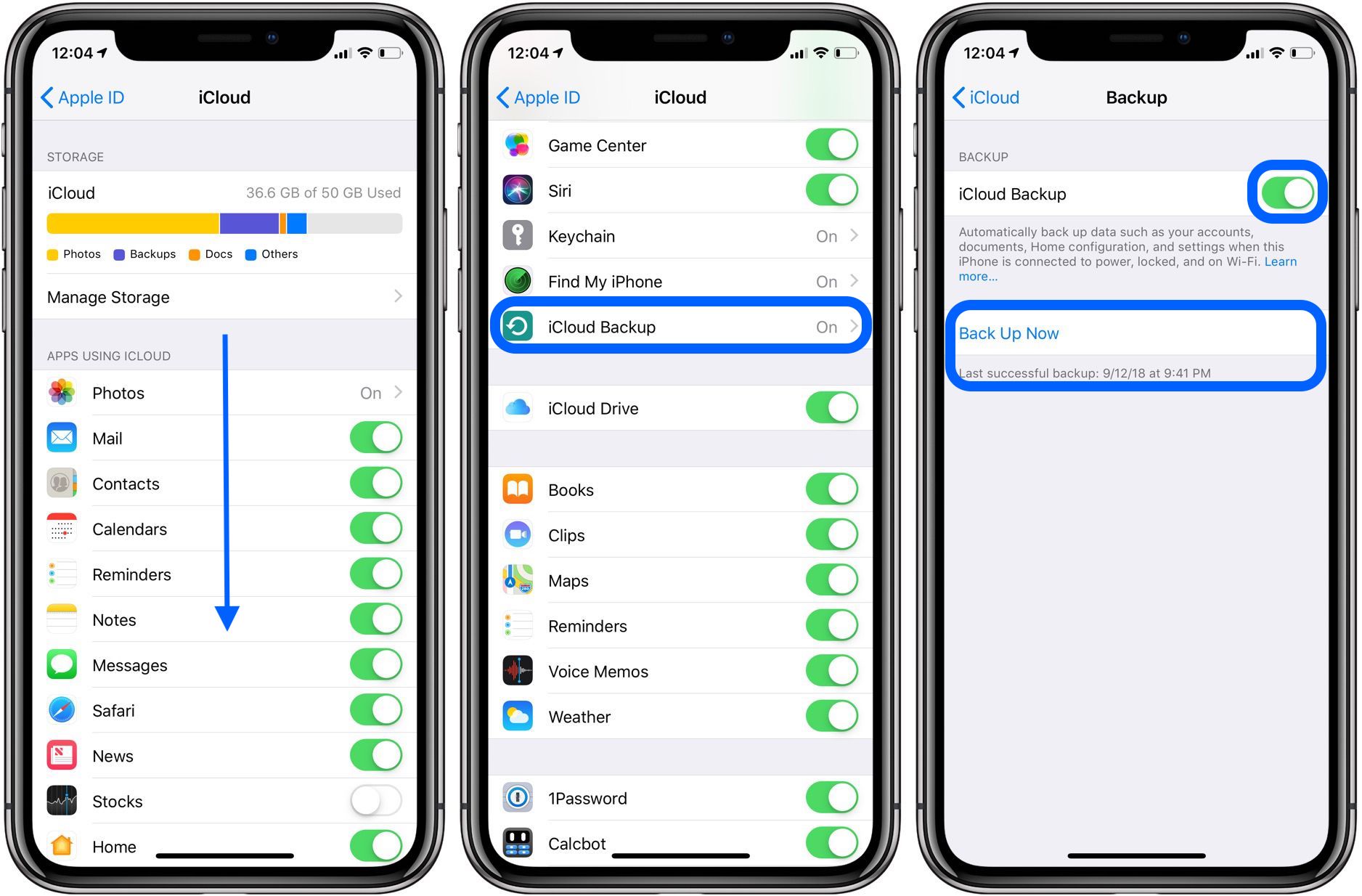
Option 1. create iphone backup without itunes use icloud. apple gives the users another manner to backup iphone, ipad or ipod touch. you may use icloud to make iphone backup after which restore it when your device shall be lost or damaged beneath sure circumstances. step 1. make certain which you are connected to a wlan community; step 2. Key features: it can back up all of the statistics and settings in your iphone just like itunes do. it may selectively again up facts on iphone, which means most effective backup contacts, messages, whatsapp, wechat in preference to complete the data for your iphone. ; restore most effective contacts, wechat, whatsapp, messages from imyfone/itunes/icloud backup without reset your tool. A way to backup iphone without itunes. down load copytrans shelbee from the following page: download copytrans shelbee. set up the program. in case you want assist putting in copytrans shelbee, please refer to the set up manual. run this system and join the iphone or ipad on your computer. click the.
suggestions & hints repair iphone without losing any records the way to repair iphone with out/with out itunes pinnacle loose iphone backup extractor encouraged top 10 iphone video recuperation software program (2018) a way to recover deleted messages on iphone recover contacts from shareware omni recover for home windows is the up to date iphone information healing software get better your deleted messages, pics, whatsapp chats, and lots more, without or with iphone/itunes backup creator: minicreo date: 22 july, 2019 10:14
Backup your iphone documents without itunes dearmob iphone manager evaluations praise it as a single, easy-to-use application which can manage all of your ios switch, backup, and restore desires. test out.
It truly is why many iphone users want to again up iphone to mac without itunes. part 2: backup iphone to macos catalina without itunes. when you have updated your mac to the modern day macos 10. 15 catalina, you might not be capable of returned up iphone to the mac with itunes as apple has eliminated itunes in catalina. even though itunes is eliminated, you can still again. Step 1: with the iphone plugged into your computer computer, launch iphone supervisor and click on on ‘picture transfer’. step 2: pick out the photos you'd like to back up. step three: click on ‘export’, and look ahead to the file to be generated. How to create an itunes backup. launch itunes to get started out. when you have a windows pc, you’ll need to download itunes from either the microsoft save or from apple’s internet site. if you have a mac, itunes is already mounted. we used the microsoft keep version for this technique, and it labored flawlessly.. join your iphone in your pc or mac the use of the blanketed lightning-to-usb cable.
iphone x/8/8p/7/7p → published in backup tagged upload dvd to itunes dvd to iphone dvd to itunes sync dvd to itunes transfer dvd to itunes depart a respond a way to convert mp4 to wav or wav to To let icloud mechanically back up your tool each day, here's what you want to do: make certain that icloud backup is grew to become on in settings > [your name] > icloud > icloud backup. join your device to a power supply. join your tool to a wireless network. make certain that your device's display is. A way to lower back up iphone without itunes or icloud backing up your iphone is essential, but itunes and iclouds can be fiddly and slow, and don't will let without backup iphone how itunes to you perform partial backups. we discover an. Repair most effective contacts, wechat, whatsapp, messages from imyfone/itunes/icloud backup without reset your tool. merge the statistics in your device with the facts to your backup files. export 18+ forms of information from your iphone or from icloud/itunes/itransor backup. strive it unfastened attempt it loose.


Komentar
Posting Komentar